Unpaid and outstanding invoices piling up? How contractors collect past due invoices: a 7-step process, call script, payment plans and escalation options.

In this video:
You did the work. You sent the invoice. And now... nothing. If you're a contractor with unpaid invoices, this video is for you. You'll learn a simple plan to get paid, step by step, without making your customer mad.
First, know this. Most late payers aren't trying to cheat you. Most of the time, they forgot. Or the invoice went to the wrong person. Or they had a question and never asked. Or paying was a pain. Only a few just don't want to pay. So start friendly. Most invoices get fixed with a simple reminder.
Rule one: start early. The longer an invoice sits, the harder it is to collect. So don't wait 60 days to say something. Send a friendly note a few days before it's due. Then another on the due date. Then one the day after. Early reminders feel like good service, not like nagging.
Rule two: make it easy to pay. Every reminder should have a link to pay right away, by card or by bank. That's called ACH. Nobody wants to find a checkbook and a stamp. If paying takes one tap, more people pay today.
Rule three: use the same steps every time. Step one is friendly. 'Hi, just a reminder, here's the link.' Step two is firm. 'This invoice is now 15 days late. Please pay by Friday.' Step three is final. 'This is our last notice before we take next steps.' When you use the same steps for everyone, it's never personal. It's just your process.
Rule four: don't just email. Emails get buried. Texts get read. And when an invoice is more than two weeks late, pick up the phone. Ask one simple question: 'When can we expect payment?' Then be quiet and let them answer. Write down the date they give you, and follow up that day if it doesn't come.
Rule five: know your next steps if they still don't pay. You can offer a payment plan, so they pay a little at a time. You can send a demand letter. And if you're in construction, you may have lien rights, but those have strict deadlines, so check them early. Last steps are a collection agency or small claims court. You may not need them, but knowing them keeps you calm and firm.
The goal isn't just to get paid. It's to get paid and keep a good customer. So stay kind. Say thank you when they pay. And fix the cause. If they had a question about the invoice, make your next invoice clearer. If they forgot, set up reminders. Every unpaid invoice teaches you something.
Doing all this by hand takes hours every week. AR Workflow does it for you. It sends the friendly, firm and final reminders by text and email, with a pay link, and tells you who to call first. Our users get paid about 21 days faster. Bring one overdue invoice and book a demo. We'll show you how we'd collect it. The link is below.
Every contractor has them: unpaid invoices for jobs that were finished weeks ago. The work is done, the materials are paid for, and the crew got paid on Friday. The only thing missing is the money.
Unpaid invoices are not just an accounting problem. They decide whether you can make payroll without touching the line of credit, whether you can take the next big job, and how much of your office manager's week goes to chasing instead of billing. This guide covers why overdue invoices stall, a step-by-step process to collect them, what to say on the phone, ready-to-send reminder templates, how to set up a payment plan, when to escalate, what the law and the IRS say, and how to stop the next batch from piling up.
KEY TAKEAWAYS
An invoice is unpaid from the moment you send it until the money lands. It becomes overdue (or past due) the day after the due date on the invoice. That sounds obvious, but many contractors never put a clear due date on the invoice at all. If the invoice says "due on receipt" or nothing, the customer gets to decide when it is late.
A simple way to think about it:
| Stage | What it means | What you should be doing |
|---|---|---|
| Sent, not yet due | The clock is running | Confirm receipt, send a courtesy reminder before the due date |
| 1 to 30 days late | Usually forgotten or stuck | Friendly reminders, switch channels, find the blocker |
| 31 to 60 days late | Something is in the way | Phone call, firm notice, offer a payment plan |
| 61 to 90 days late | Real risk | Final notice, check lien deadlines, involve the owner |
| 90+ days late | Escalation territory | Lien, agency, small claims or a settlement |
An outstanding invoice is any invoice you have sent that has not been paid in full yet. It is outstanding whether or not the due date has passed. An invoice sent yesterday on net 30 terms is outstanding but not overdue. An invoice 45 days past its due date is both outstanding and overdue.
Partial payments count too. If a homeowner paid $3,000 on a $5,000 invoice, the invoice still has a $2,000 outstanding balance until the rest comes in. Add up every outstanding invoice and you get your accounts receivable balance.
| Term | What it means | Example |
|---|---|---|
| Outstanding invoice | Sent, not paid in full, due date may or may not have passed | Invoice sent Monday on net 30 |
| Overdue or past due invoice | Outstanding and past the due date | Due June 1, still open June 15 |
| Outstanding balance | The amount still owed on an invoice after any payments | $2,000 left on a $5,000 invoice |
| Unpaid invoice | Everyday term for any of the above | "We have 40 unpaid invoices" |
In QuickBooks Online, outstanding invoices show as open on the customer list and in the A/R aging reports. The reason the difference matters: outstanding invoices that are not due yet are where follow-up is cheapest. A courtesy reminder a few days before the due date is the easiest way to keep an outstanding invoice from becoming an overdue one.
It is rarely because the customer refuses to pay. Most unpaid invoices stall for one of these reasons:
| 1 | Nobody followed up. QuickBooks tracks the invoice. It does not chase it. If no one on your team owns the follow-up, it does not happen, especially in busy season when the office is buried in new jobs. |
| 2 | It went to the wrong person. A homeowner forwarded it to their insurer, a GC's AP clerk never saw it, the property manager changed, or the email bounced and nobody noticed. |
| 3 | Paying is a hassle. "Mail a check" or "call the office with a card number" adds days and gives people a reason to put it off. A payment link removes that friction. |
| 4 | There is a quiet dispute. The customer is unhappy with a punch list item, a change order, or a cleanup issue and is waiting for you to call. They will not bring it up first. |
| 5 | Someone else has to approve it. Carriers, adjusters, property managers and GCs all have their own approval steps, and your invoice is one of hundreds in their queue. |
| 6 | The customer is short on cash. They intend to pay, but not all at once. Without a plan on the table, they say nothing. |
These seven steps work for a single unpaid invoice and for a whole stack of past due invoices. The order matters: confirm, remind, switch channels, talk, commit, plan, and only then escalate.
Before you chase, check the invoice number, job address, amount, due date and contact. Pull up the email you sent and check that it was delivered. Make sure the person you are about to chase is the person who actually pays. A surprising number of "unpaid" invoices are really "never received" invoices.
Also check your side: is the invoice correct? Did a change order get added? Was a deposit applied? Is a lien waiver or completion certificate missing? If the customer finds an error, you lose another week.
The first note should assume good intent. Restate what is owed, attach the invoice, and make paying one click. Use our past due invoice letter templates if you need wording, or copy the short templates further down this page.
If email gets no reply in a few days, send a short text. Then call or leave a voicemail. People ignore one channel, not all of them. A homeowner who never opens email may answer a text in minutes.
On the call, ask one simple question: "Is there anything stopping this from getting paid?" You will hear about the dispute, the missing lien waiver or the adjuster who needs photos. Fix that, and the invoice moves. A script is below.
If they say they will pay, ask "What day works?" and write it down. Send a short confirmation the same day: "Thanks, I have you down for payment of $X on Friday." If Friday passes, follow up Monday morning. A promise with no follow-up is just a delay.
For a large balance, a plan that auto-charges a card or bank account on set dates beats a vague promise. Get the first payment today. More on this below.
If the customer has gone quiet after several attempts on several channels, send a final notice with a specific date and the next step you will take. Then do what you said. Your options are a mechanic's lien, a collections agency, or small claims court.
Watch the clock: lien deadlines are strict and vary by state. Some states also require a preliminary notice early in the job. Know your deadlines before the invoice gets old, and talk to a construction attorney before filing.
Summit Home Services: kitchen water damage repair
Invoice $8,400, homeowner portion after insurance. Due on completion.
| Day 0 | Invoice emailed with a payment link and a note thanking the homeowner. |
| Day 3 | Friendly text: "Hi Dana, just checking you got the invoice for the kitchen repair. Here is the link to pay." |
| Day 7 | No reply. Office calls. Dana says the insurance check has not arrived and she cannot pay $8,400 at once. |
| Day 7 | Office offers a plan: $2,400 today, then $2,000 on the first of each month for three months, auto-charged. Dana agrees and pays the first installment by link. |
| Day 8 | Written confirmation of the plan sent by email. Reminders pause while the plan is on track. |
| Month 3 | Final installment charged. Invoice closed. Relationship intact, and Dana refers a neighbor. |
Example company, customer and amounts are made up for illustration.
Notice what made it work: the office found the real blocker (cash flow while waiting on insurance) on the first call, and it offered a specific plan instead of asking "when can you pay?"
QuickBooks tracks your invoices. Who's chasing them?
Bring one overdue invoice and we'll show you how it would get followed up.
Most office staff hate collection calls because they feel confrontational. They do not have to be. The goal of the call is not to demand money. It is to find out what is in the way and agree on a date.
CALL SCRIPT
Open: "Hi, this is [Name] from [Company]. I'm calling about the invoice for the work at [job address]. Do you have a minute?"
Confirm: "I wanted to make sure you received invoice [number] for $[amount]. Did that come through okay?"
Ask: "Is there anything stopping it from getting paid, or anything about the job you'd like us to look at?"
If they have a concern: "Thanks for telling me. Let me get [project manager] to call you by [day] so we can sort that out."
If it's cash flow: "We can split it into payments if that helps. Could you do $[amount] today and the rest over the next few months?"
Close: "Great, so I have you down for [amount] on [date]. I'll text you the payment link now."
Voicemail: "Hi, it's [Name] from [Company] about the invoice for [job address]. I just sent a text with a link to pay or to reach me. Thanks."
Tip: Always send a text or email right after the call that confirms what you agreed. It turns a verbal promise into a written one and puts the payment link in their hand.
Short beats long. Each message should name the job, the invoice number and the amount, and make paying one click. Here are three you can adapt. For a full sequence, see our payment reminder email templates for contractors.
FRIENDLY EMAIL
Subject: Invoice [number] for [job address]
"Hi [Name], thanks again for choosing us for the work at [job address]. Invoice [number] for $[amount] was due on [date]. You can pay by card or bank transfer here: [link]. If anything about the job or the invoice needs a second look, just reply and we'll take care of it."
TEXT
"Hi [Name], it's [Your name] at [Company]. Quick reminder that invoice [number] for $[amount] is past due. Pay here: [link]. Reply if you have any questions."
FINAL NOTICE
"Hi [Name], invoice [number] for $[amount] is now [X] days past due, and we have not been able to reach you. Please pay or contact us by [date]. If we do not hear from you by then, we will [next step, such as filing a lien or referring the account to collections] as allowed under our agreement and state law. Pay here: [link]."
A payment plan is not giving in. It is turning a stalled invoice into a scheduled one. A good plan has five parts:
AR Workflow can set up payment plans that charge a card or bank account on schedule, with each payment posting back to QuickBooks. If a plan payment fails, call within a day or two. The longer a missed payment sits, the more likely the whole plan unravels.
The same reminder does not work for everyone. Who owes you changes the tone, the channel and what you ask for.
| Payer | What works | What to avoid |
|---|---|---|
| Homeowner | Friendly tone, text messages, a payment link, payment plans | Legal language too early, long emails |
| Insurance carrier or adjuster | Status requests, documentation, claim numbers | Payment links, pressure tactics |
| General contractor | Lien waivers, pay application deadlines, the AP contact by name | Missing paperwork, chasing only the PM |
| Property manager | Job and property references, steady follow-up across many properties | One email covering ten properties with no detail |
Restoration invoices often have two or three payers: the carrier, the homeowner's deductible, and sometimes a mortgage company that has to endorse the check. Track each portion separately. Chase the adjuster for status and documentation, and chase the homeowner for the deductible with a payment link. See our guide to restoration insurance billing.
Roofing jobs usually stall on the supplement or on the depreciation holdback that the carrier releases after completion. Send the completion paperwork the day the job is done, and make sure the homeowner knows they need to forward any check they receive. A clear roofing invoice that splits insurance and homeowner amounts helps a lot.
Service jobs are smaller but there are many more of them. The risk is volume: dozens of small invoices that each feel too small to chase. Automatic reminders matter most here, and collecting at the time of service with a card or a link is best. See how this works for HVAC invoice collection, plumbing invoice automation and electrical contractor invoice collection.
Know the GC's pay application cutoff and what paperwork they need: conditional waivers, certified payroll, insurance certificates. Ask for the AP contact by name. If your contract allows it, note the retainage release date on your calendar the day you sign.
The seven steps above assume you start early. If you are looking at a stack of past due invoices that are 60, 90 or 120 days old, change the order a little:
Invoice collection is the whole job of turning outstanding invoices into cash. For most contractors it is done by whoever runs the office, between billing, scheduling and payroll. There are three ways to handle it, and many businesses use a mix:
| Approach | Best for | Tradeoffs |
|---|---|---|
| In-house, by hand | Few invoices, a dedicated office manager | Free, but follow-up slips in busy season and depends on one person |
| In-house, with automation | Many invoices or a small office team | Reminders go out on schedule by email and text, and staff spend their time on calls that need a person |
| Collection agency | Customers who have stopped responding entirely | The agency keeps a share of what it collects, and it usually ends the relationship |
Automation fits in the middle. Tools built for accounts receivable automation send automated payment reminders on a schedule, so a person only steps in when a reply or a call is needed. For a closer look at the tradeoffs, read our comparison of a commercial collection agency vs automating collections, or our guide to accounts receivable workflow software.
| Option | When it fits | Things to know |
|---|---|---|
| Mechanic's lien | Work on real property, within your state's deadline | Strict deadlines and notice rules. Often gets attention fast. Use an attorney. |
| Collections agency | Customer has stopped responding entirely | Agencies keep a share of what they collect. It usually ends the relationship. |
| Small claims court | Smaller balances under your state's limit | Limits vary by state. Bring the contract, invoice and your follow-up history. |
| Settlement | Genuine dispute, or a customer who cannot pay in full | Get it in writing. Sometimes a fast partial beats a slow full. |
Whatever you choose, your follow-up history is your evidence. A dated log of every email, text, call and voicemail makes a lien, a court case or an agency referral much stronger.
A few facts worth knowing before an overdue invoice gets old. None of this is legal or tax advice, and the rules vary by state.
Your AR aging report in QuickBooks sorts open invoices into buckets by age. Read it every week, and look for three things:
What the aging report does not tell you is which of those invoices anyone is actually working. Two invoices can both sit at 45 days, but one has had five touches and a promise to pay while the other has had nothing since it was sent. That second one is the real risk.
For more on building the process, read how to improve your collections process.
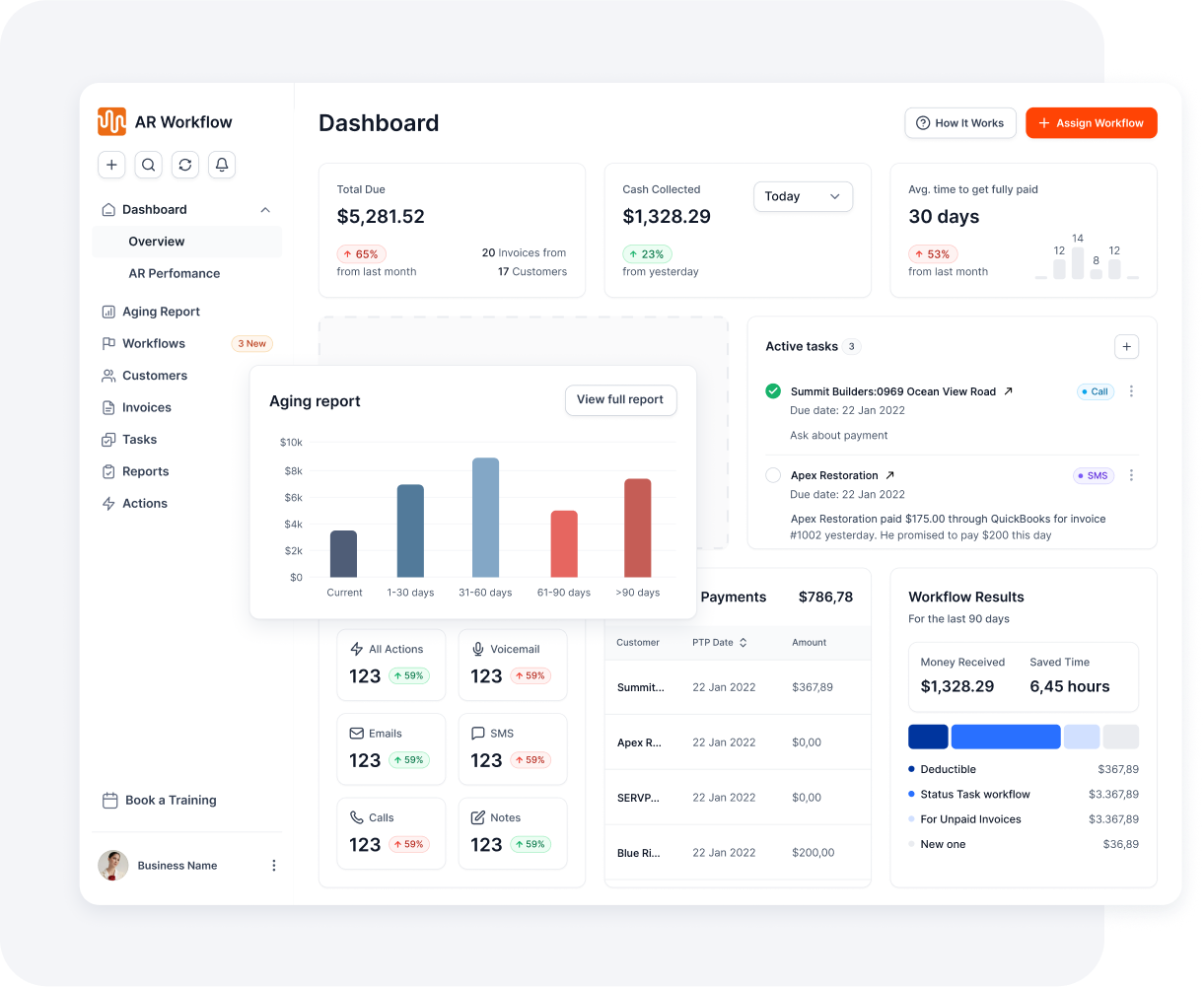
One screen every morning: what is covered, and what is slipping.
AR Workflow connects to QuickBooks Online and puts every open invoice on a follow-up schedule by email, two-way text, ringless voicemail and recorded calls from a dedicated number. Each message to a customer carries a payment link for card or ACH, partial payments are allowed, and payments post back to QuickBooks. Workflows pause when someone promises to pay and stop when the invoice is paid. You can set up payment plans that charge on schedule.
The Priority Queue gives your office a short daily list of who to call. The dashboard shows the open balance with no follow-up on it, and one click puts those invoices on a workflow. Every touch is logged on the invoice, so if you ever need to escalate, the history is already there.
Example: A $6,400 water mitigation invoice is 12 days late. Day 12: a friendly text with a pay link. Day 15: a firm email with a Friday deadline. Day 18: a call asking, "When can we expect payment?" The customer commits to the 25th. You note it and follow up that morning if it hasn't arrived.
An outstanding invoice is one you have sent that has not been paid in full. It may or may not be past due yet. Once the due date passes, an outstanding invoice is also overdue. Your total of outstanding invoices is your accounts receivable balance.
Do not wait for it to be late. Send a courtesy reminder a few days before the due date, then follow up the day after it is due. Early, friendly follow-up is the least awkward kind. Assume good intent, be specific about the invoice and amount, make paying easy with a link, and ask if anything is in the way. Polite and specific beats vague and apologetic.
Only if your contract or invoice terms say so and your state allows it. Rules vary, so check with your attorney before adding late fees, and make sure the terms are agreed before the work starts.
On ongoing jobs, your contract may allow you to pause work for non-payment. Check the contract and your state's rules first, and give written notice. For new work, ask for a deposit or payment of the old balance before scheduling.
When the customer has stopped responding after several attempts across email, text and phone, and a lien or small claims is not a better fit. Check your lien deadline first, because a lien can be more effective and the deadline does not wait.
Texting a customer you have a business relationship with is common, but consent rules apply, especially for automated messages under the federal Telephone Consumer Protection Act and state laws that vary by state. Get consent in your contract or work authorization and talk to counsel about your specific setup.
Start with a friendly reminder and a pay link, then follow a set schedule: firm reminder, phone call, then a final notice. Get a payment date in writing. If that fails, consider a payment plan, a demand letter, lien rights where they apply (check deadlines early), a collection agency or small claims court.
Yes. Put collections on a schedule instead of doing it in batches. Send reminders before and after the due date by text and email with a pay link, and call only the invoices that are large or very late. Software like AR Workflow can run the reminders automatically from QuickBooks.
Related reading
Your invoice, not a feature tour.
Bring one overdue invoice to a demo. We'll show you who would be contacted, when, and how they would pay.
Photos: Unsplash. This article is general information, not legal advice.
Each guide below has a 3-minute video at the top.
Sam owned and ran three restoration companies for more than 14 years and collected over $100 million in receivables. He built AR Workflow in 2020 to give contractors the collections system he wished he'd had.

AI writes the emails, sends the texts, and leaves the voicemails. Your team handles the conversations that matter, and your cash keeps moving.
 Keep QuickBooksStart with one invoiceStay in control

 Log in