Payment reminder email templates for contractors: friendly, firm and final reminder messages, subject lines and text versions you can copy and send today.

A good payment reminder email is short, specific and easy to act on. It names the invoice, states the amount, and puts a payment link one click away. A bad one is vague, apologetic, or angry, and it gets ignored.
This guide gives contractors a complete set of payment reminder email templates you can copy today: from a courtesy note before the due date to a final notice, with text message versions, versions for adjusters, GCs and property managers, subject lines that get opened, and a schedule for when to send each one. If you need a more formal written notice, our past due invoice letter templates pair well with these emails.
KEY TAKEAWAYS
Before the templates, here is the anatomy of a reminder that gets paid. Every template below follows it.
| Part | What to include | Why |
|---|---|---|
| Subject line | Invoice number, job address or project name, and status | The customer knows what it is before they open it |
| Greeting | First name, not "Dear Customer" | Personal emails get read; form letters get skimmed |
| The facts | Amount, due date, what the work was | Removes "which invoice?" back-and-forth |
| One clear ask | "Pay here" or "can you pay by Friday?" | Two asks in one email means neither gets done |
| Payment link | Card and ACH, partial payments allowed | Every extra step is a reason to wait |
| An exit for problems | "If something is holding this up, reply" | Surfaces quiet disputes early |
| A real sender | A person's name, phone number and company | People pay people, not "noreply@" |
Every payment reminder email in this guide falls into one of three stages. The facts stay the same in all three. What changes is how direct you are, how specific the date is, and whether you name a next step.
| Stage | Templates | Say this | Avoid this |
|---|---|---|---|
| Friendly | Courtesy, due today, just past due | "A quick reminder", "If it is already on the way, thank you" | Apologizing for asking, or "no rush" |
| Firm | Second reminder, payment plan offer | "Can you pay by Friday, November 7?", "Is something holding this up?" | "At your earliest convenience" |
| Final | Final notice | "Please pay by [date] or call me", "the next step in our collections process" | Threats you will not carry out, all caps, exclamation marks |
A useful test: if you would be uncomfortable reading the email out loud to the customer on their front porch, rewrite it. Firm reminders keep the relationship intact. Angry ones rarely get you paid any faster, and they cost you the next job and the referral.
Reminders sent before the due date are customer service. They catch wrong addresses and lost invoices while nobody is late yet, so the tone can be warm and short. Reminders after the due date carry more weight, so they need the exact amount, the number of days past due and a specific date. Setting clear payment terms on the original invoice makes every later reminder easier to write. So does starting with a clear invoice email template when you first send the bill.
Here is a simple schedule for a typical homeowner or commercial invoice with a 30-day term. Shorten it for service calls that are due on completion, and adjust it for insurance jobs.
| When | Template | Channel |
|---|---|---|
| 3 days before due | Courtesy reminder | |
| Due date | Due today | |
| 1 to 7 days late | Just past due | Email, then text |
| 15 days late | Second reminder | Email and text |
| 30 days late | Payment plan offer | Email, then a call |
| 45 days late | Final notice | Email, text and voicemail |
Sent before the invoice is due. This one is pure customer service: it catches invoices that went to spam or to the wrong person while there is still time.
3 DAYS BEFORE DUE
Subject: Invoice [#] for [job address] is due [date]
Hi [First name], a quick heads-up that invoice [#] for [amount] is due on [date]. You can pay online here: [payment link]. Thanks again for choosing [Company].
[Your name], [Company], [phone]
Text version: Hi [First name], it's [Your name] at [Company]. Invoice [#] for [amount] is due [date]. Pay here: [link]
DUE DATE
Subject: Invoice [#] is due today
Hi [First name], invoice [#] for [job address] is due today. The balance is [amount]. Pay in a minute here: [payment link]. Reply if you have any questions.
The most important reminder in the sequence. Keep it light and assume it slipped through the cracks, because it usually did.
1 TO 7 DAYS LATE
Subject: Invoice [#] is past due
Hi [First name], our records show invoice [#] for [amount] was due on [date]. If it is already on the way, thank you. If not, you can pay here: [payment link].
Text version: Hi [First name], invoice [#] for [amount] was due [date]. Pay here: [link]. Questions? Just reply.
15 DAYS LATE
Subject: Second reminder: invoice [#], [amount]
Hi [First name], I am following up on invoice [#] for the work at [job address]. The balance of [amount] is now 15 days past due. Can you pay by [date]? Here is the link: [payment link]. If something on the invoice is holding this up, reply and I will sort it out today.
Text version: Hi [First name], following up on invoice [#] for [amount], now 15 days past due. Can you pay by [date]? [link]. If there's an issue, just reply.
By 30 days late, there is usually a reason. Often it is cash flow. Offering a plan gives the customer a way to say yes instead of going silent.
30 DAYS LATE
Subject: Options for invoice [#]
Hi [First name], invoice [#] for [amount] is now 30 days past due. If paying the full balance at once is difficult, we can split it into scheduled payments by card or bank account. Reply with what works for you, or pay in full here: [payment link]. I'll also give you a call this week.
Only send this if you are ready to take the next step. A final notice you do not follow through on teaches the customer that your deadlines are not real.
45 DAYS LATE
Subject: Final notice: invoice [#]
Hi [First name], this is our final reminder for invoice [#] for [amount], due [date]. Please pay by [date] at [payment link] or call me at [phone]. If we do not hear from you, we will move to the next step in our collections process.
Voicemail version: Hi [First name], it's [Your name] from [Company] about invoice [#] for [job address]. This is our final reminder before we take the next step. Please call me back at [phone] or use the link I just texted you. Thanks.
Adjusters and carriers do not pay by link, and pushing one can hurt the relationship. Ask for status and offer documentation instead.
INSURANCE JOBS
Subject: Payment status, claim [claim #]
Hi [Adjuster name], can you confirm the payment status for our invoice [#] on claim [claim #] at [property address]? If anything else is needed from us, such as photos, moisture logs or a revised estimate, let me know and I will send it today.
SUBS BILLING GCs
Subject: [Project name]: pay app [#] for [period], [amount]
Hi [AP contact], I'm checking on our pay application [#] for [project name], covering [period], for [amount]. Our conditional lien waiver and backup were included. Can you confirm it is approved and scheduled for the next pay run? If anything is missing, let me know and I'll send it today.
PROPERTY MANAGERS
Subject: [Property name], unit [#]: invoice [#] past due
Hi [First name], invoice [#] for [work] at [property name], unit [#], is past due. The work order number was [WO #]. The balance is [amount]. You can pay here: [payment link], or let me know if it needs to go to a different approver.
PLAN PAYMENT FAILED
Subject: Your [date] payment for invoice [#] didn't go through
Hi [First name], your scheduled payment of [amount] for invoice [#] on [date] didn't go through. Can you update your card or bank details here: [payment link]? If you need to move the date, just reply and we'll work it out.
Often skipped, and it matters. A thank-you closes the loop, confirms the balance is zero, and is the best time to ask for a review or referral.
PAID
Subject: Thank you, invoice [#] is paid
Hi [First name], we received your payment of [amount] for invoice [#]. Your balance is now zero. Thanks for trusting [Company] with [job]. If you were happy with the work, a quick review would mean a lot: [review link].
Tip: Stop the sequence as soon as the customer pays or gives you a date, and restart it if they miss that date. Nothing annoys a customer more than a "past due" email the day after they paid.
Stop writing reminders by hand.
Bring one overdue invoice and see the exact reminders your customer would get.
The subject line does most of the work. Specific beats clever every time.
| Use this | Not this |
|---|---|
| Invoice 1042 for 18 Oak St is due Friday | Friendly reminder! |
| Invoice 1042 is past due | URGENT: PAYMENT REQUIRED |
| Second reminder: invoice 1042, $3,250 | Following up |
| Payment status, claim 88-1234 | Where is our money? |
| Final notice: invoice 1042 | Last chance before legal action!!! |
Clearwater Plumbing & Air: water heater replacement
Invoice $3,250 to a homeowner, Net 15.
| Day 12 | Courtesy reminder email with payment link. Not opened. |
| Day 15 | Due today email. Still not opened. |
| Day 17 | Text version sent. Homeowner replies: "Sorry, your emails are going to my old work address." |
| Day 17 | Office updates the email in QuickBooks. Homeowner pays from the link in the text. |
| Day 17 | Reminders stop. Thank-you email goes out with a review request. |
Example company, customer and amounts are made up for illustration.
The lesson: the emails were fine. The channel was wrong. Without the text, that invoice would have drifted to 30 or 60 days before anyone noticed.
Split reminders by payer. The homeowner gets reminders for the deductible and any non-covered work, with a payment link. The adjuster gets status requests with the claim number and an offer to send documentation, never a payment link. Read more in our guide to collecting from carriers, adjusters and homeowners.
Mention the claim and what the homeowner should do with any insurance check: "If you receive a check from [carrier], you can endorse it to us or pay through this link." Remind about the depreciation release after completion paperwork is filed. See how this runs on insurance jobs on our roofing collections page.
Service invoices are small and frequent. Use a short sequence (due today, just past due, second reminder, final) and lean on text. Collect at the time of service when you can, and send the link before the tech leaves the driveway. We cover trade-specific setups for HVAC invoice collection and plumbing invoice automation.
Reference the project, pay app number and billing period. Mention that waivers and backup were included. The goal is to make it easy for AP to approve without asking you anything.
Copying templates works for a handful of invoices. Past that, reminders get skipped on busy weeks, which is exactly when cash gets tight. Here is how to move from manual reminders to an automated sequence without losing the personal tone.
Dedicated automated payment reminders handle steps 3 to 5 for you, so your office spends its time on the exceptions instead of the routine.
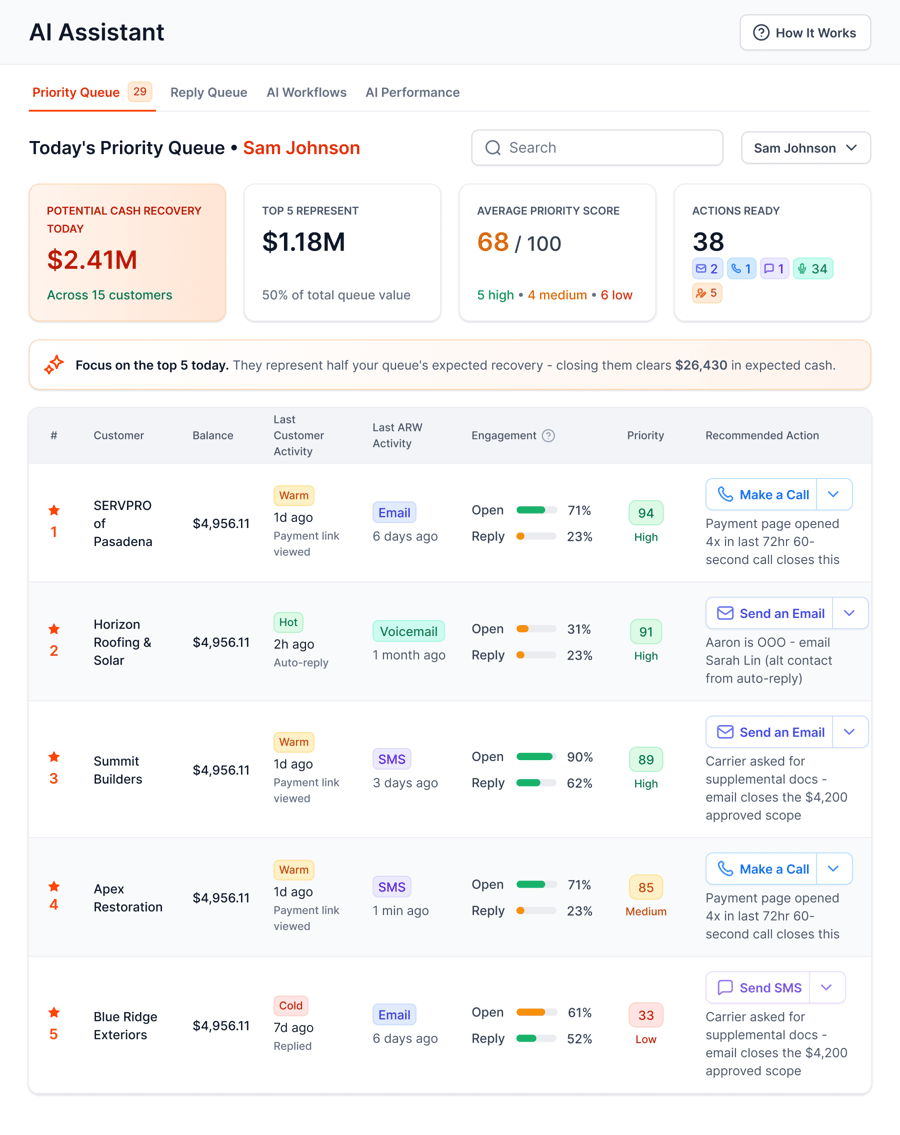
The Priority Queue tells your team who to contact today and what to do next.
The templates are the easy part. The hard part is sending the right one, to the right person, on the right day, for every open invoice. AR Workflow does that from QuickBooks Online. It sends email, two-way text and ringless voicemail reminders from a dedicated number, includes a payment link for card or ACH, pauses when a customer promises to pay, and stops when the invoice is paid. Payments post back to QuickBooks automatically. Learn more about QuickBooks collections and ringless voicemail for collections.
You can start from built-in templates, including restoration-specific ones, and review AI-drafted replies before they go out. AI drafts never add a payment link for adjuster, carrier or legal contacts.
A typical sequence is five or six touches over about six weeks, across email, text and phone. Fewer than that and invoices slip; more than that without escalation and customers learn to ignore you.
Weekday mornings tend to work well because people are clearing their inbox and paying bills. Avoid late evenings and weekends for texts and calls.
Yes, for homeowners and small commercial customers, a text is often read much faster than an email. Get consent to text in your contract or work authorization, and keep texts short with a link.
Use the customer's name, state the invoice and amount, assume good intent, give a link, and invite questions. Polite does not mean vague. Be specific.
QuickBooks Online can send basic invoice reminders by email. It does not run multi-channel sequences with texts, voicemail and calls, pause on promises to pay, or treat adjusters differently from homeowners. That is where AR software comes in.
The invoice, the amount, a specific deadline, how to pay, how to reach you, and the next step you will take. Keep it calm and factual.
Related reading
Your invoice, not a feature tour.
Bring one overdue invoice to a demo and see what would be sent, when, and how your customer would pay.
Photos: Unsplash. This article is general information, not legal advice.
Sam owned and ran three restoration companies for more than 14 years and collected over $100 million in receivables. He built AR Workflow in 2020 to give contractors the collections system he wished he'd had.

AI writes the emails, sends the texts, and leaves the voicemails. Your team handles the conversations that matter, and your cash keeps moving.
 Keep QuickBooksStart with one invoiceStay in control

 Log in