Compare the 8 best invoicing software tools for contractors in 2026: Jobber, Housecall Pro, QuickBooks, Joist and more, with prices, pros and cons.

Sending an invoice is easy. Getting paid on it is the hard part. The right invoicing software makes both faster: it turns a finished job into a clean invoice in minutes, puts a pay link in front of the customer, and keeps your books in sync so nobody re-types anything.
The trouble is that "invoicing software" covers very different tools, from a $6 phone app to a field service platform that costs thousands a month. I owned three restoration companies for more than 14 years and collected over $100 million in receivables. I've used, paid for and replaced a lot of software along the way. In this guide I compare eight options contractors ask us about most, with real prices, who each one fits and where each one falls short.
Full disclosure: I'm the founder of AR Workflow, which appears on this list. I've tried to be fair to every product. Where another tool is the better fit, I say so. Prices come from each company's pricing page or public listings as of November 2026, and they change often, so check before you buy.
KEY TAKEAWAYS
| Tool | Best for | Starting price (Nov 2026) | Works with |
|---|---|---|---|
| Jobber | Service crews that want quotes, scheduling and invoicing in one app | From about $49/mo | QuickBooks Online, Xero |
| Housecall Pro | Home service companies that want a polished customer experience | $79 to $329/mo | QuickBooks Online and Desktop |
| QuickBooks Online | Contractors who want invoices and books in one place | From $38/mo | Native |
| Joist | Solo trades who estimate and invoice from a phone | Free to about $32/mo | QuickBooks Online |
| Invoice2go | Very small businesses that send a few invoices a month | $5.99 to $39.99/mo | QuickBooks Online |
| Knowify | Commercial and specialty subs who need progress billing and job costing | From about $99/user/mo | QuickBooks Online and Desktop |
| ServiceTitan | Large HVAC, plumbing and electrical shops with many techs | Quote | Its own accounting tools, plus integrations |
| AR Workflow | Getting paid on the invoices your other tools create | $295 to $495/mo | QuickBooks Online |
TABLE OF CONTENTS
The best time to invoice is the minute the job is done, while the customer is standing there happy. Look for mobile invoicing that pulls in the estimate, adds photos and gets a signature. Every day you wait to invoice is a day added to your DSO.
A pay link for card and ACH is the single biggest speed-up. Check the processing fees and whether you can pass card fees to the customer where your state allows it.
If your invoicing tool and QuickBooks don't talk, someone ends up typing invoices twice and matching payments by hand. Ask whether the sync is two-way and whether it includes payments and fees. Our QuickBooks for contractors guide covers setup.
Bigger jobs need deposits, draws and sometimes retainage. Service apps handle deposits well. Progress billing and AIA pay apps usually need a construction tool.
This is where most invoicing tools stop. They send the invoice and maybe a couple of email reminders. If your customers are homeowners who never open email, you need text, voicemail and a call list. That's what AR software adds.
Jobber is field service software for home service businesses such as lawn care, cleaning, HVAC, plumbing and handyman work. It takes a job from request to quote, schedule, invoice and payment, with a customer portal and online booking.
Invoicing is simple: when a job is marked complete, Jobber can create the invoice, send it by email or text, and collect card or ACH payment. It also has automatic invoice follow-ups by email and text. It syncs with QuickBooks Online and Xero.
Key features
Pros
Cons
Pricing: Core starts around $49 a month for one user on monthly billing, with lower rates on a yearly plan. Connect runs about $139 and Grow about $199 a month for one user, and more users cost extra. Check Jobber's pricing page for current numbers.
Skip it if: you do large projects with draws and retainage.
Housecall Pro is a field service platform for home service trades. It handles booking, dispatch, estimates, invoicing, payments, reviews and marketing, with a polished app customers like.
Invoices can go out by text or email from the field, and customers pay by card or bank transfer. Essentials and higher plans add QuickBooks sync. Housecall Pro also offers consumer financing for bigger tickets.
Key features
Pros
Cons
Pricing: Basic $79 a month (1 user), Essentials $189 (up to 5 users) and MAX $329 (up to 8 users) on monthly billing, or $59, $149 and $299 a month billed yearly.
Skip it if: you need job costing, progress billing or commercial pay apps.
Most contractors already keep their books in QuickBooks Online, and it creates solid invoices. You can add your logo, items and terms, take card and ACH through QuickBooks Payments, track job costs on Plus and up, and run an aging report.
Where it falls short is the field and the follow-up. There's no scheduling or dispatch, and reminders are a short series of emails. We cover the gaps in QuickBooks accounts receivable automation.
Key features
Pros
Cons
Pricing: From $38 a month (Simple Start, 1 user). Essentials $85, Plus $140 and Advanced $340 a month after Intuit's August 2026 price change. QuickBooks Payments charges processing fees per transaction.
Skip it if: you need a mobile-first tool for crews in the field; pair it with one instead.
Joist is a mobile app for estimates and invoices, built for trade contractors like remodelers, painters and handymen. You can build a professional estimate on site, turn it into an invoice, and get paid by card or bank transfer.
It's simple and quick, which is the point. It won't run a crew or chase overdue invoices, but for a one- or two-person business it's an easy upgrade from paper or Word templates.
Key features
Pros
Cons
Pricing: Free Basics plan (up to 5 documents a month). Elite is about $32 a month or $320 a year. Pro sits in between. 14-day free trial.
Skip it if: you have a crew to schedule or more than a few dozen open invoices.
Invoice2go, now part of BILL, is a simple invoicing app for small businesses. It creates invoices and estimates, accepts online payments and has a basic client portal.
The low entry price comes with tight invoice caps, so most working contractors end up on the top tier. It's fine for a side business or a very small shop.
Key features
Pros
Cons
Pricing: Starter $5.99 a month (2 invoices a month), Professional $9.99 (5 a month) and Premium $39.99 (unlimited). Yearly billing saves a bit.
Skip it if: you send more than five invoices a month or need QuickBooks-level job tracking.
Knowify is construction management software for commercial and specialty subcontractors such as electrical, mechanical and plumbing. It covers bids, contracts, job costing, time tracking and invoicing.
Its invoicing handles progress billing, retainage and AIA-style pay apps, which most service apps can't. It syncs with QuickBooks Online and Desktop. If you're weighing it, also read our construction billing software roundup.
Key features
Pros
Cons
Pricing: Entry plans start around $99 per user a month on a yearly plan, with higher tiers above that. Knowify Base, a lighter product, starts around $48 a month.
Skip it if: you mostly do one-day service calls for homeowners.
ServiceTitan is an enterprise field service platform for residential and commercial HVAC, plumbing, electrical and other trades. It runs call booking, dispatch, pricebooks, memberships, invoicing, payments and deep reporting.
It's powerful and priced to match. Shops with a dozen or more techs and a full office often say it pays for itself. Smaller contractors usually find it too much. See how it stacks up in our HVAC software guide.
Key features
Pros
Cons
Pricing: Quote only. ServiceTitan is priced per technician and is usually the most expensive option on this list once setup is included.
Skip it if: you have fewer than about 10 technicians.
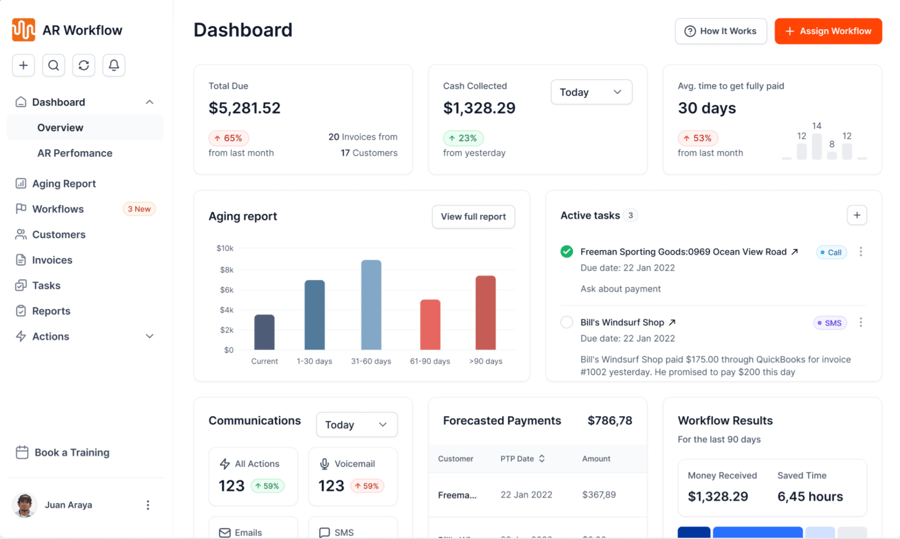
AR Workflow shows what's owed, what came in and who to contact next.
AR Workflow is not an invoicing app. It's the tool that gets your invoices paid. Whatever creates your invoices, AR Workflow makes sure every one of them is followed up until it's paid. It's built for contractors whose customers are homeowners, insurers and small businesses.
It syncs two ways with QuickBooks Online. Every open invoice goes on a follow-up workflow of emails, two-way texts, ringless voicemails and call tasks that stops the moment the customer pays. Customers pay by card or ACH from a link in every message, in full, in part or on a payment plan, and the payment posts back to QuickBooks on its own.
More than 3,200 users rely on it. Customers report getting paid an average of 21 days faster and getting back about 18 hours a week of office time. SERVPRO of Northeast San Diego cut its average days to pay from 105 to 52, and Horizon Roofing went from 45 days to 25.
Key features
Pros
Cons
Pricing: Lite $295 a month (50 open invoices), Grow $395 (100 open invoices, 10 users), Enterprise $495 (unlimited). Yearly billing drops it to $278, $370 or $462 a month. See pricing.
Skip it if: you have only a handful of open invoices, or you're on QuickBooks Desktop.
"Partial" means the feature is limited, an add-on, or only on higher plans. Check each vendor before you buy.
| Feature | Jobber | Housecall Pro | QuickBooks | Joist | Invoice2go | Knowify | ServiceTitan | AR Workflow |
|---|---|---|---|---|---|---|---|---|
| Mobile invoicing | Yes | Yes | Yes | Yes | Yes | Yes | Yes | No |
| Scheduling and dispatch | Yes | Yes | No | No | No | Partial | Yes | No |
| Card and ACH payments | Yes | Yes | Yes | Yes | Yes | Yes | Yes | Yes |
| Progress billing and retainage | No | No | Partial | No | No | Yes | Partial | No |
| Email reminders | Yes | Yes | Yes | Partial | Partial | Partial | Yes | Yes |
| Text reminders | Yes | Yes | No | No | No | No | Yes | Yes |
| Ringless voicemail | No | No | No | No | No | No | No | Yes |
| Daily call list for overdue invoices | No | No | No | No | No | No | Partial | Yes |
| QuickBooks Online sync | Yes | Partial | Native | Yes | Yes | Yes | Partial | Yes |
| Published pricing | Yes | Yes | Yes | Yes | Yes | Partial | No | Yes |
Contractors often expect one app to do everything. In practice, most growing companies use three layers:
| Layer | What it does | Examples |
|---|---|---|
| Field or invoicing software | Creates estimates and invoices, schedules jobs, takes payment on site | Jobber, Housecall Pro, Joist, ServiceTitan |
| Accounting software | Keeps the books, taxes, job costs and payroll | QuickBooks Online |
| AR software | Follows up on every unpaid invoice by email, text and voicemail until it's paid | AR Workflow |
If your invoices go out fast but sit unpaid for 60 days, the gap isn't invoicing. It's follow-up. Our best AR software for contractors guide compares the tools built for that job, and AR automation software explains how it works.
Jobber, Housecall Pro and ServiceTitan are built so a tech can mark a job complete and send the invoice from the truck in a couple of minutes. The estimate becomes the invoice, photos attach, and the customer can sign on the screen. Joist and Invoice2go are just as fast for a single person, but there's no office view of what every crew billed today.
QuickBooks Online is fast once you're at a desk, and slower in the field. Its mobile app works, but it's built for bookkeeping, not crews. Knowify is slower to set up for each job because it ties invoices to contracts, budgets and schedules of values, which is exactly what you want on a $400,000 commercial project and too much for a $600 service call.
All eight tools put a card or ACH payment option in front of the customer. The difference is what happens when they don't pay. Jobber and Housecall Pro send automatic follow-ups by email and text. QuickBooks sends a short series of emails. Joist and Invoice2go do very little after the invoice goes out. ServiceTitan can be configured for strong follow-up, but it takes setup and staff.
AR Workflow is the only tool on the list built just for this stage. It adds two-way texting, ringless voicemail, call tasks and a daily Priority Queue, and it handles insurance jobs with more than one payer.
If you run QuickBooks Online, the quality of the sync matters more than any single feature. Jobber, Joist, Invoice2go, Knowify and AR Workflow all sync with QuickBooks Online. Housecall Pro includes QuickBooks sync from its Essentials plan up. ServiceTitan has its own accounting tools and integrations, and many large shops run it alongside an outside accounting system.
Before you buy, ask each vendor exactly what syncs: customers, items, invoices, payments, fees, deposits and refunds. Then ask what happens when someone edits an invoice in QuickBooks after it synced. The answers will tell you how much cleanup your bookkeeper will be doing.
Service apps handle deposits well and progress billing poorly. If you do remodels, additions or commercial work with draws, look at Knowify or a construction platform, or use QuickBooks progress invoicing. Track retainage as its own invoice so it doesn't get forgotten when the job closes. Our progress payments guide walks through it.
Every tool shows revenue and open invoices. Fewer show the numbers that predict cash trouble: how many days invoices take to pay, how much is over 60 days, and which invoices nobody is following up on. QuickBooks gives you the aging report. AR Workflow adds "unprotected AR" and user performance reports. ServiceTitan has the deepest reporting overall.
These are made-up examples based on the kinds of companies we talk to every week.
| Business | What they need | Good fit |
|---|---|---|
| Solo handyman, 15 invoices a month | Fast estimates and invoices from a phone, card payments | Joist or Invoice2go, with QuickBooks Simple Start for books |
| 3-truck HVAC company | Scheduling, dispatch, maintenance plans, on-site payment | Housecall Pro or Jobber, synced to QuickBooks Online |
| Roofing company doing insurance work | Invoices to homeowners and carriers, depreciation releases, lots of follow-up | QuickBooks Online plus AR Workflow; see AR Workflow for roofing |
| Water damage restoration company | Multiple payers per job, supplements, adjusters | QuickBooks Online plus AR Workflow; see AR Workflow for restoration |
| Electrical sub doing commercial work | Progress billing, retainage, pay apps, job costing | Knowify, or a construction billing tool, with an AR follow-up process |
| Plumbing company with 15 techs and a call center | Call booking, pricebook, memberships, deep reports | ServiceTitan |
Notice that the best answer is often two tools: one to create the invoice and one to make sure it gets paid. That's normal. Very few platforms do both well for contractors.
List price is only part of the bill. Here's what to add up before you compare.
| Tool | How it charges | Watch for |
|---|---|---|
| Jobber | Monthly plan by features, priced for one user with more users costing extra | Per-user costs as crews grow; yearly plans are cheaper |
| Housecall Pro | Plan tiers with user limits | QuickBooks sync needs Essentials; add-ons and extra users on MAX |
| QuickBooks Online | Plan tiers by users and features | August 2026 price increase; QuickBooks Payments processing fees |
| Joist | Free plan plus paid tiers | Document caps on the free plan; payment processing fees |
| Invoice2go | Tiers by invoices per month | Most working contractors need the top tier |
| Knowify | Per user per month | Costs grow with every office and field user |
| ServiceTitan | Quote, usually per technician | Setup and training fees, long contracts |
| AR Workflow | Flat monthly plan by open invoices | Texts, calls and payment processing billed by usage |
Card processing is often the biggest number of all. At about 3%, a contractor who takes $2 million a year by card pays around $60,000 in fees. Pushing large invoices to ACH, and passing card fees to the customer where your state allows it, can save more than any subscription costs.
| When | What to do |
|---|---|
| Week 1 | Connect QuickBooks, import customers and items, and set up your invoice template with your logo, license number and terms. |
| Week 1 | Turn on card and ACH payments. Decide whether to pass card fees on where your state allows it. |
| Week 2 | Train techs or crew leads to invoice from the field before they leave the job. Run a few test invoices end to end. |
| Week 2 | Set up reminder schedules: before the due date, on the due date and after. Use our reminder templates. |
| Week 3 | Move old open invoices over, or put them on an AR follow-up tool so they get chased too. |
| Week 4 | Compare your days to pay and your aging report with where you started. Fix the steps that slowed down. |
Bring a real job to the demo. Our 2026 buyer's checklist has a printable version.
If the app can't do most of these, techs will fall back to "the office will send it later," and later is where cash flow goes to die.
| Tool | Accounting | Other notable connections |
|---|---|---|
| Jobber | QuickBooks Online, Xero | Payments, marketing and review tools |
| Housecall Pro | QuickBooks Online and Desktop | Financing, marketing, review tools |
| QuickBooks Online | Native | Hundreds of apps in the Intuit app store |
| Joist | QuickBooks Online | Payments |
| Invoice2go | QuickBooks Online | Payments through BILL |
| Knowify | QuickBooks Online and Desktop | Time tracking, construction workflows |
| ServiceTitan | Own tools plus integrations | Large partner marketplace |
| AR Workflow | QuickBooks Online | Card and ACH payments, texting and voicemail built in |
Check each vendor's current integration list. These change often.
Bring one overdue invoice to a demo.
We'll show you exactly how AR Workflow would chase it, from the first text to the payment posting in QuickBooks.
Get a demoIt depends on how you work. Solo trades who want fast estimates and invoices from a phone do well with Joist or Invoice2go. Service companies with crews usually pick Jobber or Housecall Pro. Big HVAC and plumbing shops often choose ServiceTitan. Most contractors still keep their books in QuickBooks Online, and add AR Workflow to follow up on unpaid invoices.
Yes, for most small and mid-size contractors. QuickBooks Online creates invoices, tracks job costs on higher plans, accepts card and ACH, and sends basic email reminders. It's weak at scheduling, dispatch and follow-up by text, which is why many contractors pair it with field service software and an AR tool.
Invoice2go starts at $5.99 a month and Joist has a free Basics plan capped at five documents a month. Both get expensive once you need unlimited invoices. Zoho Invoice is free but is not built for trades.
Usually yes. Invoicing and field service apps create the bill and collect a payment on site. Accounting software like QuickBooks keeps your books, taxes and job costs. The best setups sync the two so invoices and payments only get entered once.
Most can send a few email reminders. Few can text, leave voicemails or give your office a list of who to call. If late payments are your real problem, look at AR software that adds those channels on top of your invoicing tool. See our best AR software for contractors guide.
Your business name and license number, the customer and job address, invoice number and date, a clear list of work and materials, payment terms, the due date, any deposit or retainage, and a link to pay online. Our invoice email templates show how to send it.
Invoice the same day the work is done, put a pay link on every invoice, accept card and ACH, set clear terms in the contract, and follow up on a schedule by text as well as email. Read how to reduce late payments for the full playbook.
No. AR Workflow works with the invoices already in QuickBooks Online. You keep creating invoices the way you do now, and AR Workflow handles the follow-up and payments until the money is in.
Knowify, Buildertrend and other construction tools handle progress billing, retainage and AIA-style pay apps. Field service apps like Jobber and Housecall Pro are built for one-visit jobs and simple deposits. See our progress billing guide.
Jobber, Housecall Pro, Joist and Invoice2go all advertise free trials. ServiceTitan and AR Workflow start with a demo instead.
Joist and Invoice2go are the easiest for solo contractors. Jobber and Housecall Pro are the easiest all-in-one apps for companies with crews.
Yes. Jobber, Housecall Pro and ServiceTitan can text invoices with a pay link. AR Workflow texts reminders from a dedicated business number, and customers can text back.
Yes, for most jobs over a few thousand dollars. A deposit covers materials, confirms the customer is serious and cuts the risk of a large unpaid balance. Check your state, since some limit residential deposits.
Residential work is usually due on receipt or within 7 days. Commercial work is often net 30. Shorter terms get you paid faster, but only if you follow up when they pass.
For one or two people, Joist or Invoice2go with QuickBooks Simple Start. For a small crew, Jobber or Housecall Pro synced to QuickBooks Online.
QuickBooks Online Plus and Advanced, Knowify and ServiceTitan track job costs. Most simple invoicing apps don't.
If invoices go out fast but sit unpaid, yes. Invoicing tools are built to send bills. AR software is built to get them paid, with follow-up by text, voicemail and calls.
Start with your customer list and price list, set up one invoice template, and send every new invoice from the software. Put old open invoices into the system or an AR tool so they get followed up too.
Usually not. ServiceTitan shines for shops with many technicians and a full office. Smaller companies often get 90% of the value from Jobber or Housecall Pro at a fraction of the cost.
Joist has a free plan for up to five documents a month, and QuickBooks reminders are included in your plan. Fully free tools rarely fit a working contracting business for long.
Bring one overdue invoice to a demo and see what AR Workflow would send, when, and how your customer would pay.
Book a demo
Sam owned and ran three restoration companies for more than 14 years and collected over $100 million in receivables. He built AR Workflow in 2020 to give contractors the collections system he wished he'd had.

AI writes the emails, sends the texts, and leaves the voicemails. Your team handles the conversations that matter, and your cash keeps moving.
 Keep QuickBooksStart with one invoiceStay in control

 Log in