Compare the 7 best plumbing invoicing software tools for 2026: Housecall Pro, Jobber, Workiz, ServiceTitan, Joist and more, with prices and pros and cons.

Plumbing has a cash flow quirk: the residential calls usually pay on the spot, and the work for landlords, property managers, builders and commercial buildings pays whenever someone gets around to it. If a growing share of your revenue comes from that second group, your invoicing setup matters a lot more than it used to.
I owned three restoration companies for more than 14 years and collected over $100 million in receivables. I've used, paid for and replaced a lot of software along the way. Below I compare seven tools plumbers ask us about, with prices, strengths and the jobs each one fits. If you're in HVAC too, see our best HVAC invoicing software guide.
Full disclosure: I'm the founder of AR Workflow, which appears on this list. I've tried to be fair to every product. Where another tool is the better fit, I say so. Prices come from each company's pricing page or public listings as of November 2026, and they change often, so check before you buy.
KEY TAKEAWAYS
| Tool | Best for | Starting price (Nov 2026) |
|---|---|---|
| Housecall Pro | Small and mid-size residential plumbing | $79/mo |
| Jobber | Simple quoting, scheduling and invoicing | From about $49/mo |
| Workiz | Call-heavy service shops | Varies by plan; get a quote |
| ServiceTitan | Large residential and commercial shops | Quote |
| Joist | One-person shops | Free to about $32/mo |
| QuickBooks Online | Invoicing and books together | From $38/mo |
| AR Workflow | Landlords, property managers, builders and other slow payers | $295/mo |
TABLE OF CONTENTS
For residential calls, a tech who can build an invoice from a flat-rate price, get a signature and take a card payment on site will collect almost every dollar. Text-to-pay links cover the homeowner who isn't home.
Disputes come from surprises. Put the after-hours rate on the quote, get approval by text, and show it on the invoice.
Property managers often need a work order number, photos and a specific billing address. Your software should store these per customer so invoices don't bounce back for missing details.
New construction and remodel rough-ins are billed in stages, sometimes with retainage. Service apps handle this poorly. Track it carefully or use a construction tool.
Landlords and small business owners ignore email. Text, voicemail and a short call list do the work. Our plumbing invoice automation page shows what that looks like.
Housecall Pro gives plumbing shops booking, dispatch, estimates, invoicing, payments, service plans and review requests in one app. Techs invoice and collect on site, and customers can pay from a texted link.
It's a strong fit for residential plumbing. QuickBooks sync starts on the Essentials plan.
Key features
Pros
Cons
Pricing: Basic $79 a month (1 user), Essentials $189 (up to 5 users) and MAX $329 (up to 8 users) on monthly billing, or $59, $149 and $299 a month billed yearly.
Skip it if: most of your work is new construction with draws.
Jobber covers requests, quotes, scheduling, invoicing, payments and automatic invoice follow-ups by email and text. Many small plumbing companies use it because it's quick to learn.
It isn't plumbing-specific, so very large shops may outgrow its pricebook and reporting.
Key features
Pros
Cons
Pricing: Core starts around $49 a month for one user on monthly billing, with lower rates on a yearly plan. Connect runs about $139 and Grow about $199 a month for one user, and more users cost extra. Check Jobber's pricing page for current numbers.
Skip it if: you need deep pricebooks for many techs.
Workiz is field service software for plumbers, locksmiths, garage door and appliance repair companies. It combines scheduling, dispatch, invoicing and payments with phone tools such as call tracking and recording, which suits shops that run on inbound calls.
Its published plans have changed over time and third-party listings disagree on prices, so get a current quote.
Key features
Pros
Cons
Pricing: Plans and prices vary; listings range widely, so ask Workiz for a quote.
Skip it if: you mostly bill builders and commercial projects.
ServiceTitan runs call booking, dispatch, pricebooks, memberships, invoicing, payments and reporting for big residential and commercial plumbing companies.
It's the most complete option and the most expensive. It makes sense once you have many trucks and a full office.
Key features
Pros
Cons
Pricing: Quote only. ServiceTitan is priced per technician and is usually the most expensive option on this list once setup is included.
Skip it if: you run fewer than about 10 trucks.
Joist lets you build an estimate on your phone, turn it into an invoice and get paid by card or bank transfer. It's a big step up from paper invoices for a solo plumber.
It doesn't schedule, dispatch or chase overdue invoices.
Key features
Pros
Cons
Pricing: Free Basics plan. Elite about $32 a month or $320 a year. 14-day trial.
Skip it if: you have more than one truck.
QuickBooks Online handles invoices, QuickBooks Payments, basic email reminders and your aging report. It's where most plumbing shops keep their books, so field software and AR tools sync into it.
It has no dispatch or text reminders. See accounting for plumbers for setup tips.
Key features
Pros
Cons
Pricing: From $38 a month (Simple Start, 1 user). Essentials $85, Plus $140 and Advanced $340 a month after Intuit's August 2026 price change. QuickBooks Payments charges processing fees per transaction.
Skip it if: you need field tools for techs.
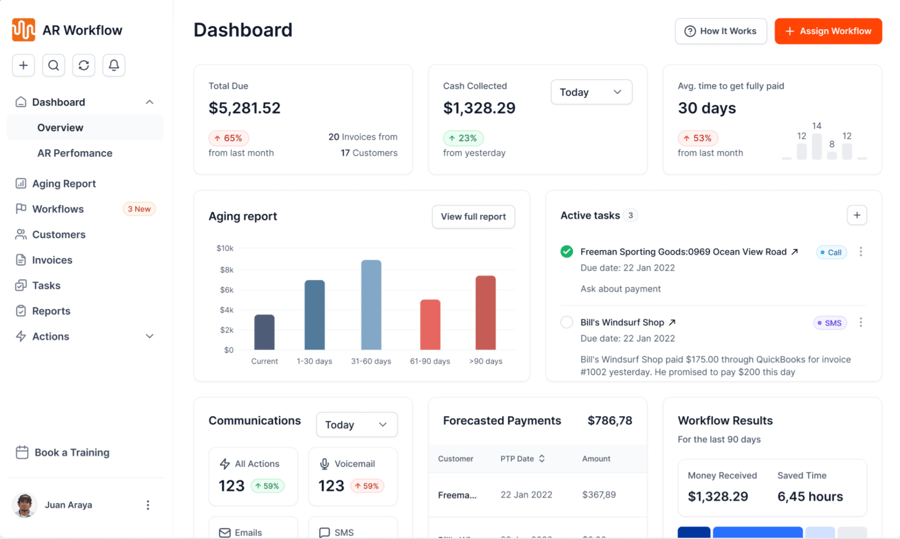
AR Workflow shows what's owed, what came in and who to contact next.
AR Workflow is not an invoicing app. It's the tool that gets your invoices paid. Plumbing shops that do rental, commercial or builder work use it to chase the invoices that never get paid on site.
It syncs two ways with QuickBooks Online. Every open invoice goes on a follow-up workflow of emails, two-way texts, ringless voicemails and call tasks that stops the moment the customer pays. Customers pay by card or ACH from a link in every message, in full, in part or on a payment plan, and the payment posts back to QuickBooks on its own.
More than 3,200 users rely on it. Customers report getting paid an average of 21 days faster and getting back about 18 hours a week of office time. SERVPRO of Northeast San Diego cut its average days to pay from 105 to 52, and Horizon Roofing went from 45 days to 25.
Key features
Pros
Cons
Pricing: Lite $295 a month (50 open invoices), Grow $395 (100 open invoices, 10 users), Enterprise $495 (unlimited). Yearly billing drops it to $278, $370 or $462 a month. See pricing.
Skip it if: you have only a handful of open invoices, or you're on QuickBooks Desktop.
| Feature | Housecall Pro | Jobber | Workiz | ServiceTitan | Joist | QuickBooks | AR Workflow |
|---|---|---|---|---|---|---|---|
| Dispatch | Yes | Yes | Yes | Yes | No | No | No |
| On-site invoicing and payment | Yes | Yes | Yes | Yes | Yes | Partial | No |
| Phone and call tracking | Partial | No | Yes | Yes | No | No | Partial |
| Text reminders | Yes | Yes | Partial | Yes | No | No | Yes |
| Ringless voicemail | No | No | No | No | No | No | Yes |
| Daily call list for overdue invoices | No | No | No | Partial | No | No | Yes |
| QuickBooks Online sync | Partial | Yes | Yes | Partial | Yes | Native | Yes |
| Published pricing | Yes | Yes | Partial | No | Yes | Yes | Yes |
| Payer | Why they pay late | What works |
|---|---|---|
| Landlords | Small owners juggle many bills | Text the invoice with photos and a pay link the same day |
| Property managers | Need owner approval or a work order number | Collect billing rules up front, include the work order number, follow up weekly |
| Builders and GCs | Pay on their draw schedule, may hold retainage | Bill on the schedule, track lien deadlines, send preliminary notices |
| Commercial accounts | Net 30 to 60 and an AP department | Send to the right AP contact, confirm receipt, call at day 31 |
| Homeowners after big repairs | Waiting on insurance or short on cash | Offer payment plans and track promises to pay |
A simple weekly escalation routine fixes most of this. If it gets to the point of a formal demand, use our payment demand letter template.
Housecall Pro works well for residential plumbing: online booking for drain and water heater calls, on-the-way texts, estimates with options for repair versus replace, and payment on the spot. Service plans help sell annual inspections and water heater flushes. Financing helps on repipes and water heater replacements.
The gaps show on landlord, property management and builder work. Those customers need work order numbers, owner approvals and draw schedules. Housecall Pro can send the invoice, but the follow-up on 45-day-old property management invoices usually falls to the office.
Best for: residential plumbing shops with 1 to 10 trucks.
Jobber is easy to learn and handles the basics well: requests, quotes, scheduling, invoices, payments and automatic follow-ups. Plumbers who also do small remodel and fixture work like how quickly they can build and send a quote.
It's not plumbing-specific, so pricebooks and service agreement tools are lighter than ServiceTitan's. For shops focused on service calls, that's often fine.
Best for: small shops that want to get organized fast.
Workiz was built for service businesses that live on the phone. Built-in call tracking and recording mean the dispatcher can see where a call came from and book it straight onto the board. For emergency plumbing companies running ads, knowing which calls turned into paid jobs is valuable.
Pricing is harder to pin down than its rivals, and some features are add-ons. Get a written quote with everything you need included.
Best for: call-heavy emergency and service shops.
ServiceTitan gives large plumbing companies call booking, dispatch, pricebooks, memberships, sales tools and deep reporting in one system. It's common among big residential shops and companies that do both service and construction.
It's expensive and slow to set up. Smaller shops often pay for far more than they use.
Best for: shops with about 10 or more trucks and a full office.
Joist is a clean, fast way for a one-person plumbing business to send professional estimates and invoices from a phone and take payment. It won't schedule or dispatch, but for a solo plumber it replaces paper tickets and late-night typing.
Best for: solo plumbers and very small shops.
QuickBooks keeps your books, handles invoices and payments, and runs your aging report. Most plumbing shops use it as the accounting system behind a field app. Our accounting for plumbers guide covers how to set it up.
Best for: the books behind any of the tools above.
AR Workflow works on top of QuickBooks Online to get unpaid invoices paid. Plumbing shops use it most for landlords, property managers, builders and homeowners who couldn't pay at the door. Each invoice gets emails, two-way texts, ringless voicemails and call tasks, and payments post back to QuickBooks.
It doesn't schedule or create invoices, so you'll keep your field app. See AR Workflow for plumbing.
Best for: shops with a growing overdue balance from rental, commercial and builder work.
Made-up examples based on shops we talk to.
| Shop | Situation | Good fit |
|---|---|---|
| Solo plumber | Residential repairs, invoices on paper | Joist, plus QuickBooks Simple Start |
| 3 trucks, emergency service | Runs ads, lives on inbound calls | Workiz or Housecall Pro |
| 6 trucks, lots of rentals | Landlords and property managers on terms | Housecall Pro or Jobber, plus AR Workflow for follow-up |
| Service plus new construction | Builder draws and retainage alongside service calls | Field app for service, QuickBooks progress invoicing for builders, AR Workflow for follow-up |
| 25 techs, call center | Memberships, pricebook, marketing attribution | ServiceTitan |
| Tool | How it charges | Watch for |
|---|---|---|
| Housecall Pro | Tiers with user limits | QuickBooks sync from Essentials |
| Jobber | Plan by features, per user | Per-user growth |
| Workiz | Plans plus add-ons | Get a full written quote |
| ServiceTitan | Quote, per tech | Setup fees, contract length |
| Joist | Free plan plus paid tiers | Free plan document cap |
| QuickBooks Online | Tiers by users | August 2026 price increase |
| AR Workflow | Flat monthly by open invoices | Usage for texts, calls and processing |
Emergency shops should also price out call tracking and after-hours answering, which can cost as much as the software.
| When | What to do |
|---|---|
| Week 1 | Load customers, properties and your price list. Connect QuickBooks. |
| Week 1 | Turn on payments and set your after-hours pricing. |
| Week 2 | Train techs to invoice and collect before leaving. |
| Week 2 | Store billing rules for each property manager and landlord. |
| Week 3 | Put all open and overdue invoices on a follow-up schedule. |
| Week 4 | Compare on-site collection, DSO and overdue balance to your starting point. |
| Job type | Typical payer | How to bill | Where payment stalls |
|---|---|---|---|
| Drain or leak service call | Homeowner or tenant | Flat rate, collect on site | Tenant vs landlord confusion |
| Water heater replacement | Homeowner | Deposit or pay at install, financing on big tickets | Homeowner waiting on paycheck or financing |
| Repipe | Homeowner | Deposit, progress payment, final at inspection | Final payment after inspection delays |
| Rental turnover work | Landlord or property manager | Work order number, photos, net terms | Owner approval, wrong billing address |
| New construction rough-in and trim | Builder or GC | Draw schedule, retainage, lien notices | Draw delays, held retainage |
| Commercial service | Business AP department | PO number, net 30 | Missing PO, AP queue |
Each row needs a slightly different follow-up. That's why one reminder schedule for everyone underperforms. Build separate workflows for homeowners, property managers, builders and commercial accounts.
| Tool | Accounting | Notable |
|---|---|---|
| Housecall Pro | QuickBooks Online and Desktop | Financing, reviews, marketing |
| Jobber | QuickBooks Online, Xero | Client hub, reviews |
| Workiz | QuickBooks | Phone and call tracking |
| ServiceTitan | Own tools plus integrations | Large marketplace |
| Joist | QuickBooks Online | Payments |
| QuickBooks Online | Native | Intuit app store |
| AR Workflow | QuickBooks Online | Texting and voicemail built in |
Bring one overdue invoice to a demo.
We'll show you exactly how AR Workflow would chase it, from the first text to the payment posting in QuickBooks.
Get a demoSmall plumbing shops do well with Housecall Pro, Jobber or Workiz. One-person shops can start with Joist. Large shops with many trucks often use ServiceTitan. Most plumbers keep their books in QuickBooks Online and add AR Workflow to follow up on landlord, property manager and commercial invoices that sit unpaid.
Quote the flat rate before starting, get approval in writing or by text, and invoice and collect before leaving. After-hours rates should be on the quote and the invoice so there's no surprise.
Get the property manager's billing rules in writing up front: who approves work, purchase order numbers, and where invoices go. Then send invoices the same day and follow up on a set schedule. Most late payments here are paperwork, not refusal.
Often yes, if the late fee is in your signed terms and follows your state's rules. Read what late fees contractors can charge before you add one.
Your business name, license number, the customer and service address, date, a description of the problem and the fix, parts and labor or the flat-rate price, any warranty, payment terms and a link to pay online.
QuickBooks Online handles invoices, payments and books well. It doesn't do dispatch, flat-rate pricebooks or text reminders, so most plumbing shops pair it with field service software.
When a leak turns into a water damage claim, the homeowner's insurer may pay part of the bill. Get the claim number and adjuster contact, document the work with photos, and bill the homeowner for any deductible. Our guide to collecting from carriers and adjusters explains the process.
Simple apps start free or under $40 a month. All-in-one field service tools run roughly $50 to $350 a month for small teams. ServiceTitan is quote-based and usually costs the most.
Workiz is stronger for call-heavy shops that want phone tools built in. Housecall Pro is stronger on customer experience, service plans and financing. Both send invoices and take payments in the field.
Get their vendor rules in writing, include the work order number and photos, send invoices to their AP contact the same day, and follow up weekly until paid.
Yes, for residential work. Collecting before the tech leaves is the single best way to avoid overdue invoices.
Bill on the agreed schedule, send any required preliminary notices, track your lien deadlines, and follow up by phone. Our unpaid construction invoices guide covers the steps.
Housecall Pro, Jobber and ServiceTitan can. AR Workflow adds two-way texting and voicemail for overdue invoices.
Joist for estimates and invoices, with QuickBooks Simple Start for the books. Move to Housecall Pro or Jobber when you add a second truck.
Confirm the payer before you start. If the landlord pays, invoice the landlord with the property address and tenant name, and send photos. Never assume the tenant will forward it.
Bring one overdue invoice to a demo and see what AR Workflow would send, when, and how your customer would pay.
Book a demo
Sam owned and ran three restoration companies for more than 14 years and collected over $100 million in receivables. He built AR Workflow in 2020 to give contractors the collections system he wished he'd had.

AI writes the emails, sends the texts, and leaves the voicemails. Your team handles the conversations that matter, and your cash keeps moving.
 Keep QuickBooksStart with one invoiceStay in control

 Log in