Compare the 7 best invoice automation software tools for contractors in 2026: what each automates, real prices, QuickBooks fit, pros and cons.

Every hour your office spends building invoices, sending them, and chasing the ones that don't get paid is an hour that could have gone into scheduling, estimating or answering the phone. Invoice automation software takes most of that work off the table.
But "invoice automation" means different things depending on who's selling it. Some tools automate creating invoices. Some automate sending and reminders. A few automate the whole follow-up until the money lands. I owned three restoration companies for more than 14 years and collected over $100 million in receivables. I've used, paid for and replaced a lot of software along the way. This guide sorts the options for contractors and shows what each one actually automates.
Full disclosure: I'm the founder of AR Workflow, which appears on this list. I've tried to be fair to every product. Where another tool is the better fit, I say so. Prices come from each company's pricing page or public listings as of November 2026, and they change often, so check before you buy.
KEY TAKEAWAYS
| Tool | What it automates best | Starting price (Nov 2026) |
|---|---|---|
| AR Workflow | Follow-up and payments on every QuickBooks invoice | $295/mo |
| QuickBooks Online | Creating, recurring and reminding | From $38/mo |
| BILL | B2B invoicing plus approvals and AP | From $49/user/mo |
| Stripe Invoicing | Sending and collecting card payments | 0.4% per paid invoice + processing |
| Zoho Invoice | Basic invoices and reminders | Free |
| InvoiceSherpa | Scheduled reminders and autopay | $49/mo |
| Upflow | B2B collections for finance teams | Quote + $390/mo fee |
TABLE OF CONTENTS
| Stage | What can be automated | Still needs a person |
|---|---|---|
| Create | Recurring invoices, invoices from completed jobs or estimates | Change orders, supplements, disputed line items |
| Send | Email or text with a pay link, on completion or on a schedule | Picking the right contact on insurance and commercial jobs |
| Remind | Friendly reminders before and after the due date | Deciding when to escalate a big account |
| Collect | Card and ACH links, autopay, payment plans | Negotiating a plan with a struggling customer |
| Post | Payments and fees synced back to QuickBooks | Fixing mismatched deposits |
| Report | Aging, DSO, who to call today | Acting on the numbers |
The best setups automate the routine 90% and hand your team a short list for the rest. That's why we built the Priority Queue in AR Workflow: software sends the reminders, and a person makes the calls that matter.
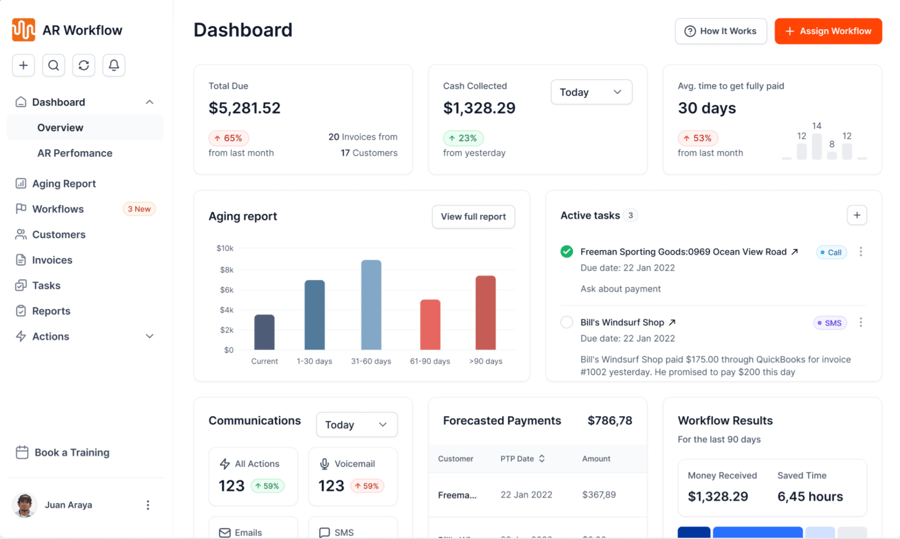
AR Workflow shows what's owed, what came in and who to contact next.
AR Workflow is not an invoicing app. It's the tool that gets your invoices paid. It automates the part of invoicing that eats the most office time: the follow-up. Invoices still get created in QuickBooks, and AR Workflow takes it from there.
It syncs two ways with QuickBooks Online. Every open invoice goes on a follow-up workflow of emails, two-way texts, ringless voicemails and call tasks that stops the moment the customer pays. Customers pay by card or ACH from a link in every message, in full, in part or on a payment plan, and the payment posts back to QuickBooks on its own.
More than 3,200 users rely on it. Customers report getting paid an average of 21 days faster and getting back about 18 hours a week of office time. SERVPRO of Northeast San Diego cut its average days to pay from 105 to 52, and Horizon Roofing went from 45 days to 25.
Key features
Pros
Cons
Pricing: Lite $295 a month (50 open invoices), Grow $395 (100 open invoices, 10 users), Enterprise $495 (unlimited). Yearly billing drops it to $278, $370 or $462 a month. See pricing.
Skip it if: you have only a handful of open invoices, or you're on QuickBooks Desktop.
QuickBooks Online can create recurring invoices, turn estimates into invoices, send automatic email reminders and collect card and ACH through QuickBooks Payments. For many small contractors, turning these on is the first step.
Reminders are email only and look the same for every customer. Read QuickBooks AR automation for what to set up.
Key features
Pros
Cons
Pricing: From $38 a month (Simple Start, 1 user). Essentials $85, Plus $140 and Advanced $340 a month after Intuit's August 2026 price change. QuickBooks Payments charges processing fees per transaction.
Skip it if: most of your customers don't read email.
BILL (formerly Bill.com) handles accounts payable and receivable for small and mid-size businesses. On the AR side it sends invoices, accepts ACH and card, and sends reminders, with approval workflows and syncs to QuickBooks and other systems.
It's strongest for companies billing other businesses, and many use it for paying vendors too. It isn't built for homeowner or insurance collections.
Key features
Pros
Cons
Pricing: Essentials $49, Team $65 and Corporate $89 per user a month. Some payment types carry transaction fees.
Skip it if: your customers are mostly homeowners.
Stripe Invoicing creates and sends invoices with a hosted payment page, automatic reminders and card or bank payments through Stripe. There's no monthly fee; you pay a small percentage of each paid invoice on top of processing.
It's simple and reliable, but it's a payments tool first. It won't manage a contractor's follow-up or job billing.
Key features
Pros
Cons
Pricing: Starter 0.4% per paid invoice, Plus 0.5%, plus Stripe processing (cards from 2.9% + $0.30).
Skip it if: you want a full follow-up process with calls and texts.
Zoho Invoice is free invoicing software with templates, a client portal, online payments through connected gateways and automatic reminders.
It's a solid free tool for very small businesses. It's not built for trades and doesn't sync with QuickBooks the way contractor tools do.
Key features
Pros
Cons
Pricing: Free. Payment gateway fees apply.
Skip it if: you already run your books in QuickBooks.
InvoiceSherpa automates reminders and can charge saved cards or bank accounts on a schedule. It has a customer portal, late fees and QuickBooks Online and Xero integrations.
It's a cheap step up from QuickBooks reminders, but it doesn't manage calls or escalation.
Key features
Pros
Cons
Pricing: $49 a month (up to 100 open invoices), $99 (101 to 500) and $199 (unlimited). Yearly: $41, $83 or $166 a month.
Skip it if: you have real overdue balances that need calls.
Upflow automates B2B collections with reminder sequences, a payment portal, shared account views and AI help for finance teams. It integrates with QuickBooks Online, Xero, NetSuite and Sage.
It's strong for software and service companies. For contractors, the quote-based pricing and lack of voicemail make it a weaker fit. See Upflow alternatives.
Key features
Pros
Cons
Pricing: Quoted by annual invoiced revenue, with a $390 a month platform fee on its pricing page.
Skip it if: you're a small contractor who wants published pricing.
| Feature | AR Workflow | QuickBooks | BILL | Stripe | Zoho Invoice | InvoiceSherpa | Upflow |
|---|---|---|---|---|---|---|---|
| Creates invoices | No | Yes | Yes | Yes | Yes | No | No |
| Recurring invoices | No | Yes | Yes | Yes | Yes | Partial | No |
| Email reminders | Yes | Yes | Yes | Yes | Yes | Yes | Yes |
| Text reminders | Yes | No | Partial | No | Partial | Yes | Partial |
| Ringless voicemail | Yes | No | No | No | No | No | No |
| Call tasks and daily call list | Yes | No | No | No | No | No | Partial |
| Payment plans | Yes | No | Partial | Partial | Partial | Yes | Partial |
| Two-way QuickBooks Online sync | Yes | Native | Yes | Partial | Partial | Yes | Yes |
| Built for contractors | Yes | No | No | No | No | No | No |
AR Workflow automates what happens after the invoice is sent. When an invoice syncs in from QuickBooks Online, it goes on a workflow you choose: homeowner, business, insurance or your own. A typical homeowner workflow sends a friendly email and text before the due date, a text on the due date, a ringless voicemail a few days later, and a call task for your office if nothing has happened by day 10. Every message carries a card and ACH pay link.
When the customer pays, the workflow stops and the payment posts back to QuickBooks with fees. When they promise to pay, your team logs it and the system follows up if the date passes. The Priority Queue ranks who to contact each morning, so a person handles the 10% of invoices that need judgment.
Where it doesn't automate: creating invoices (QuickBooks or your field app does that), late fees, and recurring autopay.
QuickBooks automation covers recurring invoices, turning estimates into invoices, automatic email reminders and online payments. Setting it up takes minutes, and for small businesses it's often the right first step.
Its reminders follow one schedule for everyone and only go by email, and there's no task list or record of promises to pay. Read QuickBooks AR automation for setup steps.
BILL is popular with accountants and finance teams because it puts payables and receivables in one place, with approval workflows and strong accounting syncs. On the AR side it sends invoices, takes ACH and card payments and sends reminders. Companies that bill other businesses on terms and want their AP and AR in one tool often like it.
For contractors billing homeowners, it's a weaker fit. It's priced per user and isn't built around text, voicemail or job-based follow-up.
Stripe Invoicing is one of the cleanest ways to send an invoice and get paid online. There's no monthly fee; you pay 0.4% or 0.5% of each paid invoice plus Stripe processing. Hosted invoice pages, automatic reminders and recurring invoices are included.
It's a payments tool first. It won't manage a contractor's follow-up, track promises to pay or handle insurance jobs, and card processing costs add up on large invoices.
Zoho Invoice is free and covers invoice templates, reminders, a client portal and online payments through connected gateways. For a side business or very small shop, it's a reasonable start.
It isn't built for trades and doesn't fit well if your books live in QuickBooks.
InvoiceSherpa adds scheduled email and SMS reminders, autopay and late fees on top of QuickBooks Online or Xero, starting at $49 a month. It's a cheap step up from QuickBooks reminders and works well for recurring service billing.
It sends reminders and that's it. There's no call list, voicemail or promise tracking, so big overdue balances still need manual work.
Upflow automates B2B collections for finance teams with reminder sequences, a payment portal, shared account views and AI help. It integrates with QuickBooks Online, Xero, NetSuite and Sage.
For contractors, the quote-based pricing with a platform fee, card fees of 3.5% + $0.30, and lack of voicemail make it a weaker fit. See AR Workflow vs Upflow.
Take a made-up company: Oak Ridge Remodeling, $2.5 million a year, 70 open invoices, average days to pay of 48. The office manager spends about 15 hours a week building invoices, sending reminders, calling customers and matching payments.
| Before automation | After automation | |
|---|---|---|
| Days to get paid | 48 | 30 |
| Cash tied up in receivables (about) | $329,000 | $205,000 |
| Cash freed up, one time | About $124,000 | |
| Office hours on billing and follow-up each week | 15 | About 4 |
| Software cost per year (QuickBooks Plus + AR Workflow Lite) | About $5,220 |
Even if the result is half as good, the freed-up cash pays for many years of software. Run your own numbers with the DSO calculator.
| Day | Homeowner workflow | Business workflow | Insurance workflow |
|---|---|---|---|
| -3 | Friendly email + text with pay link | Email to AP contact | Email to adjuster confirming invoice received |
| 0 | Text: due today | Email: due today | Text homeowner with claim status |
| +3 | Text reminder | Email reminder | Call task: confirm with adjuster |
| +7 | Ringless voicemail | Call task to AP | Email adjuster with documents |
| +10 | Call task | Statement + call | Text homeowner about deductible |
| +21 | Firm email + text | Firm email, escalate to owner | Escalate to carrier supervisor |
| +30 | Final notice, review lien options | Final notice | Review supplement or appraisal options |
Every workflow stops automatically when the invoice is paid. Our reminder templates give you wording for each step.
Many tools now advertise AI. Useful AI in collections does three things: drafts messages that sound like your business, suggests who to contact next, and spots invoices likely to go bad. Less useful AI sends messages on its own with no review.
Our view: let AI draft and prioritize, and keep a person in charge of what goes out to customers. A wrong message to a good customer costs more than it saves. AR Workflow uses AI to draft messages and pick who to contact next, with a person reviewing what goes out.
| When | What to do |
|---|---|
| Week 1 | Clean up QuickBooks: close paid and written-off invoices, fix customer emails and phone numbers. |
| Week 1 | Turn on card and ACH payments. |
| Week 2 | Set up recurring invoices for any maintenance or retainer work. |
| Week 2 | Build follow-up workflows by customer type. |
| Week 3 | Put every open invoice on a workflow and start a daily 20-minute call list. |
| Week 4 | Compare DSO, overdue balance and hours spent with your starting point. |
| Trade | What to automate first | Where people still matter |
|---|---|---|
| Restoration | Insurance workflows with adjuster and homeowner contacts | Supplements, carrier disputes |
| Roofing | Depreciation release follow-up, homeowner texts | Supplement negotiation |
| HVAC | Maintenance plan billing, commercial reminders | Large replacement balances |
| Plumbing | Landlord and property manager follow-up | Builder draws |
| Electrical | Progress invoice reminders, retainage follow-up | Pay app disputes |
| Remodeling | Draw schedule reminders, final invoice follow-up | Punch list disputes |
| Landscaping | Recurring invoices and autopay | Seasonal accounts |
Trade guides: restoration, roofing, HVAC, plumbing, electrical, remodeling and landscaping.
Bring one overdue invoice to a demo.
We'll show you exactly how AR Workflow would chase it, from the first text to the payment posting in QuickBooks.
Get a demoInvoice automation software creates, sends and follows up on invoices with little manual work. Depending on the tool, it can build invoices from jobs or contracts, send them on a schedule, remind customers, collect payments online and post those payments back to your accounting system.
For contractors on QuickBooks Online, the best setup is usually QuickBooks for creating invoices plus AR Workflow for automatic follow-up by email, text and voicemail. Very small businesses can start with QuickBooks reminders or InvoiceSherpa. Companies that bill other businesses and want approvals and AP in one place often look at BILL.
Yes. QuickBooks Online can create recurring invoices, send automatic email reminders and accept online payments. It can't text customers, leave voicemails or run different follow-up for different kinds of customers.
Invoice automation focuses on creating and sending invoices. AR automation focuses on what happens after: reminders, payments, promises to pay, call tasks and reporting until the cash is in. Contractors usually need both. See AR automation software.
Zoho Invoice is free for small volumes, and QuickBooks Online includes automation in your plan. Free tools are usually email only and don't handle calls, texts or job-based billing.
Not if they're written well. Short, friendly messages from your business name and number, sent at sensible times and stopped the moment the customer pays, feel like good service. Use our payment reminder templates as a start.
It depends on volume. AR Workflow customers report getting back about 18 hours a week of office time, mostly from not chasing payments by hand.
Most general tools can't. QuickBooks has basic progress invoicing, and construction tools handle full pay apps. Track retainage as its own invoice so automation follows up when it comes due.
Invoice (AR) automation handles money coming in from customers. AP automation handles bills you pay to vendors. BILL does both; most contractor AR tools focus on money coming in.
Yes. Both create and send invoices automatically when jobs are completed and sync them to QuickBooks. An AR tool can then follow up on any that go unpaid.
Generally yes for your own customers, with consent and reasonable hours, but rules vary. Use texting from a business number and include a way to opt out.
Pay links on every invoice, then reminders before and after the due date, then a call list for anything past 10 days.
Use a tool with two-way QuickBooks sync so payments recorded anywhere stop the workflow automatically.
If you have more than about 20 open invoices or spend more than a few hours a week chasing payments, usually yes. Below that, QuickBooks reminders may be enough.
It should pause follow-up on a dispute so a person can resolve it. Never let automated reminders keep hitting a customer who is disputing the bill.
Bring one overdue invoice to a demo and see what AR Workflow would send, when, and how your customer would pay.
Book a demo
Sam owned and ran three restoration companies for more than 14 years and collected over $100 million in receivables. He built AR Workflow in 2020 to give contractors the collections system he wished he'd had.

AI writes the emails, sends the texts, and leaves the voicemails. Your team handles the conversations that matter, and your cash keeps moving.
 Keep QuickBooksStart with one invoiceStay in control

 Log in