Compare the 7 best HVAC invoicing software tools for 2026: Housecall Pro, Jobber, ServiceTitan, Service Fusion and more, with prices, pros and cons.

In this video:
You fixed the AC. You fixed the leak. So why is the money still out? In this video, you'll learn six ways HVAC and plumbing companies get paid faster. Get paid on the spot. Deposits on big jobs. Plans on autopay. Commercial accounts. A follow-up schedule. And a weekly money check.
Fix one: get paid before the truck leaves. Service calls are small and fast, so the bill should be too. Have the tech walk the customer through the work, send the invoice from the phone, and take a card or a tap right there. A small card fee beats an invoice that sits for sixty days.
Fix two: take a deposit on big jobs. A new system or a water heater swap ties up your cash in parts. Ask for a deposit when the customer says yes, then bill the rest the day you finish. On a twelve thousand dollar install, that might be half up front and half at the end. Put it in writing before you order a single part.
Fix three: put maintenance plans on autopay. Plans are the best money in the trade, but only if they renew. Keep a card on file, with the customer's OK, and charge it on the renewal date. Send a reminder two weeks before. A plan that renews by itself is a plan that doesn't lapse.
Fix four: treat commercial accounts differently. Property managers and businesses pay on terms, like net thirty. They need a purchase order number, the right billing contact, and sometimes an upload to their payment portal. Get all three before the job starts. A missing purchase order number is one of the top reasons a commercial invoice sits.
Fix five: follow up on a schedule. Day one, send the invoice with a pay link. Day three, a friendly text. Day seven, an email. Day fourteen, a phone call. Then every week until it's paid. Same steps, every invoice, every time. Most customers aren't saying no. They just forgot.
Fix six: check your money every Monday. Pull your aging report from QuickBooks. Look at three buckets: under thirty days, over thirty, and over sixty. Start with the oldest and the biggest. Fifteen minutes a week keeps a small problem from turning into a big one.
So here's the plan. Get paid on the spot. Take deposits on big jobs. Put plans on autopay. Get the purchase order number up front. Follow up on a schedule. And check your aging report every Monday. Which one would help your shop the most? Tell us in the comments.
Follow-up is the first thing to slip when the phones are ringing. AR Workflow connects to QuickBooks Online and follows up on every open invoice for you, by email, text, and voicemail. Every message has a link to pay. More than 3,200 users get paid about 21 days faster. Bring one overdue invoice and book a demo. The link is below.
An HVAC company lives and dies on two things: getting techs to the right job and getting paid for the work. The first gets most of the attention. The second quietly eats your cash, especially once you take on commercial accounts, property managers and service agreements.
HVAC invoicing software turns a finished call into an invoice on the spot, collects payment before the truck leaves, and handles maintenance plan billing in the background. I owned three restoration companies for more than 14 years and collected over $100 million in receivables. I've used, paid for and replaced a lot of software along the way. Here are seven tools HVAC owners ask us about, what they cost, and who each one is right for.
Full disclosure: I'm the founder of AR Workflow, which appears on this list. I've tried to be fair to every product. Where another tool is the better fit, I say so. Prices come from each company's pricing page or public listings as of November 2026, and they change often, so check before you buy.
KEY TAKEAWAYS
| Tool | Best for | Starting price (Nov 2026) |
|---|---|---|
| Housecall Pro | Small and mid-size residential HVAC | $79/mo |
| Jobber | Growing shops that want simple quoting and invoicing | From about $49/mo |
| ServiceTitan | Large residential and commercial shops | Quote |
| Service Fusion | Shops that want unlimited users | $245/mo |
| FieldEdge | Established shops on QuickBooks that want flat-rate pricing | Quote |
| QuickBooks Online | Invoicing and books in one place | From $38/mo |
| AR Workflow | Collecting from commercial accounts, property managers and slow payers | $295/mo |
TABLE OF CONTENTS
Most HVAC shops price by the task, not by the hour. Your software should pull flat-rate prices into the invoice so techs aren't guessing and customers see a clear number.
On residential calls, the best collection rate comes from taking payment on site by card, tap or a texted pay link. Every invoice that leaves unpaid becomes something your office has to chase.
Service agreements are steady revenue, but only if they get billed and paid. Look for automatic recurring billing, cards on file and alerts when a payment fails.
Commercial customers pay on net 30 or longer, often after a purchase order and an approval chain. Property managers wait on owners. These invoices need a follow-up routine, not just a reminder email. See our collection email templates.
Your invoices, payments and fees should land in QuickBooks without retyping. Read HVAC software that works with QuickBooks for how each platform handles it.
Housecall Pro handles booking, dispatch, estimates with good-better-best options, invoicing, payments and review requests. Techs can invoice and collect on site, and customers can pay from a texted link.
It's popular with residential HVAC shops for its clean app and marketing tools. Service agreements, QuickBooks sync and consumer financing are available on higher plans.
Key features
Pros
Cons
Pricing: Basic $79 a month (1 user), Essentials $189 (up to 5 users) and MAX $329 (up to 8 users) on monthly billing, or $59, $149 and $299 a month billed yearly.
Skip it if: most of your revenue is commercial work on long terms.
Jobber covers requests, quotes, scheduling, invoicing and payments, with automatic invoice follow-ups by email and text. It's used across home service trades, including many smaller HVAC companies.
It's simpler than HVAC-specific platforms, which is a plus for small shops and a limit for larger ones that need deep pricebooks and memberships.
Key features
Pros
Cons
Pricing: Core starts around $49 a month for one user on monthly billing, with lower rates on a yearly plan. Connect runs about $139 and Grow about $199 a month for one user, and more users cost extra. Check Jobber's pricing page for current numbers.
Skip it if: you need HVAC pricebooks and memberships at scale.
ServiceTitan is the most complete platform for big residential and commercial HVAC companies. It runs call booking, dispatch, pricebooks, memberships, invoicing, payments, marketing attribution and detailed reporting.
It's expensive and takes real time to set up. Shops with 10 or more techs and a dedicated office usually get the most from it.
Key features
Pros
Cons
Pricing: Quote only. ServiceTitan is priced per technician and is usually the most expensive option on this list once setup is included.
Skip it if: you have fewer than about 10 techs.
Service Fusion is field service software with scheduling, dispatch, estimates, invoicing, payments and customer history. Its big selling point is that every plan includes unlimited users at a flat monthly price.
That makes it attractive for shops that are adding techs and office staff and don't want a per-user bill.
Key features
Pros
Cons
Pricing: Starter $245, Plus $382 and Pro $627 a month on month-to-month billing, or $208, $325 and $533 a month billed yearly. All plans include unlimited users.
Skip it if: you're a one- or two-person shop.
FieldEdge is field service software built for HVAC, plumbing and electrical contractors. It includes flat-rate pricing, service agreements, dispatch, invoicing and a QuickBooks integration that many shops choose it for.
It's quote-based and aimed at established shops rather than startups.
Key features
Pros
Cons
Pricing: Quote only.
Skip it if: you want published pricing or a light app.
QuickBooks Online creates invoices, takes card and ACH through QuickBooks Payments, sends basic email reminders and runs your aging report. If you're a small shop, you may be able to start here and add field software later.
It has no dispatch, pricebook or memberships, and reminders are email only.
Key features
Pros
Cons
Pricing: From $38 a month (Simple Start, 1 user). Essentials $85, Plus $140 and Advanced $340 a month after Intuit's August 2026 price change. QuickBooks Payments charges processing fees per transaction.
Skip it if: you run more than one or two trucks; add field software.
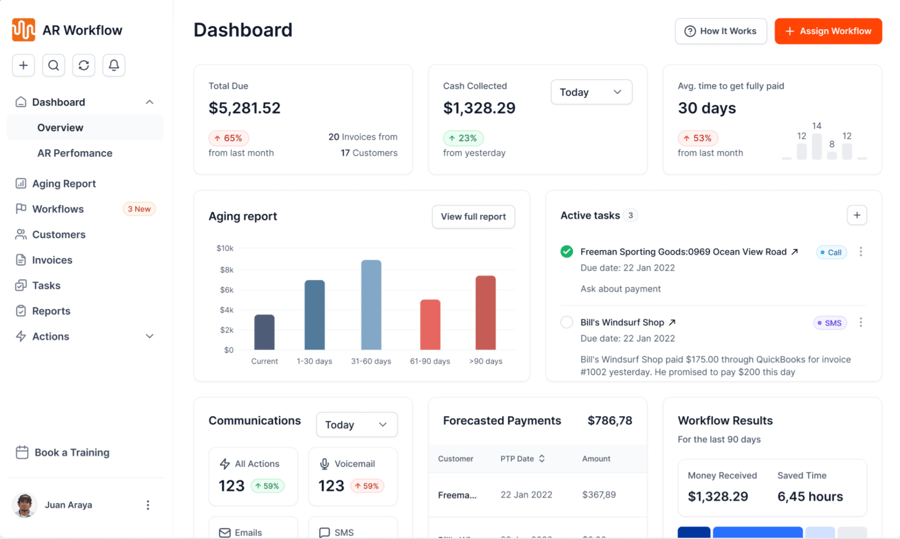
AR Workflow shows what's owed, what came in and who to contact next.
AR Workflow is not an invoicing app. It's the tool that gets your invoices paid. For HVAC shops, the invoices that sit are rarely the residential calls paid on site. They're the commercial accounts, property managers and homeowners who said "I'll pay next week."
It syncs two ways with QuickBooks Online. Every open invoice goes on a follow-up workflow of emails, two-way texts, ringless voicemails and call tasks that stops the moment the customer pays. Customers pay by card or ACH from a link in every message, in full, in part or on a payment plan, and the payment posts back to QuickBooks on its own.
More than 3,200 users rely on it. Customers report getting paid an average of 21 days faster and getting back about 18 hours a week of office time. SERVPRO of Northeast San Diego cut its average days to pay from 105 to 52, and Horizon Roofing went from 45 days to 25.
Key features
Pros
Cons
Pricing: Lite $295 a month (50 open invoices), Grow $395 (100 open invoices, 10 users), Enterprise $495 (unlimited). Yearly billing drops it to $278, $370 or $462 a month. See pricing.
Skip it if: you have only a handful of open invoices, or you're on QuickBooks Desktop.
| Feature | Housecall Pro | Jobber | ServiceTitan | Service Fusion | FieldEdge | QuickBooks | AR Workflow |
|---|---|---|---|---|---|---|---|
| Dispatch | Yes | Yes | Yes | Yes | Yes | No | No |
| Flat-rate pricebook | Partial | Partial | Yes | Partial | Yes | No | No |
| Service agreements | Yes | Partial | Yes | Partial | Yes | Partial | No |
| On-site payments | Yes | Yes | Yes | Yes | Yes | Yes | No |
| Text reminders | Yes | Yes | Yes | Partial | Partial | No | Yes |
| Ringless voicemail | No | No | No | No | No | No | Yes |
| Daily call list for overdue invoices | No | No | Partial | No | No | No | Yes |
| QuickBooks Online sync | Partial | Yes | Partial | Yes | Yes | Native | Yes |
| Published pricing | Yes | Yes | No | Yes | No | Yes | Yes |
Here's a pattern we see over and over. A residential HVAC shop grows, wins a few property management and light commercial accounts, and suddenly has $80,000 sitting past 60 days. The field software sent the invoices. Nobody followed up, because the reminders went to an accounts payable inbox nobody reads.
The fix is a routine: a friendly reminder before the due date, a text or call the day after, a statement weekly, and a firm notice at 45 days. If you do commercial work, know your mechanics lien deadlines and your state's prompt payment rules. Our HVAC invoice collection page shows how AR Workflow handles it.
ServiceTitan and FieldEdge are built around flat-rate pricebooks, which is a big reason established shops choose them. Housecall Pro offers good-better-best estimates that techs can present on a tablet. Jobber supports optional line items on quotes. Service Fusion has estimates and price lists. QuickBooks has items and estimates but no field-friendly pricebook.
If you sell flat-rate, ask each vendor to build a real repair ticket from your price list during the demo. If it takes more than a minute, your techs won't use it.
Every field platform here lets a tech take payment before leaving, by card or a texted link. Housecall Pro and ServiceTitan also offer consumer financing for system replacements, which helps close $10,000 to $20,000 tickets that customers can't pay up front. Financing moves the collection risk to the lender, which is great for cash flow.
Service agreements smooth out seasonal cash flow. ServiceTitan, FieldEdge and Housecall Pro have the strongest agreement tools. Whatever you use, watch failed card payments: an expired card can quietly turn a paying member into a free one. Someone should review failed agreement payments every week.
This is where most HVAC shops lose money to slow payment. Commercial customers need purchase order numbers, specific billing addresses and sometimes their own portals. Property managers need owner approval. Field platforms send the invoice; they rarely manage the follow-up that commercial AP departments require. That gap is why many shops add an AR tool like AR Workflow for these accounts.
HVAC revenue spikes in summer and winter. Shoulder seasons are when slow-paying commercial invoices hurt most, because new work isn't covering payroll. Keeping your DSO low before the slow months is cheaper than a line of credit. See 9 ways to fix cash flow gaps.
Made-up examples based on shops we talk to.
| Shop | Situation | Good fit |
|---|---|---|
| Owner-operator, 1 truck | Mostly residential repair, wants to stop doing invoices at night | Jobber or Housecall Pro Basic, QuickBooks Simple Start |
| 4 trucks, residential | Maintenance plans, replacements, financing | Housecall Pro Essentials or Service Fusion |
| 8 trucks, half commercial | Property managers and commercial accounts on net 30 | Housecall Pro or Service Fusion, plus AR Workflow for commercial follow-up |
| 20 techs, call center | Pricebook, memberships, marketing attribution | ServiceTitan |
| Established shop on QuickBooks | Flat-rate pricing, deep QuickBooks link | FieldEdge |
| Tool | How it charges | Watch for |
|---|---|---|
| Housecall Pro | Tiers with user limits | QuickBooks sync from Essentials; extra users on MAX |
| Jobber | Plan by features, per user | Costs rise as you add techs |
| ServiceTitan | Quote, usually per tech | Setup fees and longer contracts |
| Service Fusion | Flat monthly, unlimited users | Higher starting price |
| FieldEdge | Quote | Onboarding and contract terms |
| QuickBooks Online | Tiers by users | August 2026 price increase |
| AR Workflow | Flat monthly by open invoices | Usage for texts, calls and processing |
For a shop with 6 techs and 2 office staff, per-user pricing can double the bill compared with a flat-rate plan. Count everyone who needs a login.
| When | What to do |
|---|---|
| Week 1 | Load customers, equipment history and your pricebook. Connect QuickBooks. |
| Week 1 | Turn on payments and financing. |
| Week 2 | Train techs to build tickets from the pricebook and collect before leaving. |
| Week 3 | Move maintenance agreements and set up recurring billing. |
| Week 3 | Put commercial and overdue invoices on a follow-up schedule. |
| Week 4 | Compare on-site collection rate, DSO and overdue balance with your starting numbers. |
Housecall Pro's biggest strength is how it looks to the homeowner. Customers get a text when the tech is on the way, a clean estimate with options, an invoice they can pay from their phone, and a review request afterward. For residential HVAC shops that compete on reputation, that experience is worth a lot.
The trade-off is cost creep. The Basic plan is cheap, but most HVAC shops want QuickBooks sync, which starts on Essentials, and many add marketing tools and extra users over time. Commercial billing is serviceable but not a focus. If more than a third of your revenue is commercial on net 30 or longer, plan a separate follow-up process for those accounts.
Best for: residential HVAC shops with 1 to 10 techs who want an easy, polished system.
Jobber is the simplest platform here, and that's why many small HVAC companies start with it. Quotes, scheduling, invoicing and payments are easy to learn, and automatic invoice follow-ups by email and text come built in. Its client hub lets customers approve quotes and pay without calling the office.
It isn't HVAC-specific. There's no deep flat-rate pricebook or equipment-heavy service agreement setup like ServiceTitan or FieldEdge. Shops that grow past 10 techs often move to a trade-specific platform.
Best for: newer or smaller shops that want to get organized fast.
ServiceTitan is built for HVAC companies that run like a business with departments: a call center, dispatchers, a service manager, a sales team for replacements and an accounting team. It tracks every call from marketing source to invoice, which helps big shops decide where to spend ad dollars.
It costs much more than the other options, and setup takes weeks to months. Smaller shops often pay for features they never turn on. If you're considering it, ask for references from shops your size, not just the biggest customers.
Best for: shops with roughly 10 or more techs and a full office.
Service Fusion's pitch is simple: unlimited users on every plan. For an HVAC shop adding techs, dispatchers and a bookkeeper, that can be much cheaper than per-user platforms. It covers scheduling, estimates, invoicing, payments and customer history, with QuickBooks sync.
The starting price is higher than per-user apps for very small teams, and it doesn't offer a free trial. It's a good middle ground between simple apps and ServiceTitan.
Best for: growing shops with several office and field users.
FieldEdge has been in the HVAC and plumbing world for a long time and is known for flat-rate pricing, service agreements and a close QuickBooks link. Shops that already run QuickBooks and sell flat-rate often like how it fits their process.
Pricing is quote-only, and the interface feels more traditional than newer apps. Get a written quote that includes onboarding and any per-user costs.
Best for: established flat-rate shops on QuickBooks.
Many small HVAC companies run on QuickBooks alone at first: estimates, invoices, QuickBooks Payments and the aging report. It works until scheduling gets messy and the owner is doing invoices at night. Most shops keep QuickBooks as the books and add a field platform once they have more than one truck.
Best for: owner-operators who aren't ready for field software yet.
AR Workflow sits on top of QuickBooks Online and works on the invoices your field software has already sent. For HVAC shops, it's usually used for commercial accounts, property managers, warranty disputes and homeowners who said they'd pay later. Each invoice gets a workflow of emails, texts, ringless voicemails and call tasks, and the Priority Queue shows the office who to contact first.
It doesn't schedule, dispatch or create invoices, so it's not a replacement for Housecall Pro or ServiceTitan. It's the follow-up layer most of them lack. See AR Workflow for HVAC.
Best for: HVAC shops with a growing overdue balance from commercial and property management work.
Bring one overdue invoice to a demo.
We'll show you exactly how AR Workflow would chase it, from the first text to the payment posting in QuickBooks.
Get a demoFor small HVAC shops, Housecall Pro and Jobber are the easiest all-in-one picks. Growing shops that want unlimited users often like Service Fusion. Large shops with 10 or more techs usually choose ServiceTitan or FieldEdge. Most keep their books in QuickBooks Online and add AR Workflow to follow up on unpaid invoices.
QuickBooks Online creates good invoices and keeps your books, but it has no dispatch, pricebook or service agreements. Most HVAC companies pair it with field service software that syncs invoices and payments into QuickBooks.
Invoice on site before the tech leaves, using flat-rate pricing from your pricebook. Collect payment right there by card or tap, or text a pay link. For commercial accounts on terms, send the invoice the same day and follow up on a schedule.
Most field service platforms bill maintenance plans automatically each month or year and charge a card on file. Make sure failed card payments trigger a follow-up, or you'll lose agreement revenue quietly.
The most common reasons are commercial customers with slow approval chains, property managers waiting on owners, homeowners who said they'd pay later, and warranty or billing disputes. A follow-up routine with text, email and calls fixes most of them.
Residential service shops that collect on site often run under 15 days. Shops with lots of commercial and property management work often run 40 to 60 days. Use our DSO calculator to see what yours costs you.
Housecall Pro, Jobber and ServiceTitan can send text reminders. AR Workflow adds two-way texting, ringless voicemail and a daily call list for overdue invoices on top of QuickBooks Online.
Simple apps start under $100 a month. All-in-one platforms like Housecall Pro, Jobber and Service Fusion run roughly $100 to $650 a month depending on plan and users. ServiceTitan and FieldEdge are quote-based and usually cost more.
Both work well for small shops. Housecall Pro has stronger HVAC-friendly features like good-better-best estimates, financing and service plans. Jobber is simpler and a bit easier to learn.
Usually not until you have around 10 or more techs and a full office. Below that, the cost and setup time often outweigh the benefit.
Confirm the billing contact and PO number before work starts, invoice the same day, confirm receipt, and follow up by phone at day 31. Know your lien deadlines on larger jobs.
On replacements, yes. Financing helps close large tickets and the lender takes the payment risk.
Strong residential shops collect most service calls before the tech leaves. Track yours monthly and coach techs who fall behind.
Yes, for a one-truck shop. Once you have several techs, scheduling and maintenance agreements are much easier in field software that syncs with QuickBooks.
Flat-rate charges a set price per task from your pricebook. Time-and-materials bills hours plus parts. Flat-rate is easier for customers to approve and usually faster to invoice.
Each guide below has a 3-minute video at the top.
Bring one overdue invoice to a demo and see what AR Workflow would send, when, and how your customer would pay.
Book a demo
Sam owned and ran three restoration companies for more than 14 years and collected over $100 million in receivables. He built AR Workflow in 2020 to give contractors the collections system he wished he'd had.

AI writes the emails, sends the texts, and leaves the voicemails. Your team handles the conversations that matter, and your cash keeps moving.
 Keep QuickBooksStart with one invoiceStay in control

 Log in