
 Log in



THE USUAL FIX
Automated reminder emails
THE CATCH
One channel, one generic message. Easy to ignore.
AR SOFTWARE ACCOUNTS RECEIVABLE SOFTWARE FOR CONTRACTORS AR SOFTWARE FOR CONTRACTORS

OPEN INVOICE
PAIDFinal invoice


AI is following up on open invoices
WHY CONTRACTOR AR SLIPS
Your office is busy running jobs. Last month's invoices sit unpaid.
Behind every open invoice is a follow-up somebody has to remember: the email, the text, the call. When the schedule is full, follow-up slips. When follow-up slips, cash flow slips.
Comparing tools? Our guide to the best accounts receivable software and our accounts receivable collections software roundup explain what to look for.
“Did they pay the final invoice?”
“Who is calling the GC about the pay app?”
“Is that payment plan still on track?”

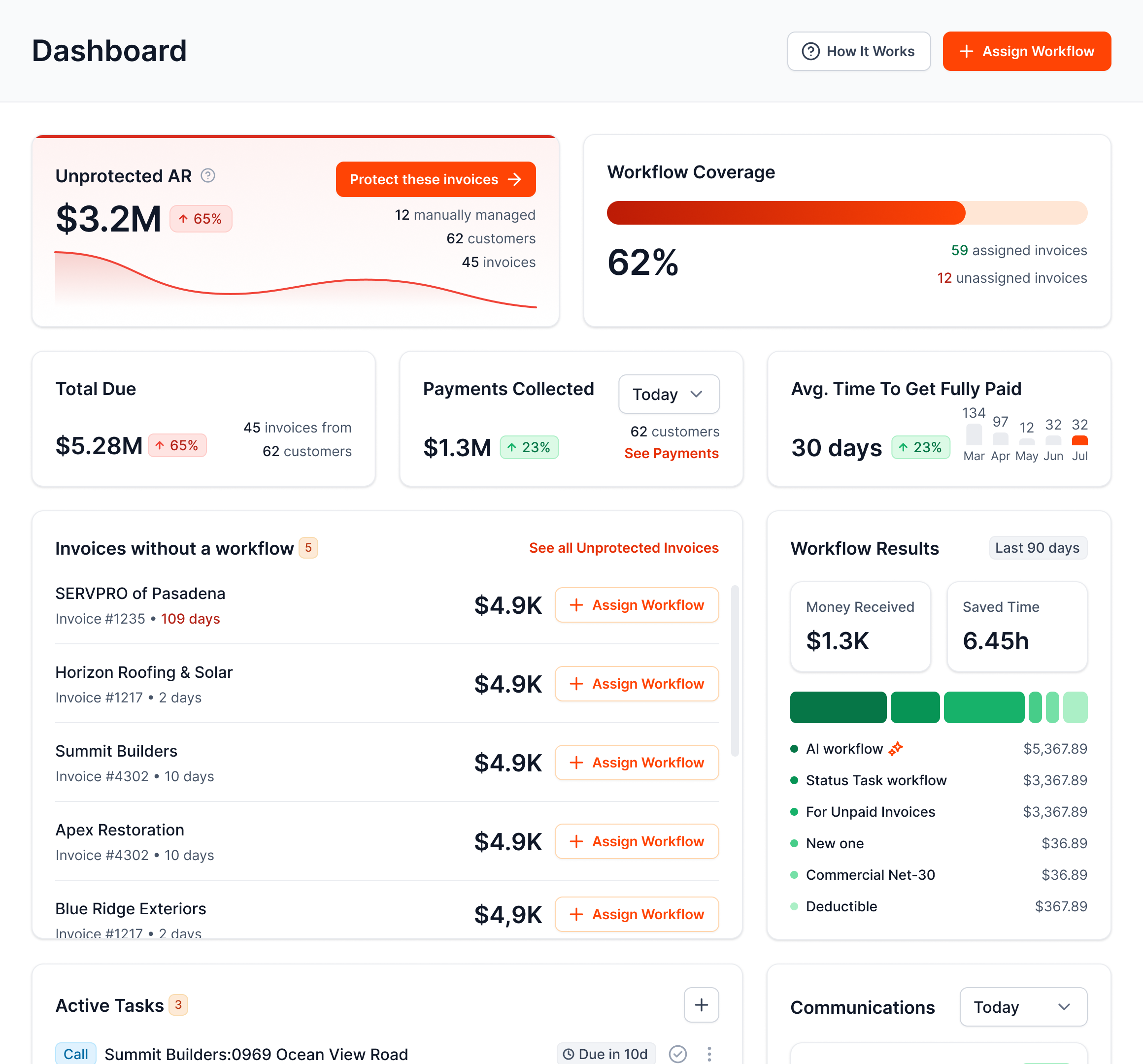

AR Workflow puts AI on the follow-up, so it never slips.
ONE ACCOUNTS RECEIVABLE PLATFORM
Every open invoice gets the same steady follow-up, on the rules you set.

INSIDE AR WORKFLOW
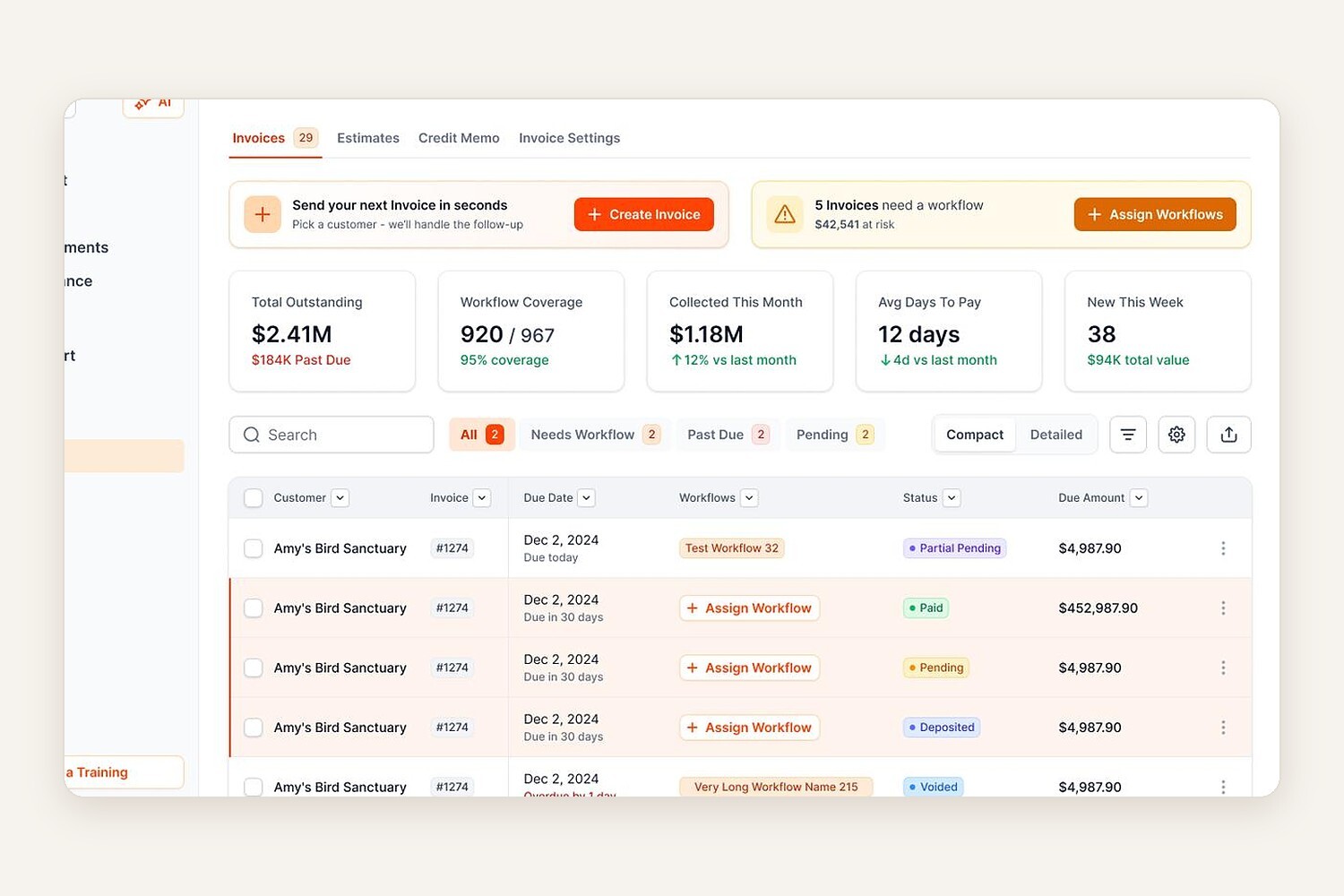
Filter by status, see what is past due and assign a workflow in a click.
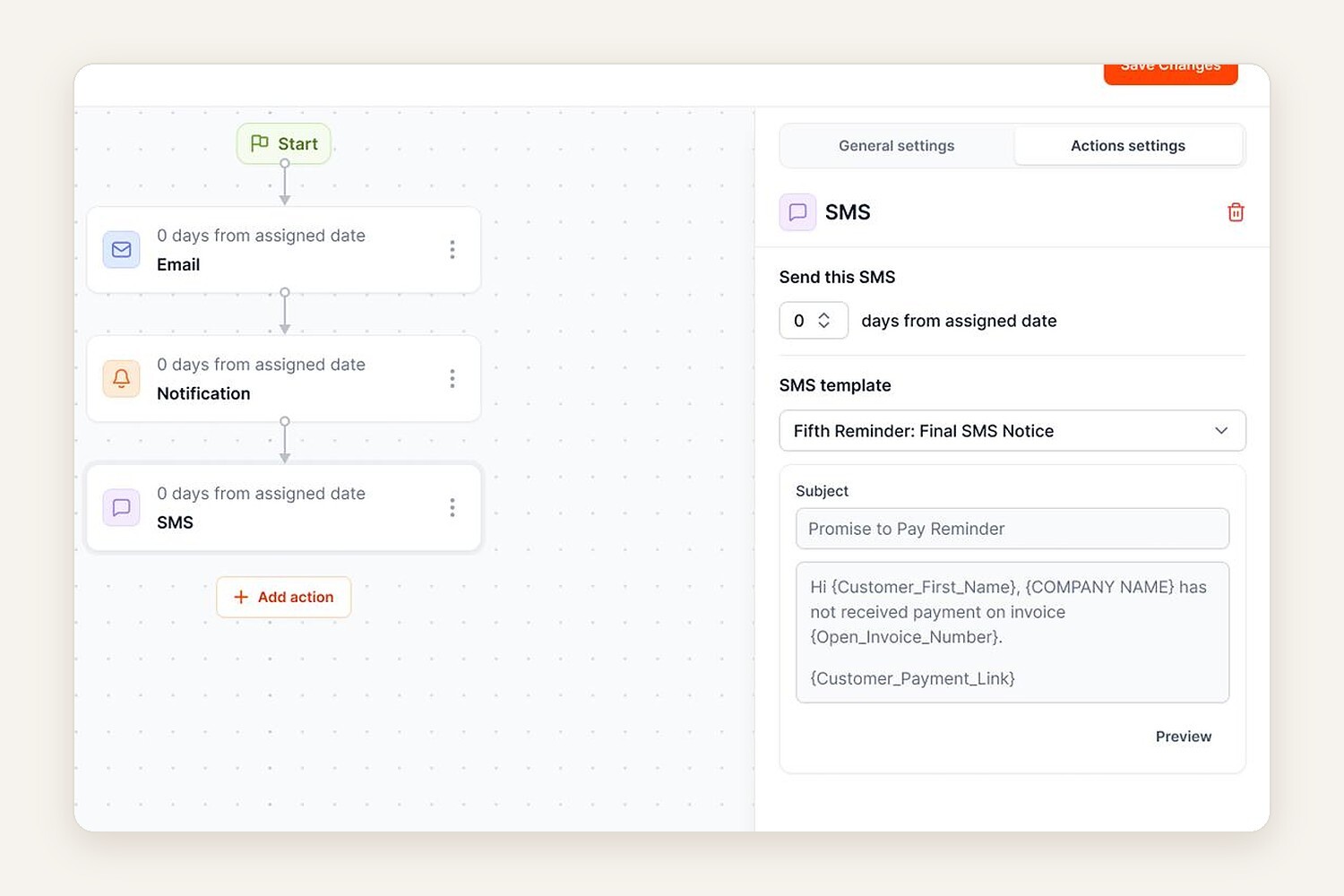
Pick the template and the timing. AI sends it from a dedicated number.
YOUR ACCOUNTS RECEIVABLE, ONE SCREEN

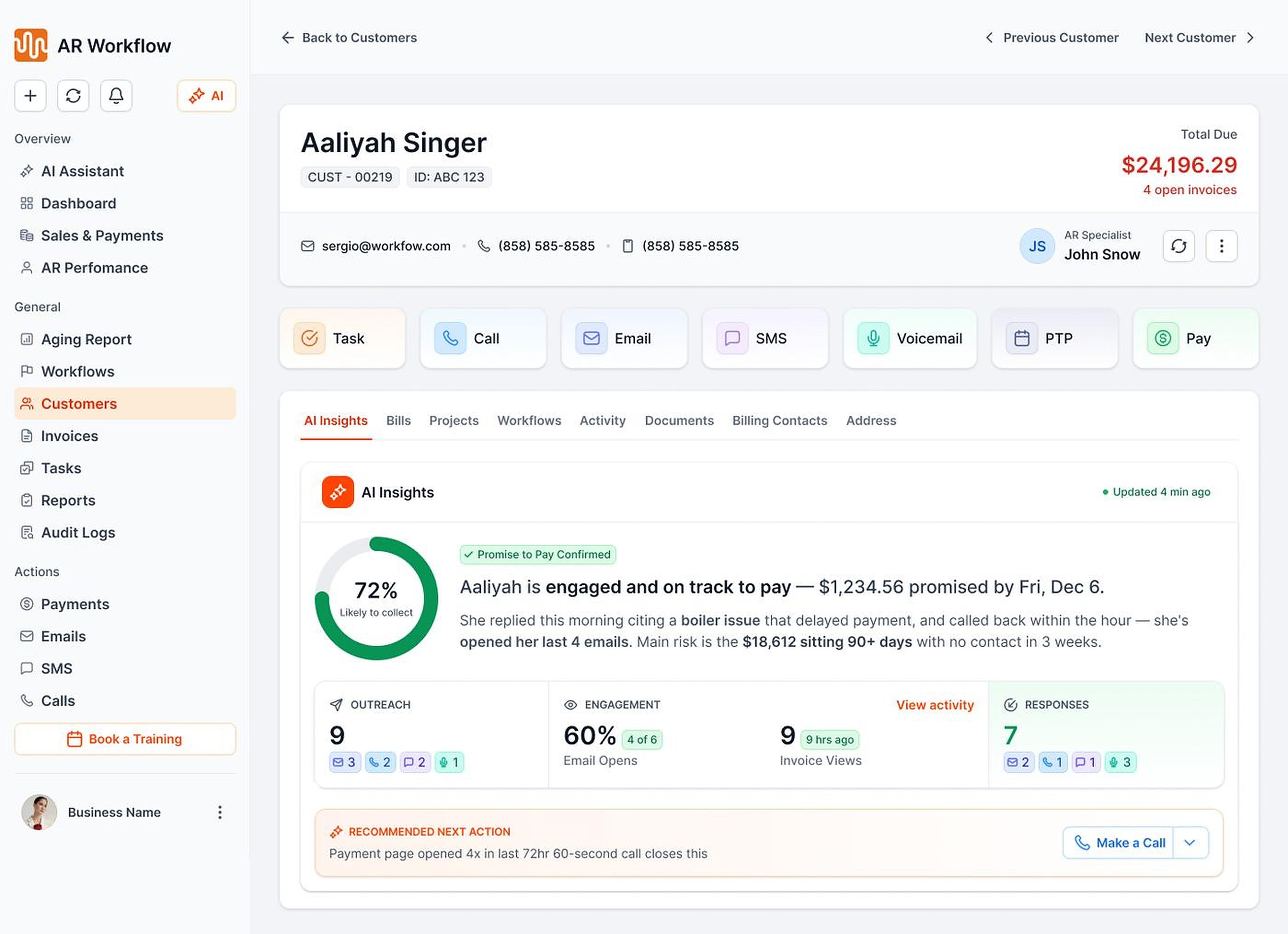
 ON SCHEDULE
Reminders going out
 Email, two-way text and ringless voicemailPayments post back to QuickBooksEvery touch logged
 NEEDS YOU
Example view. Your screen shows your own QuickBooks Online data.
WHY AR WORKFLOW
THE USUAL FIX
THE CATCH
One channel, one generic message. Easy to ignore.
THE USUAL FIX
THE CATCH
Takes a cut of money you earned, and can cost you the next job.
THE USUAL FIX
THE CATCH
Salary and training, and follow-up still depends on one person remembering.

 THE FIX
AR WORKFLOW
THE DIFFERENCE
Personalized follow-up by email, text, and voicemail, every day, with your team in control.
SIDE BY SIDE How the usual fixes compare |
 Reminder emails |
 Collection agency |
 Another AR hire |
RECOMMENDED |
|---|---|---|---|---|
| Email, text, and voicemail | Email only | Their channels | If they remember |  Yes |
| Personalized, not generic |
 No |
No
|
 Yes |
Yes |
| You keep every dollar you earned |
Yes
|
They take a cut | Plus a salary | Yes |
| Protects the next job |
Yes
|
No
|
Yes
|
Yes |
| Doesn’t depend on one person remembering |
Yes
|
Yes
|
No
|
Yes |
| Your team stays in control |
Yes
|
No
|
Yes
|
Yes |
Get a demo

| ||||


BUILT FOR CONTRACTORS
Small business payables and receivables look different in every trade. Follow-up should too.

Insurance claims, adjusters and homeowner deductibles, followed up in order.

Deposits, final invoices and insurance checks, chased until they clear.

A text with a payment link after every service call.

Service calls and project billing, each with its own follow-up.

Pay apps, retainage and change orders tracked through long payment cycles.

Painting, flooring and landscaping too. Deposits, progress payments and final invoices, on schedule.
YOU ARE IN CONTROL
Your company, your tone, your rules.
Start with one invoice and add more when you're ready

Choose the contacts, channels, tone, and frequency
Review AI-drafted replies before they're sent
Pause or stop any workflow at any time
 Pause
ON THE JOB

Homeowners get a friendly reminder with a card or ACH payment link the day the job closes.

Property managers, GCs and AP teams get polite, steady follow-up on longer terms, and every touch is logged.

YOUR INVOICE, NOT A FEATURE TOUR
No generic feature tour. You'll see:
YOUR OPEN INVOICE
Past due[YOUR BALANCE]
 Status requestEmail
 Second touchText
 Still openVoicemail
Payer can pay by card or ACH

Paid
Posted to QuickBooks
FAQ


Software that tracks and collects the money customers owe you. AR Workflow focuses on the collecting part: AI follows up on the invoices you already create in QuickBooks Online, by email, text and voicemail, until they are paid.
It handles the follow-up your office does by hand. Each part has its own page: automated payment reminders, ringless voicemail, contractor payments, QuickBooks collections, AR reporting and accounts receivable automation.
Contractors in every trade. See how it works for restoration, roofing, HVAC, plumbing, electrical, construction, general contractors, remodeling, painting, flooring and landscaping.
Software that sends payment reminders for you on a schedule, instead of someone in the office remembering. AR Workflow sends them by email, text and ringless voicemail, and pauses when a customer promises to pay.
No. It works on top of QuickBooks Online. Your books stay in QuickBooks, and payments post back automatically.
Yes. AI sends scheduled emails, texts and voicemails on the rules you set. Your team only steps in when a customer needs a real conversation.
AI drafts replies, and your team approves them before they are sent. You choose the tone for every message.
Yes. Every message can include a payment link, with partial payments and payment plans for bigger jobs.
An agency takes a cut and can cost you the next job. AR Workflow keeps follow-up friendly and in your name, and you keep every dollar.
Connect QuickBooks Online, choose your rules and start with one invoice. Most offices are running after one session.
Plans are $295, $395 and $495 a month. There is no free trial. Get a demo to see it on your own invoices.

AI writes the emails, sends the texts and leaves the voicemails for every open invoice. Your team handles the calls that need a person.
 Keep QuickBooksStart with one invoiceStay in control