Hiring a restoration billing company? See what billing services cover, how pricing works, in-house vs. outsourced costs, and a checklist for choosing well.

Most owners start looking for a restoration billing company when the billing work grows faster than the office can keep up. As a restoration company takes on more jobs, the billing work behind those jobs grows with it. Your team has more estimates to prepare, invoices to send, and insurance paperwork to manage.
Hiring more people isn't the only way to handle that workload. Restoration company billing services can take specific billing tasks off your team's plate. An outside billing company might prepare invoices or manage insurance billing, while software can help with parts of the process you want to keep in-house.
So which option makes sense for your company? That depends on where you need help and how much of the process you want someone else to handle.
KEY TAKEAWAYS
A restoration billing service handles billing work that your company would otherwise manage internally. That can mean preparing an estimate or invoice, managing insurance billing, or helping with unpaid accounts. If most of your work runs through carriers, our guide to insurance claim billing services goes deeper on the claims side.
The exact scope, however, depends on the provider. Before comparing services, it helps to know which parts of your current process you especially need help with. Here are some of the things a restoration billing service can help you with.
Estimates document the expected scope and cost of a restoration job before the final bill is issued. Once the work is completed, the invoice needs to reflect what was actually performed and what the customer or other payer owes.
Preparing those documents requires information from the job itself. The person handling the billing may need to review the scope of work and supporting job documentation before organizing the charges into an estimate or final invoice.
A restoration billing service can take on some or all of that work. Depending on the provider, they may prepare estimates, create invoices from completed job records, or work within the estimating and pricing systems your company already uses.
Having outside support here can help prevent completed jobs from sitting in a billing backlog when the internal team doesn't have enough time to prepare each file.
When insurance is involved in a restoration job, the billing information may also need to be submitted to the carrier for review as part of the claim.
That process can require the restoration company to provide documentation supporting the work and charges being billed. The insurance company or adjuster may also have questions that require answers before the claim can move forward.
Insurance billing support helps manage this part of the process. Depending on the provider, that may include preparing claim documentation, submitting billing documents, or communicating with insurance adjusters about billing questions.
The exact level of involvement varies between services. Restoration companies should check which parts of the insurance billing process a provider will manage and which parts will remain with their own team.
The original estimate doesn't always account for everything required on a restoration job. Once work begins, additional damage may be uncovered, or the scope may change.
When completed work goes beyond what the original estimate included, those additional charges need to be documented. A supplement requests payment for work or costs not included in the original estimate.
A billing service may help prepare that supplement and gather the information needed to support the additional charges. It may also update the billing documents so the final amount reflects the work that was actually completed.
This support can reduce the amount of time the internal team spends preparing billing adjustments while helping ensure additional work doesn't get left out of the amount being billed.
Once an invoice has been sent, any amount that hasn't been paid becomes part of the company's accounts receivable (AR).
Managing accounts receivable means keeping track of which invoices are still outstanding and what has happened since they were sent. As balances age, the company may also need to contact the customer or other payer and continue following up until payment is resolved.
Some restoration billing services extend their support into this part of the process. Depending on what their service includes, they may track payment status or contact clients and other payers about outstanding invoices.
Other providers stop once the billing documents are prepared or submitted. If unpaid invoices are where your team needs the most help, check whether the service actually includes accounts receivable support rather than assuming it is part of billing.
Outsourced billing services earn their fee when the bottleneck is clearly on the billing side. Watch for these signs:
If invoices go out on time but sit unpaid, that's a collections problem rather than a billing one, and the fix looks different. We cover that below.
If you're looking for help managing restoration billing, you have several options. Here is how they compare at a glance.
| Option | Best when | Tradeoff |
|---|---|---|
| Internal billing team | You want direct control and staff who know your jobs | Salary, training and coverage costs |
| Outsourced billing service | You need extra capacity or insurance billing expertise | Scope varies by provider; check what is included |
| Software for your existing team | Your team can bill, but repetitive work eats their time | Judgment calls still need a person |
| Combined approach | One solution doesn't fit every part of your process | More moving parts to coordinate |
One option is to build an internal billing team. This means hiring employees specifically responsible for managing billing within your company.
Keeping the work in-house gives your team direct control over how you handle billing. Internal billing employees can also become familiar with your company's jobs and processes because they work with them every day.
The tradeoff is the cost and additional overhead that come with adding employees. Along with salary, you'll need to consider training and how you'll cover the work when someone is unavailable or job volume increases.
If you don't want to add more billing employees, you can hire an outside company to handle some or all of the work instead.
An outsourced billing service may prepare invoices, manage insurance billing, or help with supplements, depending on the provider and the support you pay for. This gives your company extra billing capacity without hiring another full-time employee.
Before choosing a provider, focus on which parts of the process you want them to handle. That makes it easier to compare services based on the work your company actually needs help with.
If you want to keep billing in-house, another option is to use software to help your existing team manage the work.
This makes sense if your team can handle the billing itself but wants to improve efficiency by reducing work that doesn't always need to be done manually. For example, employees may spend hours checking which invoices are still unpaid or sending payment reminders one at a time.
If outstanding invoices are where that workload starts to build up, AR Workflow can help. It gives restoration companies a structured way to track outstanding receivables and automate routine collection follow-ups through email and SMS reminders sent from a dedicated number. Most contractor billing software stops once the invoice is created; AR Workflow focuses on what happens after it goes out.
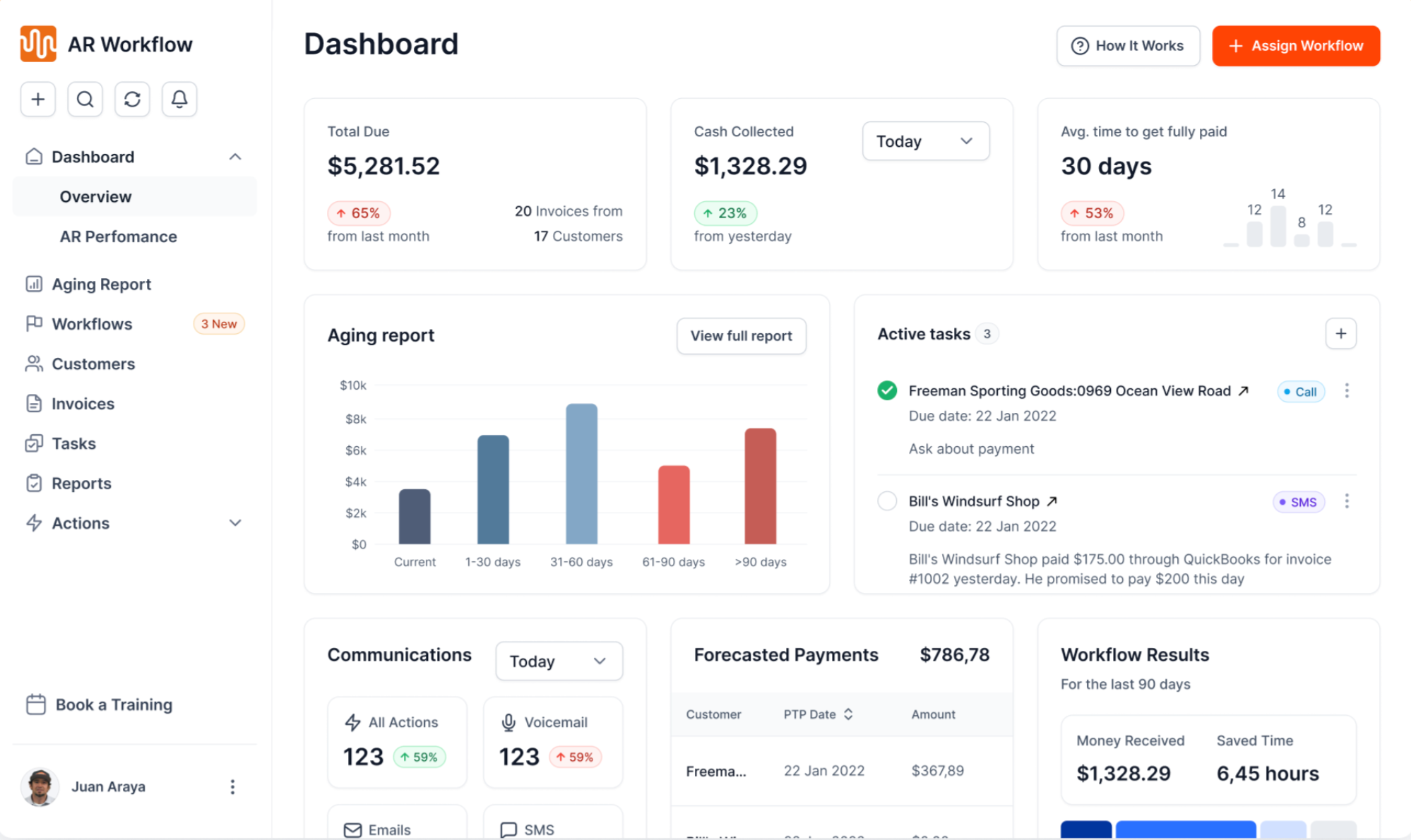
The AR Workflow dashboard shows outstanding receivables at a glance.
Your team still manages the customer relationships and situations that need their attention. The software just takes repetitive collection work off their plate so they can spend more time and energy on accounts that actually require a person to step in.
Bring one overdue invoice.
We'll show you how your team can spend less time manually managing outstanding invoices.
You also don't have to choose only one of these approaches. Your company can keep certain billing responsibilities in-house while getting outside help with the parts that require more time or specialized expertise.
For example, your team may handle routine billing while an outside service helps with insurance-related work or periods when billing volume increases. Software can then support the work that remains with your internal team.
This gives you more flexibility when one solution doesn't make sense for every part of your billing process.
How much you spend on restoration billing support will depend on which of these options you choose and how much help your company needs.
Building an internal billing team means taking on the salary and employment costs that come with adding staff. If you outsource the work instead, the provider may charge based on the services they handle, your job volume, or the terms of your agreement.
| Model | How you pay | Works best for | Watch for |
|---|---|---|---|
| Percentage | A share of the invoice total or amount collected | Uneven volume, full-service billing | Large losses get expensive fast |
| Per file | A flat or tiered fee per estimate or invoice | Estimate writing only | Extra fees for supplements and revisions |
| Retainer | A fixed monthly fee for a set scope | Steady, predictable volume | Volume caps and minimum terms |
| In-house biller | Salary, benefits, software licenses and training | High, steady volume | Coverage gaps when that person is out |
Quotes from different providers rarely line up, so build your own comparison. Pull your last three to six months of jobs and run them through each option:
For example, a percentage model can look cheap on a run of small mitigation jobs and costly once a large fire loss comes through. A per-file model can be the reverse. Running your own mix of jobs shows which one fits.
Paying for software that helps your existing team manage outstanding invoices is a different investment from hiring another employee or paying a service to take over billing work for you. AR Workflow, for example, is $295, $395 or $495 per month depending on the plan; see pricing for what each plan includes.
So when comparing your options, look at the part of the process you're paying to improve and the benefits that option provides your team. That gives you a better idea of whether the value that option provides can justify the cost for your company.
Now that you have a better idea of the billing support available, you can start narrowing down which option makes sense for your company. Here's how to do that.
One of the first things to look at is where your billing process is actually slowing down. This helps you identify which part of the work needs support before you decide how to address it.
For example, if restoration work is finished but invoices aren't going out quickly because the office team has a backlog, your company may need more billing capacity.
If invoices are already going out on time but customers or other payers aren't paying them quickly, your team needs help with a different part of the process. Your AR aging report will show you which of these is happening.
In that case, improving how you manage outstanding invoices and collections would address the problem more directly than adding more help with invoice preparation.
Once you've identified where the slowdown is happening, it also helps to understand what's causing it. In particular, consider whether your team needs more capacity or knowledge it doesn't currently have.
Your employees may already know how to handle the work but simply have too much of it. If so, adding capacity may make more sense.
If they have enough time but regularly need help with insurance billing or another specialized part of the process, your company may need additional expertise.
Knowing the problem makes it easier to choose support that addresses it.
Another area worth looking at is how much of your team's time goes into work they have to repeat manually.
Checking invoice statuses or sending the same types of payment reminders week after week can take up time even when those tasks don't require a new decision each time. If a significant amount of the workload falls into that category, software may be able to handle part of it for your team.
Tasks that require judgment, however, will still need a person. The point is to identify the repetitive work that doesn't, so you can decide whether hiring someone to do more of it is really the best option.
It's also worth considering how your company handles an invoice after it has been sent, especially if unpaid invoices are already taking up a lot of your team's time.
If an invoice remains unpaid, someone still needs to know when you last contacted the payer and what happens next. Your team needs a way to keep that process moving until the balance is resolved. Our guide to building a restoration collections process lays out that structure.
If you already have an established process for managing that work, additional AR support may not be necessary.
But if those details are scattered between spreadsheets and inboxes or depend on someone remembering what to do, improving collections may be more important than changing how you prepare invoices.
Tip: On insurance jobs, split follow-up by payer. The adjuster gets documentation and status requests, and the homeowner gets payment reminders for their share. Never send a payment link to an adjuster or carrier.
If you decide to outsource, a clean handoff prevents the first month from turning into a mess of duplicate work and lost files.
| 1 | Write down the scope. List exactly which tasks move to the provider and which stay with your team, including who answers homeowner calls. |
| 2 | Standardize the job file. Agree on the photos, moisture and equipment logs, scope notes and signed forms every file must include before it goes over. |
| 3 | Start with new jobs only. Keep files already in progress in-house so nothing falls between two teams. |
| 4 | Set a weekly status review. Walk through every open file: submitted, under review, supplemented, approved, paid. |
| 5 | Decide who owns the unpaid balance. Once a claim is approved, someone has to follow up until the money lands. Name that person or system before the first invoice ages. |
A restoration company can prepare estimates and send invoices on time and still have a significant amount of revenue sitting in accounts receivable. At that point, improving the billing side alone won't necessarily help the company collect that money any sooner.
This is especially important given that cash flow is an existing issue already putting pressure on restoration contractors.
Cleanfax's 2026 Restoration Benchmarking Survey found that cash flow received a 4.36 weighted average as a concern among industry respondents, which shows it remains one of the top concerns among restoration industry businesses.
Not every payment delay is something your team can prevent. Insurance processing can take time, and a dispute or missing documentation may hold up a payment. What your company can improve is how consistently it manages those invoices while they're still outstanding.
That could mean making sure payment reminders go out when they should and giving employees a clear view of which accounts still need attention. When a balance is already late, our guide to collecting unpaid invoices covers what to say.
AR Workflow helps restoration companies manage that work by automating routine email and SMS follow-ups while keeping outstanding receivables and payment activity in one place.
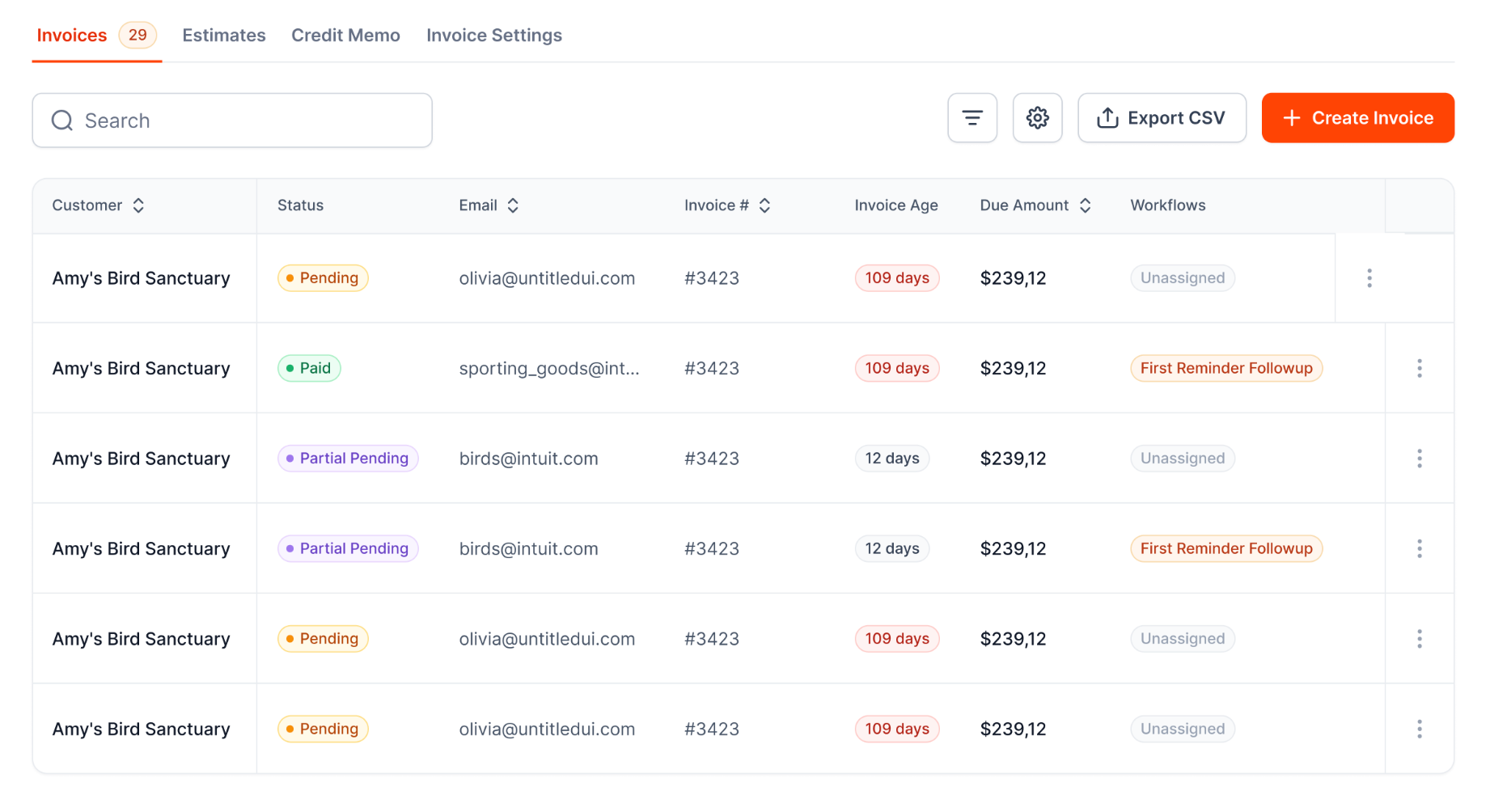
Open invoices and their follow-up status live in one list.
Your team can then spend less time checking spreadsheets or relying on individual reminders, reducing the risk of unpaid accounts slipping through the cracks.
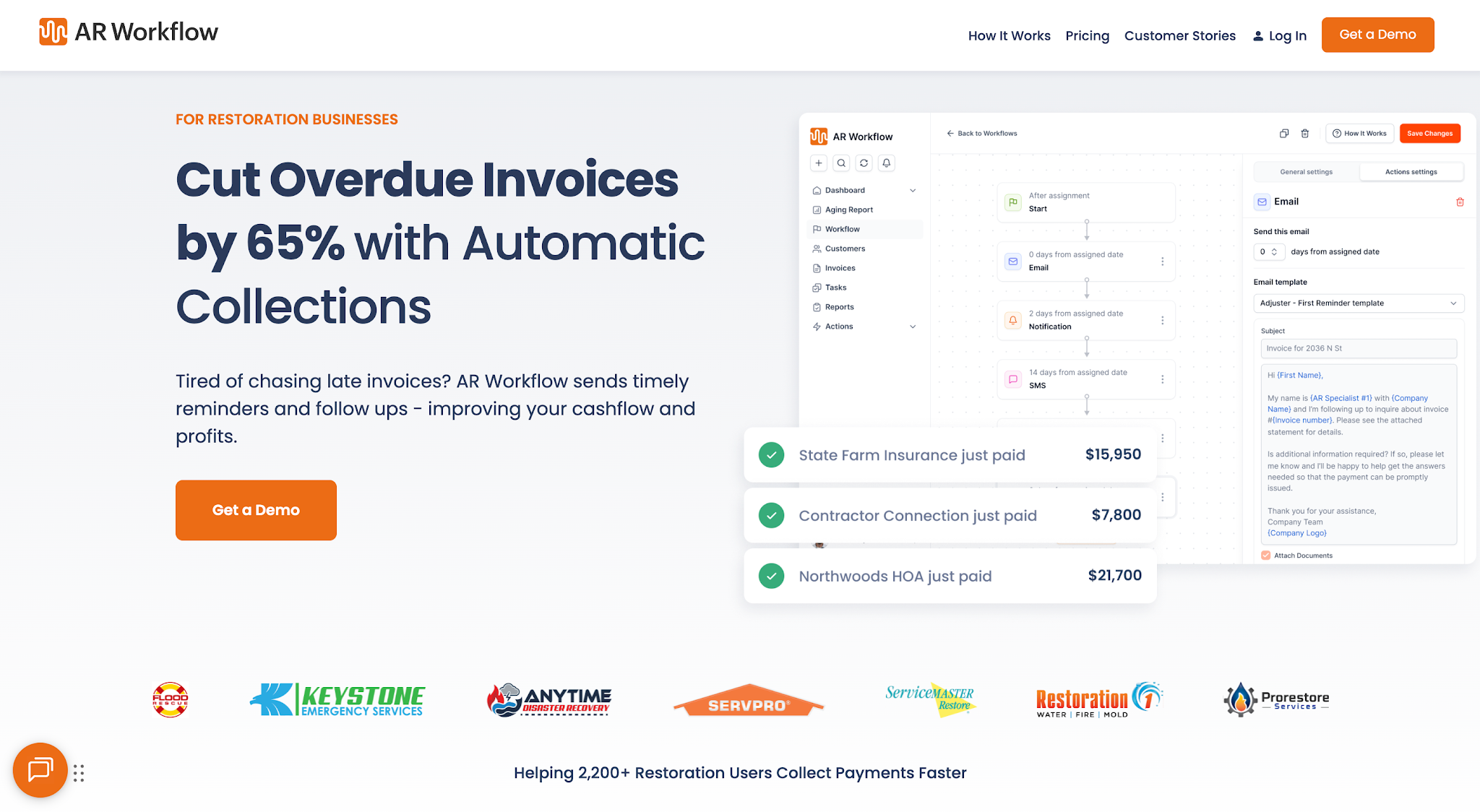
AR Workflow connects to QuickBooks Online and runs routine collection follow-up.
The right billing support should solve the part of your process that's putting stress on your team or business. So, if your team's bigger issue starts after invoices go out, an automated platform like AR Workflow is where your attention should be.
AR Workflow reduces the manual work of managing outstanding invoices, so your team can keep collections moving without spending as much time checking accounts and sending routine reminders.
After all, if cash flow is still an existing problem you're trying to improve, the support you choose should help your team spend less time managing the work behind collections and more time getting the revenue you've already earned back into the business.
Pricing depends on the provider and the scope of work. Outsourced restoration billing services usually quote based on the services they handle, your job volume and the terms of the agreement, so get quotes for the same scope. An in-house biller adds salary and overhead, while AR Workflow software is $295, $395 or $495 per month.
Common billing challenges in the restoration industry include changes to the original scope of work, insurance-related billing requirements, and unpaid invoices that require continued follow-up.
These issues can create more work for the internal team and delay how quickly completed restoration jobs turn into collected revenue.
It can be, especially if you run a handful of insurance jobs a month and nobody in the office has Xactimate experience. A per-file arrangement for estimates keeps costs tied to volume. Once volume is steady, compare that spend with a part-time in-house biller.
Outsourcing can make sense when claim volume, adjuster follow-ups, and billing administration are taking too much time from your internal team. Keeping billing in-house may work better if you already have experienced staff with enough capacity to manage claims and consistently follow up on unpaid invoices.
A supplement requests payment for work or costs that were not included in the original estimate, such as additional damage uncovered once work begins. It needs documentation that supports the added charges so the insurer can review them.
Related reading
Your invoice, not a feature tour.
Bring one overdue invoice to a demo and see what AR Workflow would send, when, and how your customer would pay.
Sam owned and ran three restoration companies for more than 14 years and collected over $100 million in receivables. He built AR Workflow in 2020 to give contractors the collections system he wished he'd had.

AI writes the emails, sends the texts, and leaves the voicemails. Your team handles the conversations that matter, and your cash keeps moving.
 Keep QuickBooksStart with one invoiceStay in control

 Log in