An accounts receivable aging report shows how long each invoice has gone unpaid. See an A/R aging report example, a free template and the aging method.

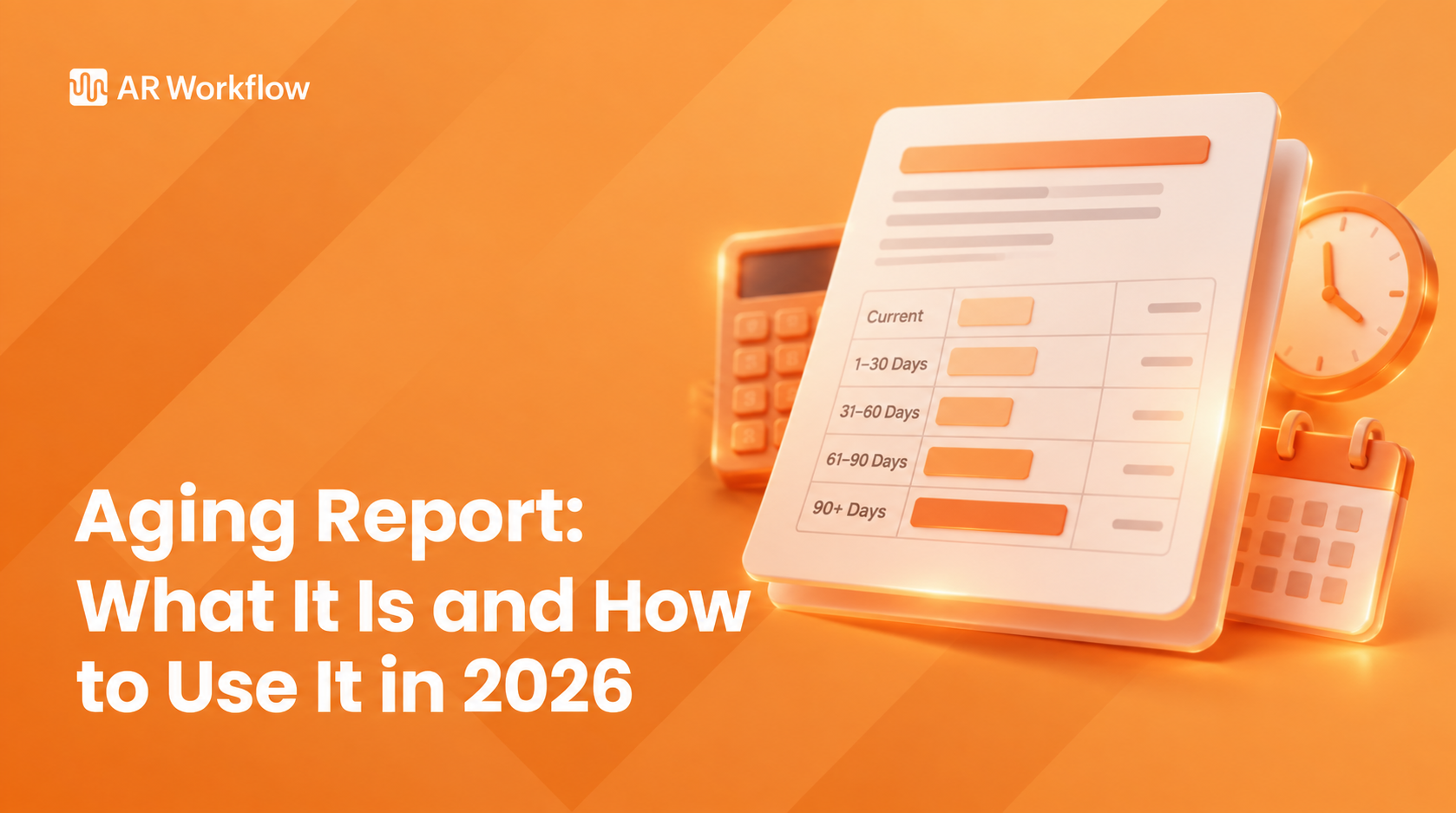
An accounts receivable aging report shows how long every unpaid invoice has been outstanding, sorted into aging buckets like current, 1 to 30, 31 to 60, 61 to 90 and 90+ days. If you run a restoration, roofing or trade business, you already know how easily unpaid customer invoices pile up. The AR aging report is the fastest way to see which ones need attention before they become a cash flow problem.
Your team already has plenty to manage, so tracking how long each balance has been sitting can easily slip. Once you know how to read an aging report, though, you get a clear picture of where your accounts receivable (AR) stands and which balances need a closer look.
This guide covers what the report is, how the buckets work, what a sample report looks like, how to read it step by step, how to build one yourself or run it in QuickBooks, and what to do with what it tells you.
KEY TAKEAWAYS
An accounts receivable aging report is a financial document that organizes outstanding customer invoices according to how long they have remained unpaid. You will also see it called an AR aging report, an aged receivables report or an accounts receivable aging schedule. They all describe the same thing.
Rather than showing accounts receivable as one total balance, the report separates that money into aging periods.
Suppose a restoration company has $600,000 in accounts receivable. That figure tells the company how much customers and other payers still owe, but it doesn't tell the finance team whether most of that money was recently invoiced or has already been outstanding for months.
An aging report fills in that missing information. If $140,000 has reached the 61 to 90 day range and another $90,000 has passed 90 days, the team now knows that a meaningful portion of its outstanding AR has been sitting unpaid much longer than the rest.
The report doesn't explain why those invoices remain unpaid, but it helps the team identify late-paying customers and other payer accounts that need a closer look to protect the company's financial stability.
Most accounting systems offer two versions of the AR aging report:
A good weekly habit is to start with the summary and drop into the detail only for the customers whose older buckets are growing.
Aged receivables are customer balances grouped by how long they have been outstanding. The term describes the money itself, while the aging report is the document that lays it out. When an accountant, lender or bonding agent asks for your aged receivables, they want to see your open invoices broken out by age, not just one AR total.
The distinction matters because two companies with the same AR balance can be in very different shape. One may have most of its aged receivables in the current and 1 to 30 day columns. The other may have the same dollars sitting past 90 days. Lenders and sureties often look at that split because older receivables are less likely to turn into cash on schedule.
For contractors, aged receivables also show where work is stuck outside your own office: a carrier supplement, a GC holding a pay application, a homeowner waiting on a mortgage company to endorse a check. If you keep your books in QuickBooks, our guide to construction bookkeeping software and a weekly routine shows where the aging review fits in the rest of your close.
Aging buckets group invoices by how long they've been past due, rather than by the original invoice date. This makes it easier to distinguish newer receivables from balances that have remained unpaid longer. (Some systems let you age by invoice date instead; check which setting your report uses before comparing it with last month's.)
Those differences are worth watching because late invoices don't necessarily get resolved within a few days.
According to Billbooks' analysis of 8,483 paid invoices from 112 small businesses, one in four late-paid invoices was at least 28 days overdue before payment arrived.
While the study isn't specific to restoration companies and shouldn't be treated as a benchmark for restoration payment timelines, it shows how long an unpaid invoice can remain outstanding. The longer those invoices sit unpaid, the more money stays tied up in accounts receivable instead of coming back into the business.
Here's how common aging buckets work.
| Bucket | What it contains | What to check |
|---|---|---|
| Current | Issued, not yet due | Share of total AR that is not late yet |
| 1 to 30 days | Recently past due | Any payer communication or follow-up since the due date |
| 31 to 60 days | More than a month late | Insurance, documentation or missed follow-up |
| 61 to 90 days | Two to three months late | Whether the bucket keeps growing between reviews |
| 90+ days | More than three months late | Why each balance is there and what will get it paid |
The current bucket contains invoices that have been issued but haven't reached their payment due date. The company is still waiting on these payments, but they aren't late yet.
This distinction matters when you look at the total AR balance. A company with most of its receivables in the current bucket is in a very different position from one with a large share already 60 or 90 days overdue. As each invoice passes its due date without payment, it moves into the first overdue bucket.
The 1 to 30 day bucket contains invoices that have recently passed the due dates set by their payment terms.
At this point, age alone doesn't tell you much about why payment hasn't arrived. A payer may already be processing the invoice, or the account may need attention from whoever manages collections.
The next step is to look at the account itself. Has the payer communicated anything? Is there an open question about the invoice? Has anyone followed up since it became due? Those details explain what the aging number cannot.
Once an invoice moves into the 31 to 60 day bucket, it has been unpaid for more than a month past its due date, and the history behind the balance becomes more important.
A restoration invoice could still be waiting on an insurance-related payment. Another could have a documentation question that needs to be resolved, while a different account may simply have gone longer than intended without another collection attempt.
The aging report won't distinguish between those situations. It places them in the same bucket because they have been outstanding for a similar amount of time, which is why this bucket should prompt a closer look rather than an assumption about what went wrong.
The 61 to 90 day bucket shows overdue receivables that have remained unpaid for two to three months.
If only a small portion of AR sits here, you may be dealing with a handful of specific overdue accounts. If the balance keeps growing from one reporting period to the next, there may be a broader issue in your billing or follow-up process worth investigating.
The real question isn't how much money is 61 to 90 days overdue. It's which invoices make up that balance and what has happened with each one since it became outstanding.
The 90+ bucket contains invoices that have remained unpaid for more than three months past their due dates.
These balances deserve a closer look because they've already spent considerable time in accounts receivable and are the ones finance teams and credit managers use to estimate potential bad debt. However, they shouldn't automatically be treated as doubtful accounts based on age alone.
Restoration payments can involve circumstances outside the contractor's direct control. Insurance processing can take time. A dispute may remain unresolved, or another party may still need to provide information before payment can move forward.
So the 90+ bucket tells you where the oldest money is. It doesn't tell you why each balance is there or what will get it paid.
The exact layout varies depending on the accounting system generating the report, but most AR aging reports follow the same structure. Each customer appears alongside the amount currently owed, and that balance is divided between aging buckets based on the due dates of the invoices behind it.
A simplified report might look like this:
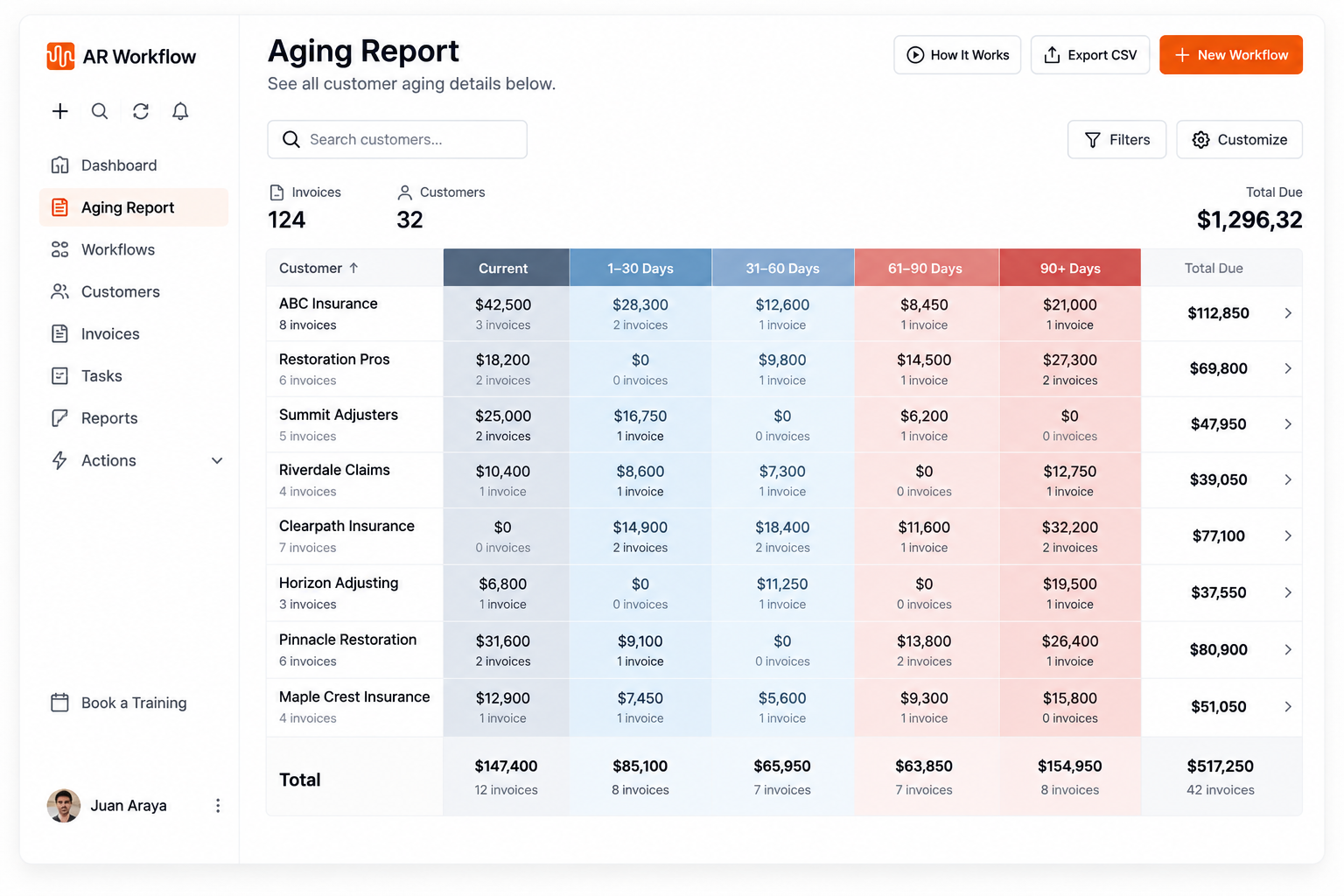
A simplified AR aging report: totals by customer, split across aging buckets.
The total column shows each customer's full outstanding balance, while the aging columns show where those amounts sit based on how long they have remained unpaid. Here is the same idea as a table you can copy, using an illustrative restoration company:
| Customer | Current | 1 to 30 | 31 to 60 | 61 to 90 | 90+ | Total |
|---|---|---|---|---|---|---|
| Homeowner A (water loss) | $18,000 | $0 | $0 | $0 | $0 | $18,000 |
| Property manager B | $6,500 | $9,200 | $4,300 | $0 | $0 | $20,000 |
| Homeowner C (fire loss) | $0 | $0 | $0 | $12,400 | $21,600 | $34,000 |
| Total | $24,500 | $9,200 | $4,300 | $12,400 | $21,600 | $72,000 |
Even in this small example, the story is obvious: almost half the balance ($34,000 of $72,000) sits with one customer, and all of it is more than 60 days past due. That is the account to work first.
The summary above tells you Homeowner C is the account to work. The aging detail tells you which invoices to work. Here is the same customer as an A/R aging report example in detail form, run as of November 4:
| Invoice # | Invoice date | Due date | Days past due | Bucket | Open balance |
|---|---|---|---|---|---|
| 1041 | Jun 2 | Jul 2 | 125 | 90+ | $21,600 |
| 1067 | Jul 14 | Aug 13 | 83 | 61 to 90 | $8,900 |
| 1072 | Jul 28 | Aug 27 | 69 | 61 to 90 | $3,500 |
| Total | $34,000 |
Now the picture is sharper. One invoice, #1041, is more than 120 days past due and makes up most of the 90+ balance. The two newer invoices are supplements on the same claim. A single call about the mortgage company endorsement on the first check may move all three, which is something the summary alone would never show you.
Bring one overdue invoice.
Pick one from your 61 to 90 day bucket and we'll show you how AR Workflow would move it toward payment.
Reading the report well is what turns aging analysis into decisions about where to spend your collection time.
| 1 | Look at your total outstanding AR |
| 2 | See where your AR is concentrated |
| 3 | Identify large older balances |
| 4 | Look for invoices moving into older aging buckets |
Start with the total accounts receivable balance at the bottom of the report. This tells you how much money is still outstanding at the moment you run it.
Use the total as a reference point for the buckets beside it. For example, $100,000 sitting beyond 60 days looks very different if your total AR is $150,000 than if it's $1 million. In the first case, most of the money you're waiting on is already more than 60 days overdue. In the second, it is a much smaller share of the overall balance.
Next, look at how that money is divided between the aging buckets. A simple way to do this is to calculate each bucket as a percentage of total AR.
If most of your AR sits in the current or 1 to 30 day columns, much of your outstanding balance is either not yet due or only recently overdue. If a large portion sits in the 61 to 90 or 90+ columns, more of the money you're waiting for has been outstanding for a long time. That also gives you context for credit risk when certain customers repeatedly appear in older buckets.
Compare the buckets with each other, too. If your 90+ balance is noticeably larger than your 31 to 60 or 61 to 90 balance, find out which invoices are feeding it.
Now move down to the individual accounts and invoices behind the older balances. A large 90+ day bucket doesn't tell you whether that money comes from one major invoice or several smaller ones.
Suppose your report shows $90,000 in the 90+ day bucket. If $70,000 comes from one invoice, that single account represents most of the money sitting in that range.
Look into why that invoice remains unpaid. Check what your team already knows about the account, including payment history, whether the payer has raised an issue, and what collection activity has already taken place. At this point, you're using the report to prioritize collections around the specific invoices that need attention.
Once you understand what the report looks like today, compare it with previous aging reports to see how your receivables are changing.
If an invoice sat in the 1 to 30 day bucket at your last review and now appears in 31 to 60 days, another review period has passed without payment. If it reaches 61 to 90 days, the same balance has kept getting older.
Looking at the report this way shows you payment patterns developing over time, which helps you assess credit risk and decide whether to adjust credit terms for consistently late-paying customers. You can see which balances are getting older and which ones are being cleared, instead of judging your receivables from one snapshot.
Tip: Save a copy of the report each week. Putting two weeks side by side is the fastest way to spot invoices that slid into an older bucket with no follow-up in between.
Your accounting software will build the report for you, but it helps to know how it works, especially if you track some jobs outside your main system or want an aging report template in a spreadsheet.
If you want to build your own, set up a spreadsheet with two tabs. This AR aging report template works in Excel or Google Sheets:
AGING REPORT TEMPLATE
Columns for the detail tab: Customer | Job or claim number | Invoice # | Invoice date | Due date | Open balance | Days past due | Bucket | Payer (homeowner, carrier, GC, property manager) | Last contact | Next step
Summary tab: one row per customer, one column per bucket, a total column, and a bottom row showing each bucket as a percentage of total AR.
The two extra columns that most generic templates leave out, payer and next step, are the ones that make the report useful for contractors. They tell you who actually has to act before the invoice can be paid.
For the bucket column, a formula like this works if days past due is in column G: =IFS(G2<=0,"Current",G2<=30,"1 to 30",G2<=60,"31 to 60",G2<=90,"61 to 90",TRUE,"90+"). Days past due itself is the as-of date minus the due date, for example =$B$1-E2 with the as-of date in cell B1.
If your invoices live in QuickBooks, you don't need to build the report by hand. Menu names can change between versions, but the reports are standard:
Either version can be exported to a spreadsheet if you want to add the payer and next-step columns from the template above. The harder part is acting on the report every week. Our QuickBooks accounts receivable automation guide covers how to turn the aging list into scheduled follow-up, our overview of accounts receivable workflow software explains how that follow-up gets organized, and AR Workflow's QuickBooks collections page shows how that works with a QuickBooks sync.
An aging report is also the raw material for a few numbers worth tracking month to month.
| Metric | How to calculate it | Why it matters |
|---|---|---|
| % of AR over 60 days | (61 to 90 + 90+) divided by total AR | The simplest single read on how old your receivables are |
| Days sales outstanding (DSO) | (Ending AR divided by credit sales for the period) times days in the period | Average time it takes to turn an invoice into cash |
| Top 10 concentration | Balance owed by your 10 largest accounts divided by total AR | Shows how exposed you are to a few slow payers |
| Allowance for doubtful accounts | Each bucket times an estimated uncollectible percentage, added together | The aging method many accountants use to estimate bad debt |
Ask your accountant which percentages to use for the allowance. They depend on your own collection history, not on a generic rule. For more on building a reporting view around these numbers, see AR reporting software.
The aging of accounts receivable method is how accountants use an aging report to estimate bad debt. Instead of applying one percentage to all receivables, it applies a higher estimated loss rate to older buckets, since older balances are less likely to be collected. The total becomes the allowance for doubtful accounts on the balance sheet.
The steps are simple:
Using the illustrative restoration company from the example above, with made-up percentages for teaching only:
| Bucket | Balance | Estimated uncollectible % | Allowance |
|---|---|---|---|
| Current | $24,500 | 1% | $245 |
| 1 to 30 | $9,200 | 3% | $276 |
| 31 to 60 | $4,300 | 8% | $344 |
| 61 to 90 | $12,400 | 15% | $1,860 |
| 90+ | $21,600 | 35% | $7,560 |
| Total | $72,000 | $10,285 |
The percentages above are placeholders, not a benchmark. Your accountant should set them from your own collection history, and accounting rules for credit loss estimates differ by company size and reporting framework. The useful takeaway for an owner is that the 90+ bucket drives most of the estimated loss, so moving even a few of those invoices toward payment has the largest effect on both cash and the books.
The buckets are the same everywhere, but what drives an invoice into them differs by trade.
No single schedule works for every company, but reviewing the aging report at least once a week is a practical starting point for any team actively managing receivables.
A weekly review shows which overdue invoices are getting older and which balances have kept aging since the previous review. Teams relying on manual aging reports also need to be deliberate about how often those reports are updated, especially if collection activity happens throughout the week.
Choose a schedule that matches how quickly your AR changes. If invoices become overdue or move into older buckets between reviews without anyone noticing, you're waiting too long between checks. Waiting until cash feels tight makes the report reactive. By then, an unpaid balance may have been sitting for weeks without attention.
An aging report gives you a snapshot of unpaid invoices based on how long they've been outstanding. What it doesn't give you is the context behind each balance.
Seeing a $40,000 invoice in the 61 to 90 day bucket tells you how old it is. It doesn't tell you whether your team contacted the payer last week, whether the payer promised a payment date, or whether an issue is still holding up payment. It also doesn't tell you what to do next.
This is where the aging report and your collections process need to work together. The report identifies the invoices that need attention, and your collections process decides the next step to keep each one moving toward payment.
AR Workflow is built around that next part of the process. It helps restoration companies and other contractors manage collection efforts around outstanding invoices once they've identified which receivables need attention. Teams use custom collection workflows to organize what should happen as invoices remain unpaid.
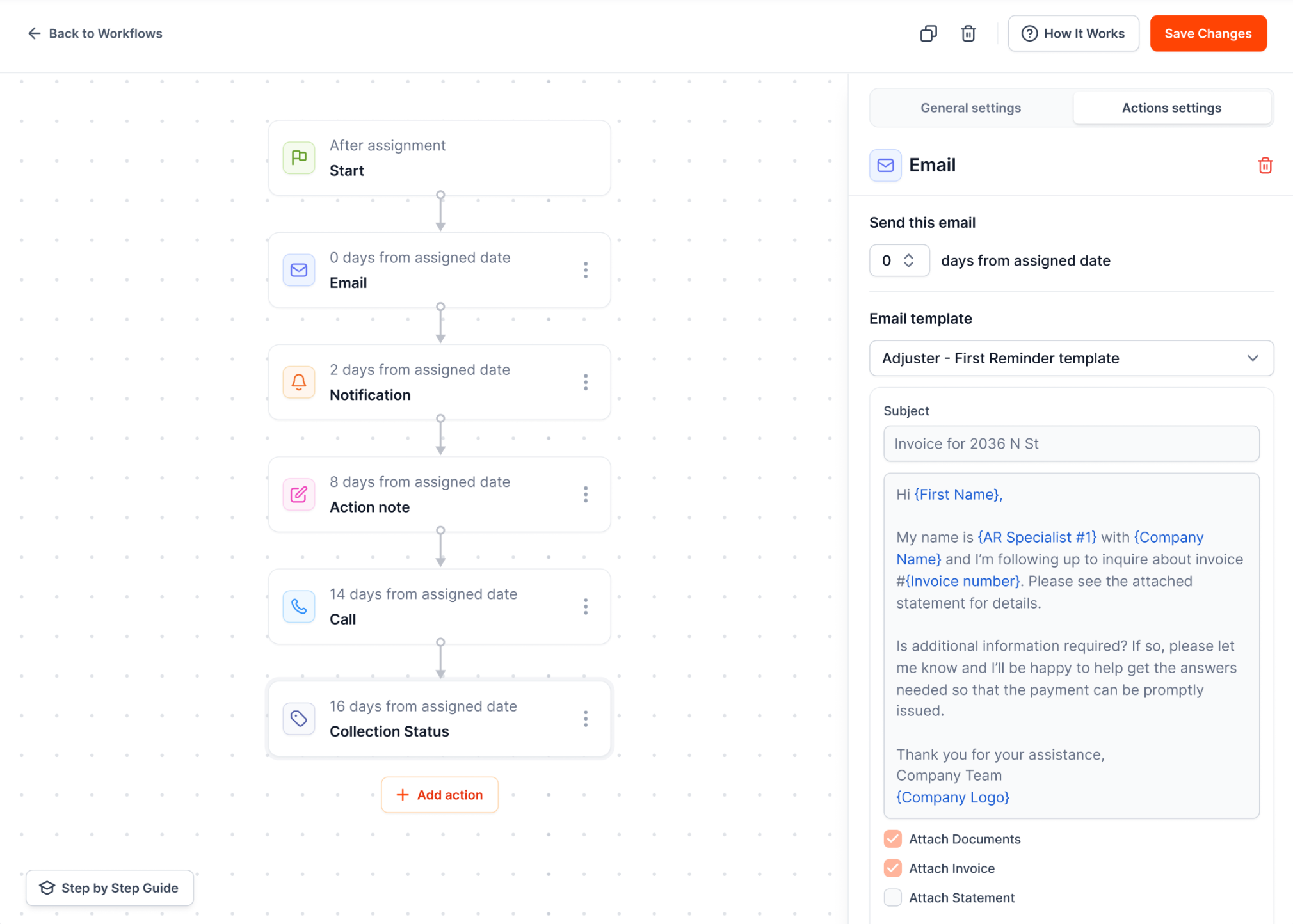
Collection workflows decide what happens as an invoice keeps aging.
Routine collection communication, including automated payment reminders by email and SMS from a dedicated number, can be scheduled, while payment and communication history give the team more context around each account. If you are comparing options, see our guide to automated invoice reminder software.
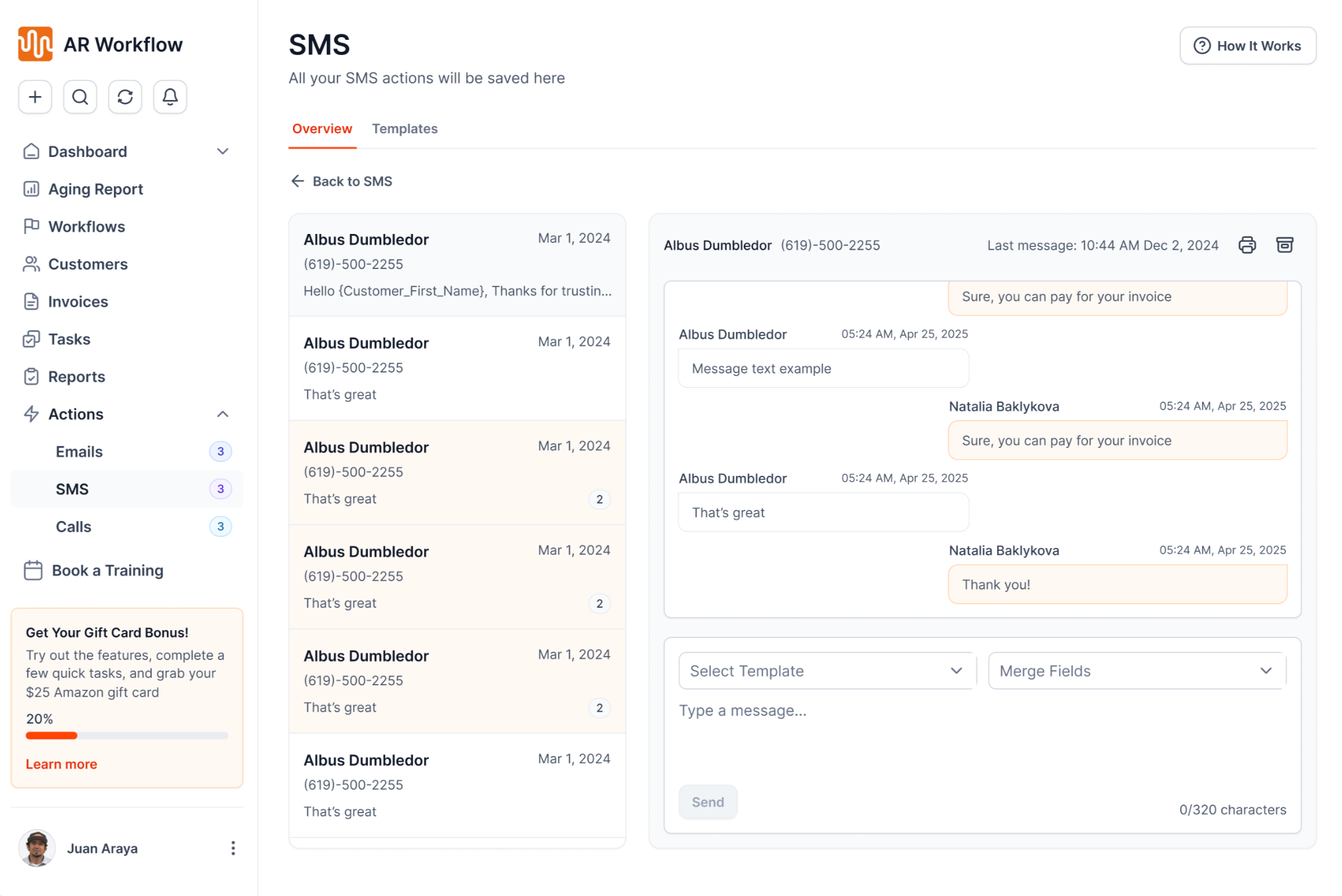
Text and email history sits next to each invoice.
That means the person reviewing aging AR doesn't have to stop at seeing that an invoice has reached 60 or 90 days overdue. They can see what collection activity has taken place and what needs to happen next.
AR Workflow also provides AR visibility and reporting as part of its accounts receivable automation, so finance teams can keep the status of outstanding receivables connected to the work being done to collect payment.
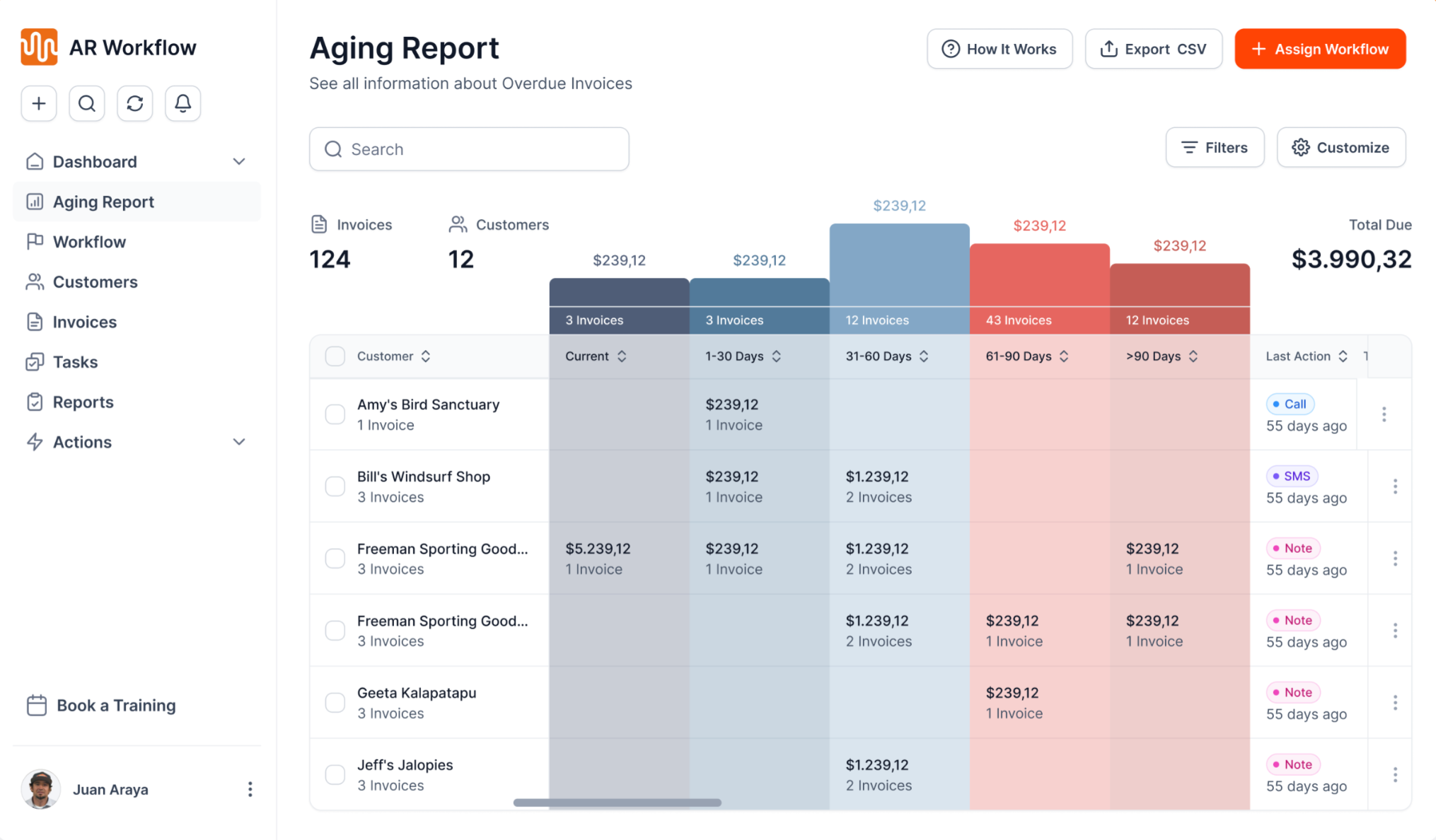
The aging view in AR Workflow, connected to collection activity.
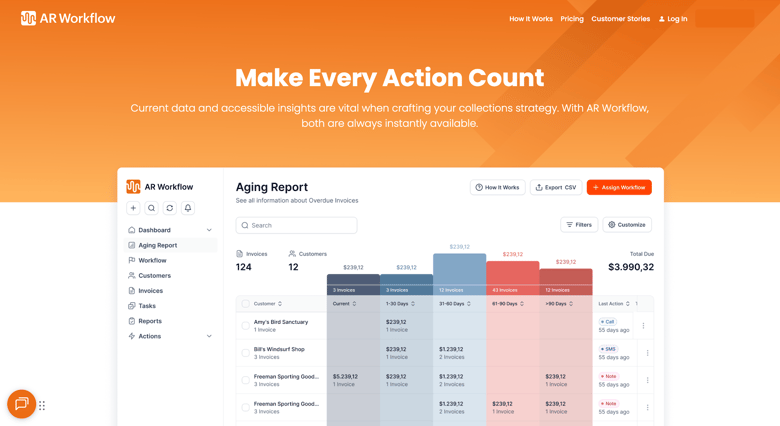
Understanding your aging report shows you how long your outstanding invoices have been sitting unpaid. If you're already seeing invoices move into older aging buckets, the question is no longer where your unpaid AR is. It's what your team is doing to get those invoices moving toward payment.
AR Workflow for restoration helps companies manage that part of the process through structured collections and flexible payment options once an invoice is outstanding. With automated email and SMS reminders, custom collection workflows and visibility into previous communication, your team spends less time figuring out what happened with an invoice and more time on what needs to happen next.
An aging report is a financial report that groups outstanding invoices according to how long they have remained unpaid. Accounts receivable aging reports commonly separate balances into current, 1 to 30, 31 to 60, 61 to 90 and 90+ day buckets. Businesses use an AR aging report to track money they are waiting to receive, while an accounts payable aging report tracks bills the business still needs to pay. See accounts payable vs accounts receivable for the difference.
Suppose a restoration company has $200,000 in outstanding accounts receivable. Its aging report might show $80,000 current, $45,000 at 1 to 30 days overdue, $30,000 at 31 to 60 days, $25,000 at 61 to 90 days and $20,000 at 90+ days. The company can see that $45,000 of its $200,000 balance has been overdue for more than 60 days, and the team can look at the accounts making up those older balances.
Start with the total accounts receivable balance, then look at how much sits in each bucket. Pay closer attention to large balances in older buckets and compare reports over time to see which invoices keep aging. Once you identify an account that needs attention, review its payment and collection history before deciding what to do next.
An aging summary shows one row per customer with that customer's balance split across the aging buckets. An aging detail report lists every open invoice with its invoice date, due date, days past due and open balance. Use the summary to find the accounts with old money and the detail to work the specific invoices. In QuickBooks Online, open Reports and search for A/R Aging Summary or A/R Aging Detail, then customize the as-of date and aging intervals before running it.
An AR aging report shows how your open balance is distributed across age ranges at one point in time. Days sales outstanding (DSO) is a single number estimating the average days it takes to collect after a sale. Aging tells you which invoices to work; DSO tells you whether collection speed is improving overall.
Most teams get the best results by keeping the 1 to 30 day bucket under control with consistent reminders while giving personal attention to the largest balances over 60 days. Early follow-up stops invoices from aging further, and the large older balances are where the most cash is at risk.
Related reading
Bring one overdue invoice.
Bring one from your aging report to a demo and see what AR Workflow would send, when, and how your customer would pay.
Sam owned and ran three restoration companies for more than 14 years and collected over $100 million in receivables. He built AR Workflow in 2020 to give contractors the collections system he wished he'd had.

AI writes the emails, sends the texts, and leaves the voicemails. Your team handles the conversations that matter, and your cash keeps moving.
 Keep QuickBooksStart with one invoiceStay in control

 Log in