AR Workflow vs QuickBooks Online reminders for contractors: what QuickBooks does on its own, what it misses, and when adding AR Workflow pays off.

If you're on QuickBooks Online, you already have invoice reminders and online payments. So why pay for AR Workflow? It's a fair question, and for some contractors the answer is "you don't need to yet."
AR Workflow doesn't replace QuickBooks. It works on top of it. Here's what QuickBooks does on its own, what it misses, and when adding AR Workflow pays off.
Full disclosure: I'm the founder of AR Workflow, so read this knowing which side I'm on. I've stuck to facts from QuickBooks's own website and pricing page as of November 2026, and I say plainly where QuickBooks is the better choice.
THE SHORT ANSWER
Stick with QuickBooks reminders if you carry fewer than about 20 open invoices and most customers pay after an email.
Add AR Workflow when overdue invoices pile up, your customers are homeowners or insurers who ignore email, or someone in your office spends hours a week chasing payments.
| AR Workflow | QuickBooks | |
|---|---|---|
| What it is | AR follow-up software that syncs with QuickBooks Online | Your accounting system, with built-in reminders |
| Reminders | Email, two-way text, ringless voicemail, call tasks | A short series of automatic emails |
| Different follow-up by customer type | Yes: homeowner, business, insurance | No, one schedule |
| Who to call today | Priority Queue | No |
| Promise-to-pay tracking | Yes | No |
| Payments | Card and ACH links, plans, partial payments | QuickBooks Payments card and ACH |
| Cost | $295 to $495 a month | Included in your QuickBooks plan |
TABLE OF CONTENTS
QuickBooks Online creates clean invoices, takes card and ACH through QuickBooks Payments, sends automatic email reminders and runs your A/R aging report. Payments land directly in your books. For a small contractor with customers who pay on time, that's enough.
The gaps show up as you grow. Reminders are email only and look the same for every customer. There's no text, no voicemail and no call list. You can't see who was contacted or what they promised. Insurance jobs with an adjuster, homeowner and mortgage company don't fit. And there's no way to tell which invoices nobody is chasing.
We go deeper in QuickBooks accounts receivable automation.
AR Workflow syncs two ways with QuickBooks Online. Invoices flow in on their own. Payments and fees flow back. You keep invoicing in QuickBooks exactly as you do today. Turn off QuickBooks reminders so customers don't get double messages, and AR Workflow handles follow-up until each invoice is paid.
Say you do $3 million a year and invoices take 50 days to pay. That's roughly $410,000 sitting in receivables. Cutting 21 days frees up about $170,000 of cash once, against about $4,740 a year for the Grow plan. If your numbers are smaller, QuickBooks alone may be fine for now. Try your own with the DSO calculator.
Here's how the two compare on the seven things that decide whether a contractor gets paid faster, with a winner for each.
| What matters | AR Workflow | QuickBooks reminders | Edge |
|---|---|---|---|
| Reaching homeowners | Email, two-way text, voicemail, calls | Email only | AR Workflow |
| Different follow-up by customer type | Yes | No | AR Workflow |
| Insurance and multi-payer jobs | Yes | No | AR Workflow |
| Daily call list | Priority Queue | No | AR Workflow |
| Payments in your books | Posts back automatically | Native | Tie |
| Price | $295 to $495 a month | Included | QuickBooks |
| Setup | Done with you | Already there | QuickBooks |
A made-up example: an HVAC company has 35 open invoices, $96,000 total, with $41,000 past 30 days. Most are property managers and homeowners.
Each customer gets the same email schedule. Property managers' AP inboxes swallow them. Homeowners don't open them. The office manager prints the aging report on Fridays and calls whoever she has time for, with notes on sticky pads.
Every invoice is on a workflow by customer type. Homeowners get texts and voicemails; property managers get emails to the right AP contact plus call tasks. The Priority Queue shows the 6 invoices to call today. Promises to pay are logged and followed up automatically. The owner gets a weekly email with what came in and what's still unprotected.
If you outgrow this, connect AR Workflow and turn QuickBooks reminders off so customers get one set of messages.
Check your numbers with the DSO calculator and our guide to contractor AR metrics.
Not sure either one fits? Compare more options:
More than 3,200 users rely on AR Workflow. Customers report getting paid an average of 21 days faster and saving about 18 hours a week of office time.
| Customer | Before | After |
|---|---|---|
| SERVPRO of Northeast San Diego | 105 days to get paid | 52 days |
| Horizon Roofing | 45 days | 25 days |
Read more customer stories.
"Partial" means limited, an add-on or higher plans only. Check QuickBooks's current plans before you buy.
| Feature | AR Workflow | QuickBooks |
|---|---|---|
| Email reminders | Yes | Yes |
| Two-way texting | Yes | No |
| Ringless voicemail | Yes | No |
| Call tasks and daily call list | Yes | No |
| Card and ACH pay links | Yes | Yes |
| Payment plans and partial payments | Yes | No |
| Multiple payers per job (insurance) | Yes | No |
| Two-way QuickBooks Online sync | Yes | Native |
| Other accounting systems | No | n/a |
| Late fees | No | Partial |
| Published pricing | Yes | Yes |
| Free trial | No | Yes |
| Done-with-you setup | Yes | No |
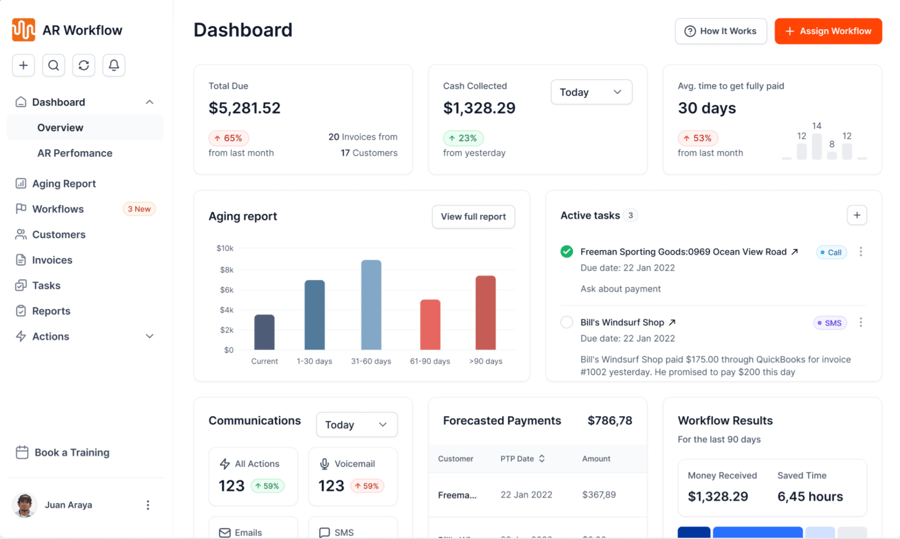
The AR Workflow dashboard: what's owed, what came in and who to contact next.
AR Workflow syncs two ways with QuickBooks Online and puts every open invoice on a follow-up workflow of emails, two-way texts, ringless voicemails and call tasks. Customers pay by card or ACH from a link in every message, and payments post back to QuickBooks on their own. The Priority Queue gives your office a short list of who to contact today, and the dashboard shows "unprotected AR": money nobody is chasing yet.
More than 3,200 users rely on it. Customers report getting paid an average of 21 days faster and saving about 18 hours a week. SERVPRO of Northeast San Diego cut its average days to pay from 105 to 52, and Horizon Roofing went from 45 days to 25.
Pick QuickBooks if
Pick AR Workflow if
Bring one overdue invoice to a demo.
We'll show you exactly how AR Workflow would chase it, from the first text to the payment posting in QuickBooks.
Get a demoYes. QuickBooks Online can send a short series of automatic email reminders with a pay link. It can't text, leave voicemails or run different follow-up for different customers.
No. QuickBooks stays your accounting system and where you create invoices. AR Workflow syncs with it and handles follow-up and payments.
Yes. Turn them off so customers get one clear set of messages.
No. AR Workflow works with QuickBooks Online only.
$295, $395 or $495 a month, or $278, $370 and $462 a month billed yearly.
Card and ACH payments collected through AR Workflow post back to QuickBooks Online automatically, including fees.
No. QuickBooks Online reminders are email only.
AR Workflow connects to QuickBooks Online through Intuit's official integration. Ask us on a demo for the latest listing details.
It syncs invoices in and posts payments and fees back. It doesn't change how you create invoices or run your books.
Stick with QuickBooks reminders and a weekly aging review until the volume grows.
Bring one overdue invoice to a demo and see what AR Workflow would send, when, and how your customer would pay.
Book a demo
Sam owned and ran three restoration companies for more than 14 years and collected over $100 million in receivables. He built AR Workflow in 2020 to give contractors the collections system he wished he'd had.

AI writes the emails, sends the texts, and leaves the voicemails. Your team handles the conversations that matter, and your cash keeps moving.
 Keep QuickBooksStart with one invoiceStay in control

 Log in