AR Workflow vs Paidnice for contractors: late fees, texting, voicemail, calling, QuickBooks sync and pricing, compared side by side.


Paidnice is a fast-growing AR automation tool that started on Xero and now connects to QuickBooks Online and Stripe. It's known for automatic late fees, early-payment discounts and low entry pricing. AR Workflow is AR software built for contractors on QuickBooks Online.
Both automate follow-up. They differ in who they're built for and how they reach customers.
Full disclosure: I'm the founder of AR Workflow, so read this knowing which side I'm on. I've stuck to facts from Paidnice's own website and pricing page as of November 2026, and I say plainly where Paidnice is the better choice.
THE SHORT ANSWER
Pick Paidnice if you want automatic late fees or early-payment discounts, you're on Xero, or you want the lowest starting price.
Pick AR Workflow if your customers are homeowners, insurers and small businesses, you want ringless voicemail and a daily call list, and you need insurance jobs with more than one payer.
| AR Workflow | Paidnice | |
|---|---|---|
| Built for | Contractors | Small businesses, Xero-first |
| Follow-up | Email, two-way text, ringless voicemail, call tasks | Email and SMS reminders, statements; in-app calling on Pro |
| Late fees and discounts | No | Yes, automatic |
| Insurance and multi-payer jobs | Yes | No |
| Accounting | QuickBooks Online | Xero, QuickBooks Online, Stripe |
| Pricing | $295 to $495 a month | Essentials $69 a month; Pro from $99 to $279+ |
| Trial | Demo first | First 20 actions free |
TABLE OF CONTENTS
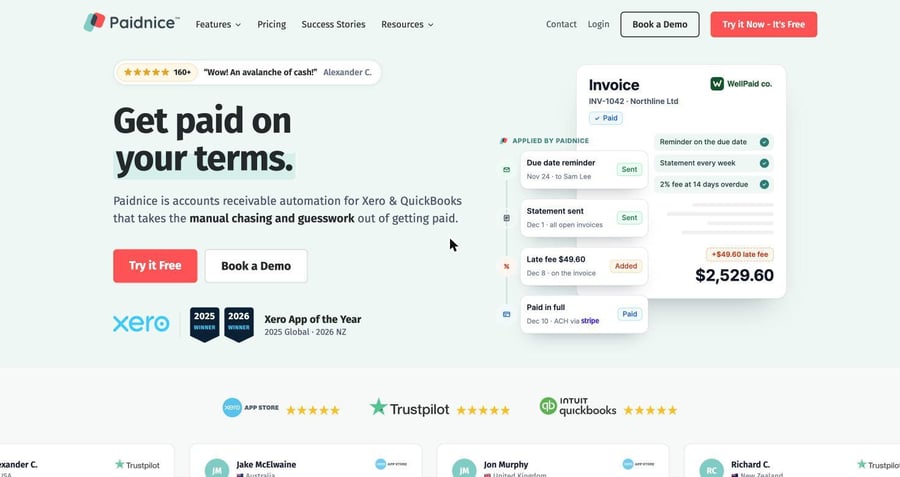
Paidnice's homepage, November 2026.
This is Paidnice's signature feature. It can add late fees automatically and offer early-payment discounts based on rules you set. AR Workflow doesn't charge late fees for you.
Before turning on automatic late fees, check your contracts and your state. Read what late fees contractors can charge. Many contractors find a fast, friendly follow-up gets paid sooner than a fee that starts an argument.
Paidnice sends email and SMS reminders and statements, and its Pro plans add in-app calling with call transcripts. AR Workflow sends email, two-way texts from a business number and ringless voicemails, creates call tasks with in-browser calling, and ranks who to contact first in the Priority Queue.
Paidnice is industry-neutral. AR Workflow was built inside restoration, so it handles the adjuster, homeowner and mortgage company on one job, separate workflows for insurance and homeowner invoices, and rolling several jobs up under one customer.
Paidnice Essentials is $69 a month for up to 150 invoices, 600 emails and 2 users. Pro runs from $99 to $279 a month and up, tiered by invoice volume, with unlimited users. AR Workflow is $295, $395 or $495 a month (or $278, $370, $462 billed yearly). Every feature on every plan.
Here's how the two compare on the seven things that decide whether a contractor gets paid faster, with a winner for each.
| What matters | AR Workflow | Paidnice | Edge |
|---|---|---|---|
| Reaching homeowners | Email, two-way text, voicemail, calls | Email, SMS, statements; calling on Pro | AR Workflow |
| Late fees and discounts | No | Automatic | Paidnice |
| Insurance and multi-payer jobs | Yes | No | AR Workflow |
| Daily call list | Priority Queue | Partial | AR Workflow |
| Accounting choice | QuickBooks Online | Xero, QuickBooks Online, Stripe | Paidnice |
| Price | $295 to $495 a month | From $69 a month | Paidnice |
| Setup help | Done with you | Self-serve | Depends on you |
A made-up example: an electrical contractor has a $6,500 invoice to a small business owner, 25 days late.
Reminder emails and texts go out on schedule, and on day 30 Paidnice adds the late fee from your terms automatically. The business owner, who meant to pay, now has a bigger bill and an annoyed reason to call and argue. Sometimes the fee works; sometimes it starts a dispute.
The business owner gets a text from your number with a pay link, then a ringless voicemail. On day 10 a call task appears. Your office manager calls, learns the owner was waiting on their own customer, and logs a promise to pay on the 5th. The workflow pauses and restarts if the 5th passes.
Late fees are a tool, not a strategy. Fast, human follow-up usually gets paid sooner and keeps the customer. If you want fees, put them in your terms and check what your state allows.
| AR Workflow | Paidnice | |
|---|---|---|
| Entry plan | $3,540 a year (Lite, 50 open invoices) | $828 a year (Essentials: 150 invoices, 600 emails, 2 users) |
| Mid plan | $4,740 a year (Grow, 100 open invoices, 10 users) | Pro from $1,188 a year ($99 a month), tiered by invoice volume |
| Top plan | $5,940 a year (Enterprise, unlimited) | Pro $279+ a month for higher volumes |
Paidnice is cheaper at every level. AR Workflow costs more because it includes voicemail, multi-payer jobs and done-with-you setup aimed at contractors.
Paidnice includes statements and collection reporting.
AR Workflow's dashboard shows total due, cash collected, the aging buckets and "unprotected AR": open invoices with no follow-up scheduled. User performance reports show what each person on your team did and collected, and scheduled email reports land in the owner's inbox every week. The AR reporting page has examples.
Paidnice is self-serve, with the first 20 actions free.
AR Workflow sets up your account with you: a US-based team connects QuickBooks, builds your first workflows from proven templates and trains your office. There's no free trial; every plan starts with a demo so the first messages that go to your customers are right.
Not sure either one fits? Compare more options:
More than 3,200 users rely on AR Workflow. Customers report getting paid an average of 21 days faster and saving about 18 hours a week of office time.
| Customer | Before | After |
|---|---|---|
| SERVPRO of Northeast San Diego | 105 days to get paid | 52 days |
| Horizon Roofing | 45 days | 25 days |
Read more customer stories.
"Partial" means limited, an add-on or higher plans only. Check Paidnice's current plans before you buy.
| Feature | AR Workflow | Paidnice |
|---|---|---|
| Email reminders | Yes | Yes |
| Two-way texting | Yes | Partial |
| Ringless voicemail | Yes | No |
| Call tasks and daily call list | Yes | Partial (in-app calling on Pro) |
| Card and ACH pay links | Yes | Yes |
| Payment plans and partial payments | Yes | Yes |
| Multiple payers per job (insurance) | Yes | No |
| Two-way QuickBooks Online sync | Yes | Yes |
| Other accounting systems | No | Yes: Xero, Stripe |
| Late fees | No | Yes |
| Published pricing | Yes | Yes |
| Free trial | No | Partial (20 free actions) |
| Done-with-you setup | Yes | No |
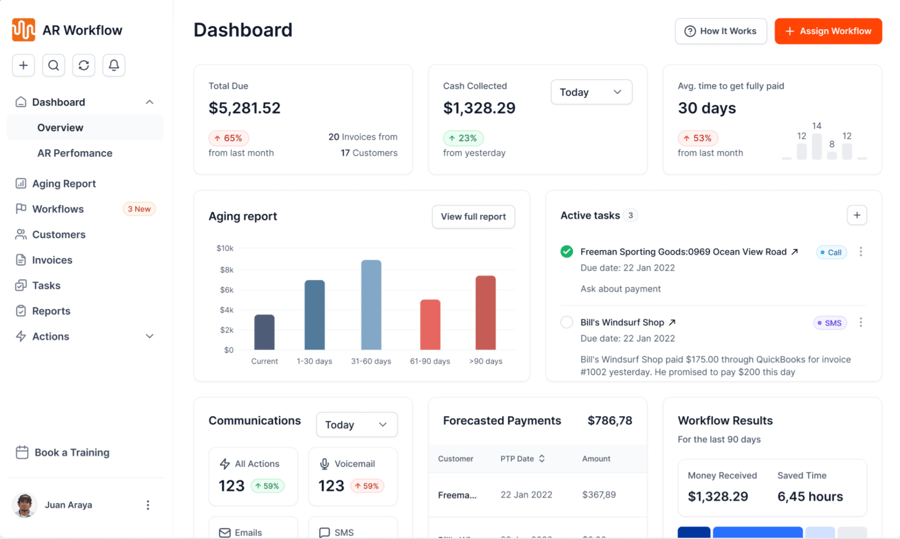
The AR Workflow dashboard: what's owed, what came in and who to contact next.
AR Workflow syncs two ways with QuickBooks Online and puts every open invoice on a follow-up workflow of emails, two-way texts, ringless voicemails and call tasks. Customers pay by card or ACH from a link in every message, and payments post back to QuickBooks on their own. The Priority Queue gives your office a short list of who to contact today, and the dashboard shows "unprotected AR": money nobody is chasing yet.
More than 3,200 users rely on it. Customers report getting paid an average of 21 days faster and saving about 18 hours a week. SERVPRO of Northeast San Diego cut its average days to pay from 105 to 52, and Horizon Roofing went from 45 days to 25.
Pick Paidnice if
Pick AR Workflow if
Bring one overdue invoice to a demo.
We'll show you exactly how AR Workflow would chase it, from the first text to the payment posting in QuickBooks.
Get a demoPaidnice is a capable, low-cost AR tool, especially if you want automatic late fees. Contractors with insurance work and lots of homeowner customers often need multi-payer jobs, voicemail and a daily call list, which AR Workflow is built for.
Essentials is $69 a month for up to 150 invoices, 600 emails and 2 users. Pro runs $99 to $279 a month and up, by invoice volume, with unlimited users.
No. AR Workflow focuses on fast follow-up and easy payment. You can still add late fees in QuickBooks under your own terms.
Yes. Paidnice connects to QuickBooks Online as well as Xero and Stripe.
Yes. Connect QuickBooks Online, set up workflows with our team, and turn off Paidnice reminders the same day.
No, Paidnice is industry-neutral. It works for many small businesses, including some contractors.
Paidnice's Pro plans include in-app calling with transcripts. AR Workflow records calls and tracks promises to pay.
Yes. Paidnice starts at $69 a month; AR Workflow starts at $295.
Paidnice. AR Workflow works with QuickBooks Online only.
Bring one overdue invoice to a demo and see what AR Workflow would send, when, and how your customer would pay.
Book a demo
Sam owned and ran three restoration companies for more than 14 years and collected over $100 million in receivables. He built AR Workflow in 2020 to give contractors the collections system he wished he'd had.

AI writes the emails, sends the texts, and leaves the voicemails. Your team handles the conversations that matter, and your cash keeps moving.
 Keep QuickBooksStart with one invoiceStay in control

 Log in