AR Workflow vs Chaser for contractors: reminders, texting, voicemail, QuickBooks sync, pricing and who each tool fits, compared side by side.


Chaser is a well-known credit control tool that started in the UK and now sells in the US. It sends polished reminder emails from your own address, and it's popular with accountants and B2B firms. AR Workflow is accounts receivable software built for contractors.
Both connect to QuickBooks Online. Here's how they compare for a contracting business.
Full disclosure: I'm the founder of AR Workflow, so read this knowing which side I'm on. I've stuck to facts from Chaser's own website and pricing page as of November 2026, and I say plainly where Chaser is the better choice.
THE SHORT ANSWER
Pick AR Workflow if your customers are homeowners, insurers and small businesses who answer texts more than emails, and you want voicemail and call tasks in the same workflow.
Pick Chaser if you bill other businesses, want professional email reminders from your own inbox, use Xero or Sage, or want the option of an outsourced credit control service.
| AR Workflow | Chaser | |
|---|---|---|
| Built for | Contractors | B2B firms and accountants |
| Follow-up channels | Email, two-way text, ringless voicemail, call tasks | Email from your own address, SMS reminders, optional calling service |
| Insurance and multi-payer jobs | Yes | No |
| Accounting | QuickBooks Online | QuickBooks Online, Xero, Sage |
| Payments | Card and ACH links, plans, partial payments | Payment portal and payment plans |
| Pricing (US) | $295 to $495 a month | From $259 a month ($233 billed yearly) for up to 4 users; next tier from $779 |
| Free trial | No, demo first | Yes |
TABLE OF CONTENTS
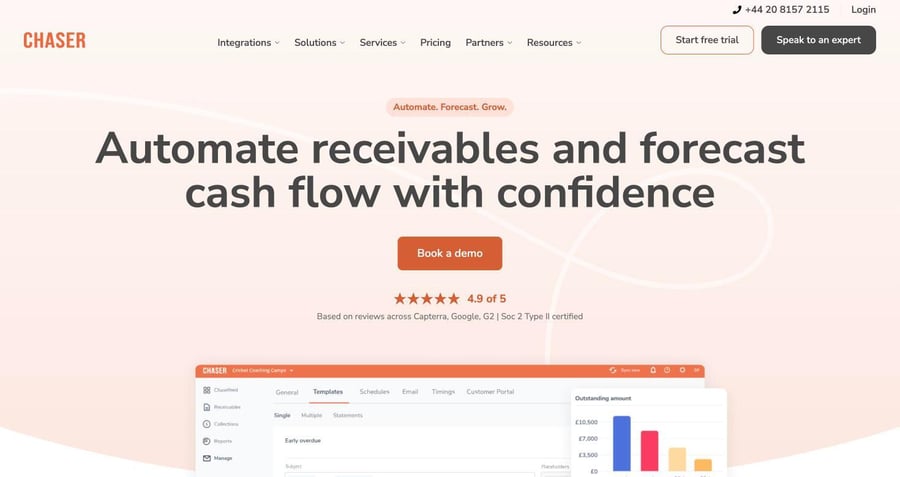
Chaser's homepage, November 2026.
Chaser's reminder emails are among the best: personalized, sent from your own email address, and easy to schedule. It adds SMS reminders and offers a separate service where its team makes calls for you.
AR Workflow is built around the channels homeowners actually respond to. Every invoice can get email, two-way texts from a dedicated business number, ringless voicemail and call tasks for your team, and it all stops the moment the customer pays.
Chaser is industry-neutral and aimed at business-to-business billing. AR Workflow was built in restoration, so it handles adjusters, mortgage companies and property managers on one job, different workflows for homeowners and insurance jobs, and a Priority Queue that tells your office who to call today.
Chaser's US pricing starts at $259 a month, or $233 a month billed yearly, for smaller companies with up to 4 users. Its next tier starts at $779 a month, and plans are set by company revenue and users.
AR Workflow is $295, $395 or $495 a month (or $278, $370, $462 billed yearly). Every feature on every plan. The Grow plan includes 10 users.
Chaser connects to QuickBooks Online, Xero and Sage. AR Workflow connects only to QuickBooks Online, with two-way sync of invoices, payments and fees. Chaser offers a free trial so you can set it up yourself; AR Workflow sets up your workflows with you after a demo.
A made-up example: a roofing company has a $9,800 invoice to a homeowner whose insurance check came in, but who hasn't paid. It's 12 days past due.
Chaser sends a well-written email from the roofer's own address, then another a few days later. An SMS reminder goes out on the schedule. The homeowner reads the text but has questions about the supplement, and there's no easy way to reply and talk. Chaser's optional calling service could step in, at extra cost.
The homeowner gets a text from the roofer's business number with a pay link. They reply with a question about the supplement. Your office sees the reply in the shared inbox and answers in a minute. When the homeowner goes quiet again, a ringless voicemail lands in their inbox with your owner's voice, and a call task shows up in the Priority Queue on day 10. The homeowner pays by card from the link.
Both tools send good messages. The difference is the two-way conversation and the call list, which is where most homeowner invoices get resolved.
A made-up contractor with 3 office users and about 90 open invoices.
| AR Workflow (Grow) | Chaser | |
|---|---|---|
| Subscription | $4,740 a year ($395 a month) | From $2,796 a year ($233 a month billed yearly) for up to 4 users at the entry tier |
| Higher tier if you grow | $5,940 a year (Enterprise, unlimited) | From $779 a month |
| Calling | In-browser calling included; usage billed | Optional calling service at extra cost |
| Texts and voicemail | Usage-based | SMS on plan; no voicemail |
Chaser's entry tier is cheaper, and Chaser sets pricing by your revenue and users, so a larger contractor may land on a higher tier. Get a current quote.
Chaser offers good reporting and cash flow forecasting, which accountants and finance managers appreciate.
AR Workflow's dashboard shows total due, cash collected, the aging buckets and "unprotected AR": open invoices with no follow-up scheduled. User performance reports show what each person on your team did and collected, and scheduled email reports land in the owner's inbox every week. The AR reporting page has examples.
Chaser offers a free trial and self-serve setup, plus optional help from its team.
AR Workflow sets up your account with you: a US-based team connects QuickBooks, builds your first workflows from proven templates and trains your office. There's no free trial; every plan starts with a demo so the first messages that go to your customers are right.
Not sure either one fits? Compare more options:
Here's how the two compare on the seven things that decide whether a contractor gets paid faster, with a winner for each.
| What matters | AR Workflow | Chaser | Edge |
|---|---|---|---|
| Reaching homeowners | Email, two-way text, voicemail, calls | Email from your inbox, SMS | AR Workflow |
| Email quality from your own address | Good | Excellent | Chaser |
| Insurance and multi-payer jobs | Yes | No | AR Workflow |
| Daily call list | Priority Queue | Optional calling service | AR Workflow |
| Accounting choice | QuickBooks Online | QuickBooks Online, Xero, Sage | Chaser |
| Entry price | $295 a month | $259 a month ($233 yearly) | Chaser |
| Free trial | No | Yes | Chaser |
More than 3,200 users rely on AR Workflow. Customers report getting paid an average of 21 days faster and saving about 18 hours a week of office time.
| Customer | Before | After |
|---|---|---|
| SERVPRO of Northeast San Diego | 105 days to get paid | 52 days |
| Horizon Roofing | 45 days | 25 days |
Read more customer stories.
"Partial" means limited, an add-on or higher plans only. Check Chaser's current plans before you buy.
| Feature | AR Workflow | Chaser |
|---|---|---|
| Email reminders | Yes | Yes |
| Two-way texting | Yes | Partial |
| Ringless voicemail | Yes | No |
| Call tasks and daily call list | Yes | Partial (optional calling service) |
| Card and ACH pay links | Yes | Yes |
| Payment plans and partial payments | Yes | Yes |
| Multiple payers per job (insurance) | Yes | No |
| Two-way QuickBooks Online sync | Yes | Yes |
| Other accounting systems | No | Yes: Xero, Sage |
| Late fees | No | Partial |
| Published pricing | Yes | Yes |
| Free trial | No | Yes |
| Done-with-you setup | Yes | Partial |
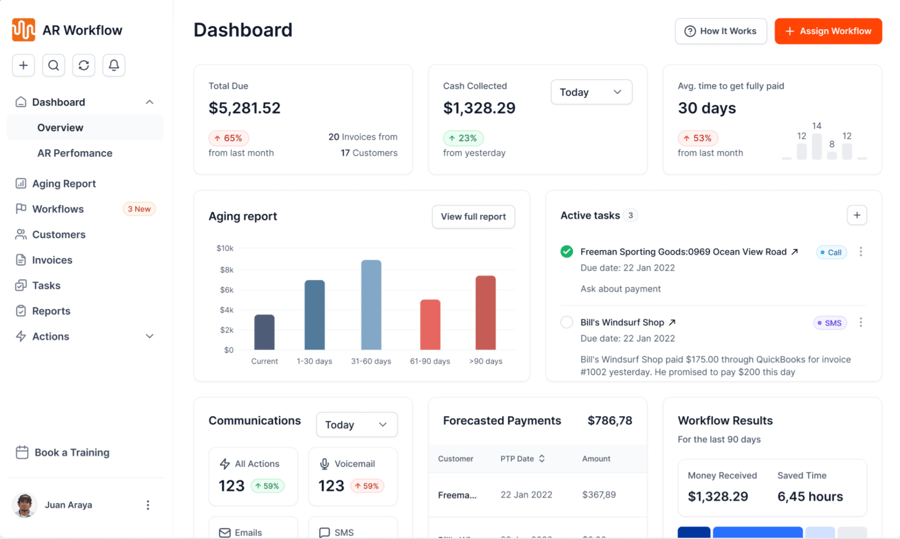
The AR Workflow dashboard: what's owed, what came in and who to contact next.
AR Workflow syncs two ways with QuickBooks Online and puts every open invoice on a follow-up workflow of emails, two-way texts, ringless voicemails and call tasks. Customers pay by card or ACH from a link in every message, and payments post back to QuickBooks on their own. The Priority Queue gives your office a short list of who to contact today, and the dashboard shows "unprotected AR": money nobody is chasing yet.
More than 3,200 users rely on it. Customers report getting paid an average of 21 days faster and saving about 18 hours a week. SERVPRO of Northeast San Diego cut its average days to pay from 105 to 52, and Horizon Roofing went from 45 days to 25.
Pick Chaser if
Pick AR Workflow if
Bring one overdue invoice to a demo.
We'll show you exactly how AR Workflow would chase it, from the first text to the payment posting in QuickBooks.
Get a demoChaser works for contractors who mainly bill other businesses and want polished email reminders. Contractors with lots of homeowner and insurance work usually need text, voicemail and multi-payer jobs, which is where AR Workflow fits better.
From $259 a month, or $233 a month billed yearly, for smaller companies with up to 4 users. The next tier starts at $779 a month. Prices are from Chaser's pricing page, November 2026.
Chaser offers SMS reminders. AR Workflow offers two-way texting from a dedicated business number, so customers can reply and your team answers from one inbox.
No. AR Workflow works with QuickBooks Online only.
Chaser has a free trial you can set up yourself. AR Workflow's US-based team sets up your workflows with you, and most contractors are live within a week.
Chaser started in the UK and now sells in the US with US pricing.
Chaser offers SMS reminders and an optional calling service. It doesn't offer ringless voicemail. AR Workflow does.
Chaser's US entry tier is cheaper at $259 a month, or $233 billed yearly, for up to 4 users. Its next tier starts at $779 a month.
It isn't built for jobs with several payers like adjusters and mortgage companies. AR Workflow is.
AR Workflow, because homeowners respond to texts and voicemail more than email, and AR Workflow lets them text back.
Bring one overdue invoice to a demo and see what AR Workflow would send, when, and how your customer would pay.
Book a demo
Sam owned and ran three restoration companies for more than 14 years and collected over $100 million in receivables. He built AR Workflow in 2020 to give contractors the collections system he wished he'd had.

AI writes the emails, sends the texts, and leaves the voicemails. Your team handles the conversations that matter, and your cash keeps moving.
 Keep QuickBooksStart with one invoiceStay in control

 Log in