AR Workflow vs InvoiceSherpa for contractors: reminders, autopay, texting, voicemail, QuickBooks sync and pricing, compared side by side.

InvoiceSherpa is one of the cheapest ways to automate invoice reminders on QuickBooks Online. AR Workflow costs more and does more. The real question is whether your overdue invoices need reminders, or need a full follow-up process.
Here's how the two compare for contractors.
Full disclosure: I'm the founder of AR Workflow, so read this knowing which side I'm on. I've stuck to facts from InvoiceSherpa's own website and pricing page as of November 2026, and I say plainly where InvoiceSherpa is the better choice.
THE SHORT ANSWER
Pick InvoiceSherpa if you have a modest number of invoices, customers who mostly pay after a nudge, and you want the lowest price.
Pick AR Workflow if you carry real overdue balances, bill homeowners and insurers, and need text, voicemail, call tasks and a daily call list so nothing slips.
| AR Workflow | InvoiceSherpa | |
|---|---|---|
| Built for | Contractors | Small businesses in general |
| Follow-up | Email, two-way text, ringless voicemail, call tasks, Priority Queue | Scheduled email and SMS reminders |
| Autopay | Payment plans and partial payments | Scheduled card and ACH charges |
| Insurance and multi-payer jobs | Yes | No |
| Accounting | QuickBooks Online | QuickBooks Online, Xero and others |
| Pricing | $295 to $495 a month | $49, $99 or $199 a month by open invoices ($41, $83, $166 billed yearly) |
| Trial | Demo first | 14-day free trial |
TABLE OF CONTENTS
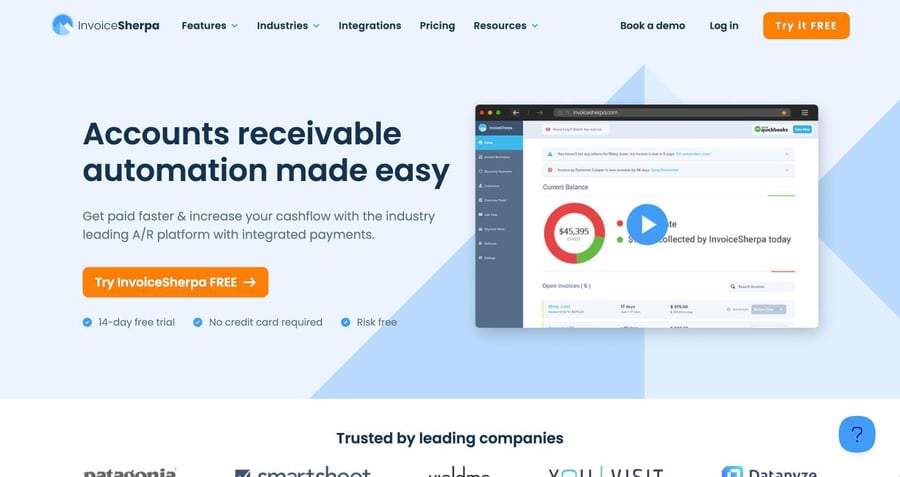
InvoiceSherpa's homepage, November 2026.
InvoiceSherpa does reminders well. You set a schedule, and it emails or texts customers before and after the due date, with a link to pay. For a customer who simply forgot, that's enough.
The invoices that hurt contractors are the ones a reminder won't fix: the homeowner waiting on an insurance check, the property manager who needs an owner's approval, the GC holding retainage. Those need two-way texting, a voicemail, a call and a note about what was promised. AR Workflow puts all of that in one place and gives your office a Priority Queue each morning.
InvoiceSherpa's autopay is a real strength: customers can save a card or bank account and get charged on schedule, which suits recurring service work like landscaping and maintenance plans. AR Workflow focuses on getting one-off and project invoices paid, with card and ACH links, partial payments and payment plans.
InvoiceSherpa is $49 a month for up to 100 open invoices, $99 for 101 to 500, and $199 for unlimited. AR Workflow is $295, $395 or $495 a month (or $278, $370, $462 billed yearly). Every feature on every plan.
If InvoiceSherpa helps you collect one $5,000 invoice a few weeks sooner, it's paid for itself. AR Workflow makes sense when the overdue balance is large enough that freeing it up is worth tens of thousands. Run your numbers with the DSO calculator.
Here's how the two compare on the seven things that decide whether a contractor gets paid faster, with a winner for each.
| What matters | AR Workflow | InvoiceSherpa | Edge |
|---|---|---|---|
| Reaching homeowners | Email, two-way text, voicemail, calls | Email and SMS | AR Workflow |
| Autopay and recurring charges | Payment plans, partial payments | Scheduled card and ACH charges | InvoiceSherpa |
| Insurance and multi-payer jobs | Yes | No | AR Workflow |
| Daily call list | Priority Queue | No | AR Workflow |
| Accounting choice | QuickBooks Online | QuickBooks Online, Xero and others | InvoiceSherpa |
| Price | $295 to $495 a month | $49 to $199 a month | InvoiceSherpa |
| Setup help | Done with you | Self-serve with trial | Depends on you |
A made-up example: a remodeler has a $22,000 final invoice to a homeowner. The homeowner is unhappy about a punch list item and hasn't paid. It's 18 days late.
Scheduled reminders keep going out by email and text. The homeowner ignores them because the real issue is the punch list. Nothing in the system tells your office that this $22,000 invoice needs a person, so it sits behind dozens of small ones.
The invoice rises to the top of the Priority Queue because of its size and age. The homeowner's text reply about the punch list lands in your shared inbox. Your project manager schedules the fix, logs a promise to pay on completion, and the workflow pauses until that date. When the date passes, it picks back up automatically.
Reminder tools are great at small, forgotten invoices. Big, stuck invoices need a person with the right information at the right time. That's what AR Workflow is built to give you.
| Open invoices | AR Workflow | InvoiceSherpa |
|---|---|---|
| Up to 50 | $3,540 a year (Lite) | $588 a year ($49 a month) |
| Up to 100 | $4,740 a year (Grow) | $588 a year |
| 101 to 500 | $5,940 a year (Enterprise) | $1,188 a year ($99 a month) |
| Unlimited | $5,940 a year | $2,388 a year ($199 a month) |
InvoiceSherpa is clearly cheaper. The question is whether the extra follow-up gets you paid enough faster to cover the difference. For a contractor with $300,000 overdue, getting paid 10 days faster on a fraction of it covers AR Workflow many times over. For a business with $15,000 overdue, it probably doesn't.
InvoiceSherpa's reporting is light: reminder activity and payment status.
AR Workflow's dashboard shows total due, cash collected, the aging buckets and "unprotected AR": open invoices with no follow-up scheduled. User performance reports show what each person on your team did and collected, and scheduled email reports land in the owner's inbox every week. The AR reporting page has examples.
InvoiceSherpa is self-serve with a 14-day free trial.
AR Workflow sets up your account with you: a US-based team connects QuickBooks, builds your first workflows from proven templates and trains your office. There's no free trial; every plan starts with a demo so the first messages that go to your customers are right.
Not sure either one fits? Compare more options:
More than 3,200 users rely on AR Workflow. Customers report getting paid an average of 21 days faster and saving about 18 hours a week of office time.
| Customer | Before | After |
|---|---|---|
| SERVPRO of Northeast San Diego | 105 days to get paid | 52 days |
| Horizon Roofing | 45 days | 25 days |
Read more customer stories.
"Partial" means limited, an add-on or higher plans only. Check InvoiceSherpa's current plans before you buy.
| Feature | AR Workflow | InvoiceSherpa |
|---|---|---|
| Email reminders | Yes | Yes |
| Two-way texting | Yes | Partial |
| Ringless voicemail | Yes | No |
| Call tasks and daily call list | Yes | No |
| Card and ACH pay links | Yes | Yes |
| Payment plans and partial payments | Yes | Yes |
| Multiple payers per job (insurance) | Yes | No |
| Two-way QuickBooks Online sync | Yes | Yes |
| Other accounting systems | No | Yes: Xero and others |
| Late fees | No | Yes |
| Published pricing | Yes | Yes |
| Free trial | No | Yes |
| Done-with-you setup | Yes | No |
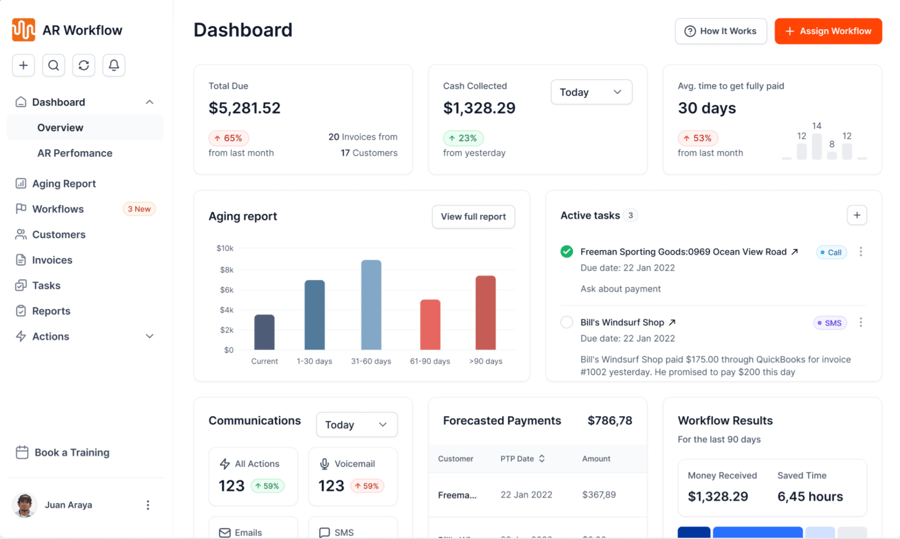
The AR Workflow dashboard: what's owed, what came in and who to contact next.
AR Workflow syncs two ways with QuickBooks Online and puts every open invoice on a follow-up workflow of emails, two-way texts, ringless voicemails and call tasks. Customers pay by card or ACH from a link in every message, and payments post back to QuickBooks on their own. The Priority Queue gives your office a short list of who to contact today, and the dashboard shows "unprotected AR": money nobody is chasing yet.
More than 3,200 users rely on it. Customers report getting paid an average of 21 days faster and saving about 18 hours a week. SERVPRO of Northeast San Diego cut its average days to pay from 105 to 52, and Horizon Roofing went from 45 days to 25.
Pick InvoiceSherpa if
Pick AR Workflow if
Bring one overdue invoice to a demo.
We'll show you exactly how AR Workflow would chase it, from the first text to the payment posting in QuickBooks.
Get a demoIt's a good low-cost reminder and autopay tool. Contractors with big overdue balances, insurance work or many homeowner customers usually need more than reminders, which is where AR Workflow fits.
$49 a month for up to 100 open invoices, $99 for 101 to 500, and $199 for unlimited, or $41, $83 and $166 a month billed yearly.
AR Workflow supports card and ACH links, partial payments and payment plans. It's focused on getting project and service invoices paid rather than recurring autopay.
You could, but customers would get two sets of messages. Most contractors pick one follow-up tool and turn the other off.
InvoiceSherpa is self-serve with a 14-day trial. AR Workflow sets up your workflows with you after a demo, usually within a week.
No. It sends email and SMS reminders. AR Workflow adds ringless voicemail and call tasks.
Yes. Its autopay and scheduled charges suit recurring service work like lawn care and maintenance plans.
When large invoices get stuck, your office spends hours a week chasing, or you do insurance work with several payers.
Yes, InvoiceSherpa supports late fees. AR Workflow doesn't add late fees for you.
Bring one overdue invoice to a demo and see what AR Workflow would send, when, and how your customer would pay.
Book a demo
Sam owned and ran three restoration companies for more than 14 years and collected over $100 million in receivables. He built AR Workflow in 2020 to give contractors the collections system he wished he'd had.

AI writes the emails, sends the texts, and leaves the voicemails. Your team handles the conversations that matter, and your cash keeps moving.
 Keep QuickBooksStart with one invoiceStay in control

 Log in