
Construction accounts receivable is the money customers owe you for work you have already done. On paper it is the same as AR in any business. In practice it is much harder: payments arrive in stages, part of every invoice is held back as retainage, approvals pass through owners, GCs, lenders and sometimes insurance carriers, and a missing lien waiver can hold up an entire pay app.
This guide explains how construction accounts receivable works, the terms and documents that matter, the numbers to track, a step-by-step AR process for contractors, and how to keep receivables from aging out.
KEY TAKEAWAYS
- Construction AR includes progress billings, retainage, change orders and final payments.
- Retainage is a receivable. Track it on its own account with a release date.
- Pay apps get paid faster when the backup and lien waivers are complete the first time.
- Track days sales outstanding (DSO), the aging buckets and the receivables nobody is following up on.
- Lien and prompt payment deadlines vary by state. Know yours before an invoice gets old.
What is construction accounts receivable?
Accounts receivable (AR) is the total of all invoices you have sent that are not yet paid. It sits on your balance sheet as an asset, because it is money you have earned and expect to collect. In construction, AR usually includes:
- Progress billings for work completed during a billing period
- Retainage receivable, the portion held back until the job or a phase is complete
- Approved change orders that have been billed
- Final invoices and closeout billings
- Service and time-and-materials invoices for smaller work
If you are new to the terms, our guide to accounts payable vs accounts receivable explains the difference.
Why construction AR is harder than most industries
| Challenge | What it means for collections |
|---|---|
| Progress billing | You invoice many times on one job, and each invoice needs approval |
| Retainage | Part of every payment is held back, sometimes for months after you finish |
| Several approvers | Architect, owner, GC, lender or carrier may all need to sign off |
| Pay-when-paid and pay-if-paid clauses | Subs may wait until the GC is paid by the owner, where the contract and state law allow it |
| Lien waivers | A missing or wrong waiver can stop a payment |
| Change orders | Unsigned or unpriced changes turn into disputes at billing time |
| Strict deadlines | Lien notice and filing deadlines can expire while you are still waiting |
Key construction AR terms
Pay application (pay app)
A formal request for payment on a commercial job, often on AIA G702 and G703 forms or the GC's own format. It shows the contract amount, the schedule of values, work completed to date, materials stored, retainage and the amount due this period.
Schedule of values
The breakdown of the contract into line items with a dollar value for each. Every pay app bills against it, so a clear schedule of values at the start makes every later invoice easier to approve.
Retainage
A percentage of each progress payment held back to make sure the job is finished. Rates and rules vary by contract, by public or private work, and by state. Retainage is still your money, so track it as a receivable with an expected release date.
Conditional and unconditional lien waivers
A conditional waiver gives up lien rights only once payment is received. An unconditional waiver gives them up immediately. Send conditional waivers with your pay app and unconditional waivers only after the funds clear. Some states require specific waiver forms.
Overbilling and underbilling
On percentage-of-completion jobs, overbilling means you have billed more than the work you have done, and underbilling means you have billed less. Both show up on a work-in-progress (WIP) report, and lenders and sureties watch them closely.
Bring one overdue pay app.
We'll show you how AR Workflow would follow up with the GC, the owner or the homeowner from QuickBooks Online.
The construction AR numbers to track
| Metric | How to calculate it | Why it matters |
|---|---|---|
| Days sales outstanding (DSO) | AR balance divided by revenue for the period, times days in the period | How long, on average, it takes to get paid |
| AR aging | Open invoices by bucket: current, 1 to 30, 31 to 60, 61 to 90, over 90 | Shows which receivables are at risk |
| Retainage receivable | Total retainage held, by job and release date | Often a large share of what you are owed |
| Percent over 60 days | Balance over 60 days divided by total AR | An early warning before invoices go bad |
| Untouched receivables | Open balance with no follow-up logged in the last 14 days | The invoices most likely to turn into write-offs |
The last one is not on a standard report, and it is often the most useful. An aging report shows what is owed. It does not show what nobody is chasing. See our guide to the AR aging report for how to read each bucket.
Example: Ironline Mechanical, DSO in one month
A mechanical subcontractor with commercial and service work.
| Revenue for October | $420,000 |
| AR balance at October 31 | $588,000 |
| DSO (588,000 / 420,000 x 31 days) | about 43 days |
| Of the AR balance, retainage held | $96,000 |
| AR balance excluding retainage | $492,000 |
| DSO excluding retainage | about 36 days |
Splitting retainage out shows two different problems: day-to-day billings take about five weeks to collect, and a large retainage balance needs its own release plan.
Example company, customer and amounts are made up for illustration.
A construction accounts receivable process, step by step
| 1 | Set terms before the job starts. Get the billing cycle, pay app due date, retainage rate, release terms, change order process and lien waiver requirements in writing. |
| 2 | Build a clean schedule of values. Break the contract into line items the owner or GC can verify. Vague lines lead to cuts and questions. |
| 3 | Bill on time, every time. Submit each pay app before the cutoff. Missing a cutoff can push payment a full cycle. |
| 4 | Include complete backup. Conditional lien waivers, sub waivers, stored materials invoices, photos and signed change orders. Incomplete pay apps get sent back. |
| 5 | Confirm receipt and approval. A few days after you submit, ask the AP contact by name whether the pay app is approved and scheduled for the next pay run. |
| 6 | Follow up on a schedule. Use the same rhythm for every invoice: due date, then a few days late, then weekly. Switch channels if email goes unanswered. |
| 7 | Escalate before deadlines. Track preliminary notice, lien filing and prompt payment deadlines by job. Talk to a construction attorney before deadlines pass, not after. |
| 8 | Collect retainage at closeout. Invoice retainage the day it is releasable, with the closeout documents the contract requires. |

Construction AR by type of work
Commercial subcontractors
Pay apps, retainage and lien waivers drive everything. Know the GC's billing cutoff, the AP contact's name and the documents they require each month.
General contractors
You are collecting from the owner while paying subs. Track owner receivables and sub payables by job so you can see the gap, and keep sub lien waivers current so the owner's payment is not held up.
Residential remodelers and specialty trades
Deposits, progress draws and a final payment from a homeowner or a construction lender. A payment link and a text reminder often matter more than formal pay apps. Our guide to contractor payment terms covers deposits and draws.
Insurance restoration and roofing
Receivables split across the carrier, the homeowner and sometimes the mortgage company. Each payer needs a different follow-up, and adjusters should get status requests, not payment links. See restoration insurance billing.
Common construction AR mistakes
- Billing late. Missing a pay app cutoff by a day can cost a month.
- Incomplete backup. The pay app comes back, and the clock starts over.
- Forgetting retainage. It sits on the balance sheet long after the job is done because nobody invoiced it.
- Working on unsigned change orders. The extra work becomes the first thing disputed.
- One person, no system. When the person who knows every job is out, collections stop.
- Watching only the total. A healthy total can hide a few large, untouched invoices.
- Missing lien deadlines. They vary by state and are often counted from your last day of work.
A month-end construction AR checklist
Use this list on the last business day of every month, before you close the books:
- Every job that progressed this month has a pay app or invoice submitted.
- Every change order worked this month is signed and billed, or on next month's pay app.
- Retainage receivable is reconciled by job, with release dates on the calendar.
- Each invoice over 30 days has a logged follow-up and a next step.
- Lien notice and filing deadlines are checked for jobs with balances over 60 days.
- Unapplied payments and deposits in QuickBooks are matched to their invoices.
- The AR aging report is saved, so you can compare it with next month.
Tracking construction AR in QuickBooks
Most small and mid-size contractors track receivables in QuickBooks Online. Use projects for each job, progress invoicing for staged billing, a separate retainage receivable account, and the A/R aging report every week. Our guide to QuickBooks for contractors walks through the setup.
QuickBooks shows you what is owed. It does not follow up on it, and it treats every customer the same. That is the part AR Workflow handles.
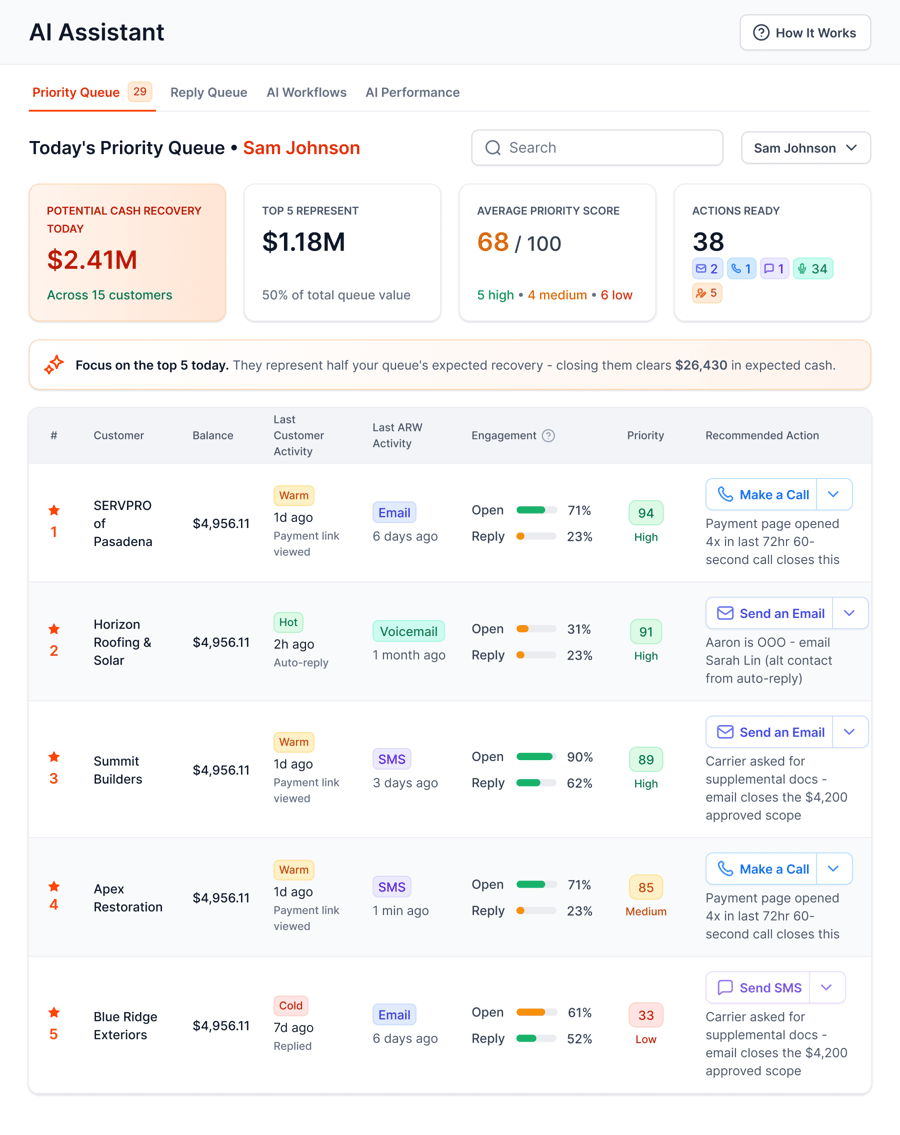
The Priority Queue tells your team who to contact today, by invoice and by payer.
AR Workflow connects to QuickBooks Online and puts every open invoice on a follow-up schedule by email, two-way text and ringless voicemail from a dedicated number. Owners, homeowners and commercial customers get a payment link for card or ACH. Adjusters and carriers get status requests, never a payment link. Follow-up pauses on a promise to pay, every touch is logged on the invoice, and payments post back to QuickBooks. The dashboard shows the open balance that has had no follow-up, so the invoices nobody is chasing get a workflow.
Frequently asked questions
What is construction accounts receivable?
Construction accounts receivable is the money owed to a contractor for work already billed, including progress billings, retainage, change orders and final invoices. It is an asset on the balance sheet. It is harder to collect than in most industries because of staged billing, several approvers and lien waiver requirements.
Is retainage included in accounts receivable?
Yes. Retainage is money you have earned but the customer has held back until the job or phase is complete. Most contractors track it in a separate retainage receivable account, with a release date per job, so it does not hide inside the regular AR balance.
What is a good DSO for a construction company?
It depends on your mix of work. Commercial subs with retainage and pay-when-paid terms usually run longer than residential or service contractors. Track your own DSO monthly, with and without retainage, and focus on the trend and on invoices over 60 days.
How do contractors speed up payment on pay applications?
Submit before the billing cutoff, include complete backup and conditional lien waivers, bill against a clear schedule of values, confirm approval with the AP contact by name, and follow up on a set schedule until the payment arrives.
When should a contractor file a mechanic's lien?
Before your state's deadline, which is often counted from your last day of work or last delivery of materials. Many states also require a preliminary notice early in the job. Deadlines and rules vary widely, so check with a construction attorney.
Can construction AR be automated?
The follow-up can be. AR software that connects to QuickBooks Online can send reminders by email, text and voicemail, track promises to pay, log every contact and show which invoices nobody is chasing. Pay app preparation and lien filings still need people.
Related reading
Your receivables, not a feature tour.
Bring one overdue invoice or pay app to a demo and see what would be sent, to whom, and when.
Photos: Unsplash. This article is general information, not legal, tax or accounting advice.