
 Log in
Homeowners need more than email. AR Workflow gets you paid.
Upflow and AR Workflow both automate accounts receivable and connect to QuickBooks Online. They were built for very different businesses.
The short answer
Which one is right for you?
Pick Upflow if...
- You bill other businesses, not homeowners
- You run NetSuite, Sage or several entities
- You have a finance team that lives in email
Choose AR Workflow if...
- You're a contractor on QuickBooks Online
- Your customers are homeowners, insurers or small businesses
- You want text and voicemail, not just email
- You want published pricing and done-with-you setup
Side by side
AR Workflow vs Upflow, feature by feature
Here is how the two compare on the features that matter most for getting a contractor paid.
Written by AR Workflow's founder, so read it knowing which side we're on. Upflow facts come from its own website and pricing page as of November 2026. We say plainly where Upflow is the better fit.
Where AR Workflow pulls ahead
Where AR Workflow does better than Upflow
AR Workflow is stronger in four areas that matter most to contractors.
A homeowner may ignore emails but answer a text. AR Workflow adds two-way text, ringless voicemail and call tasks.
AR Workflow lets you add the adjuster, homeowner and mortgage company to one job. Upflow is built for one customer per account.
AR Workflow lists $295 to $495 a month. Upflow quotes by revenue and adds a $390 a month platform fee.
A US-based team connects QuickBooks, builds first workflows and trains your office. Upflow onboarding varies by plan.
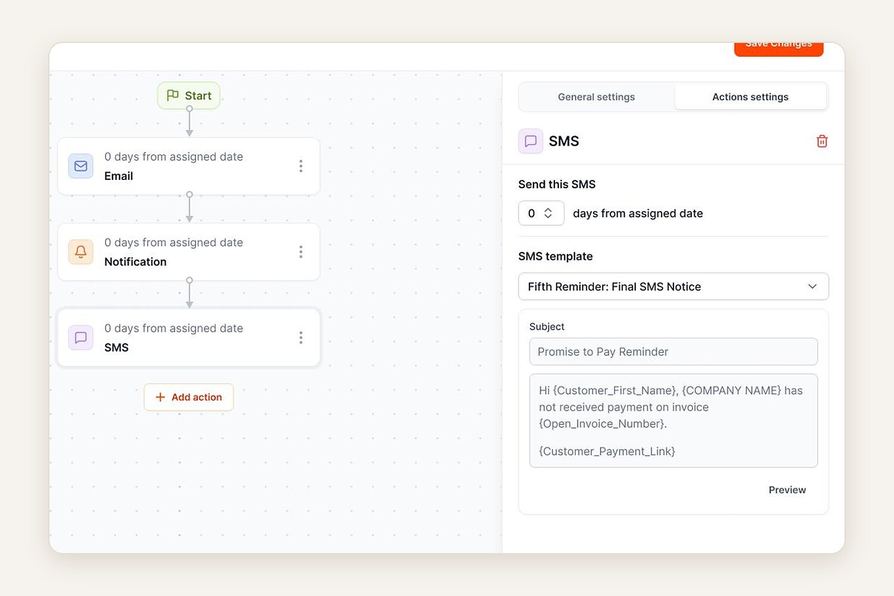
One overdue invoice, two ways
One overdue invoice, chased two ways
A restoration company finishes a $14,200 water mitigation job with a $1,000 deductible, a carrier payment and a mortgage company on the check.
With Upflow Typical
The invoice syncs from QuickBooks with the homeowner as the only customer.
Upflow's email sequence starts, but the homeowner is waiting on the carrier and ignores it.
The adjuster is not in the system, so nobody follows up unless someone remembers.
With AR Workflow Automatic
Your office adds the adjuster and mortgage company as contacts on the job.
The adjuster gets the documents by email and the homeowner gets a text about the deductible with a pay link.
A call task is created at day 3 to confirm the claim status.
The mortgage endorsement step is already on the list when the carrier check arrives.
The homeowner pays the deductible by text in two minutes.
Cost over a year
Cost over a year for a $4 million contractor
Platform fee only; Upflow's quote by revenue is not included.
Subscription on the Grow plan. No platform fee.
Upflow's published platform fee alone is $4,680 a year, close to AR Workflow's $4,740 subscription before Upflow's plan price is added. Check Upflow's current quote for your company.
Real results
What contractors see with AR Workflow
Numbers from our customers' own stories.
fewer payment delays at Flood Rescue
Read the story →days to collect at SERVPRO of NE San Diego
Read the story →a month saved at ProRestore
Read the story →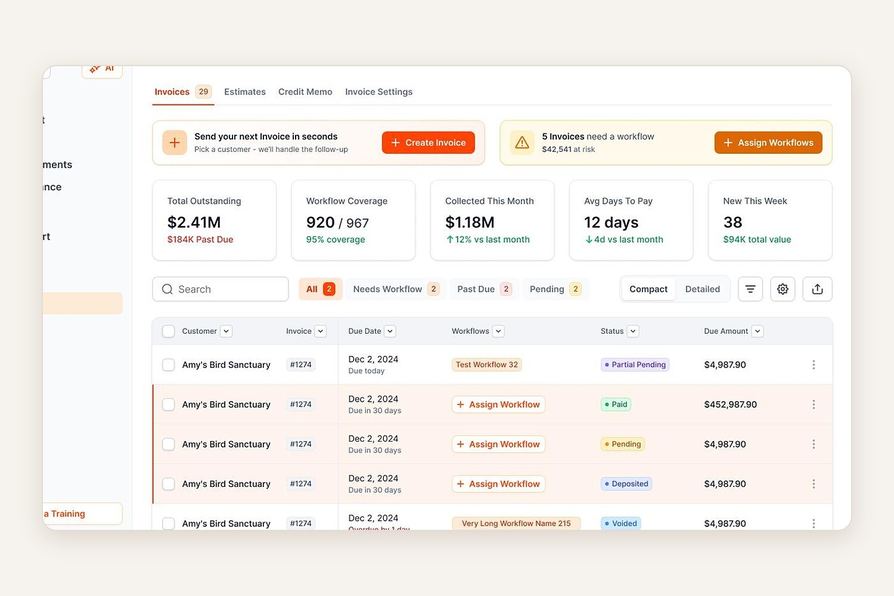
Still deciding?
Ask yourself these questions
If most are businesses with AP departments, Upflow may be enough. If most are homeowners, insurers and property managers, you need text, voicemail and calls, which favors AR Workflow.
AR Workflow works only with QuickBooks Online. If you're on something else, that decides it.
Pull your aging report. If more than 20 percent is past 60 days, reminders alone aren't working.
An office manager with ten other jobs needs a short daily list of who to call, not another dashboard to check.
If yes, check that the tool lets you add adjusters, homeowners and mortgage companies to one job. Most don't.
Making the move
How to switch to AR Workflow
Switching takes a few clear steps, and you can start by bringing one real overdue invoice to a demo.
Book a demo and bring one real overdue invoice.
Connect QuickBooks Online. Open invoices sync in on their own.
Turn on card and ACH payments. Merchant approval usually takes a few days.
Turn off reminders in your old tool the same day so customers don't get double messages.
FAQ
AR Workflow vs Upflow: common questions
Is Upflow good for contractors?
Upflow is a strong product for B2B finance teams. Contractors who bill homeowners and insurers usually find it a weaker fit because it's email-led, has no voicemail and uses quote-based pricing with a platform fee.
How much does Upflow cost?
Upflow quotes plans by annual invoiced revenue and lists a $390 a month platform fee on its pricing page, as of November 2026. Payment fees are extra.
How much does AR Workflow cost?
$295, $395 or $495 a month, or $278, $370 and $462 a month billed yearly. Every plan has every feature; plans differ by open invoices and users.
Does AR Workflow work with Xero or NetSuite?
No. AR Workflow works with QuickBooks Online only.
Can I switch from Upflow to AR Workflow?
Yes. Connect QuickBooks Online, build your workflows with our team, and turn off Upflow reminders the same day. Most contractors are running within a week.
Does either have a free trial?
AR Workflow starts with a demo and guided setup, not a free trial. Check Upflow's site for its current options.
Does Upflow have texting?
Upflow is email-led. Check its current plans for SMS options. AR Workflow includes two-way texting from a dedicated business number on every plan.
Is Upflow cheaper than AR Workflow?
For most contractors, no. Upflow lists a $390 a month platform fee before its quoted plan price, while AR Workflow's published plans run $295 to $495 a month.
Can AR Workflow handle multiple payers on one job?
Yes. You can add the adjuster, homeowner, mortgage company or property manager as contacts on a job and run insurance-specific workflows.
Who should not use AR Workflow?
Companies on Xero, NetSuite or Sage, businesses with only a handful of invoices, and B2B firms that don't need text or voicemail.
Does Upflow work for restoration companies?
It can send reminders, but it isn't built for insurance jobs with several payers, which is most of restoration billing.

Still comparing? Bring one overdue invoice.
Book a demo, bring one overdue invoice and we'll show you how AR Workflow would follow it up.

 Built for contractors on QuickBooks Online
- Setup done with you
- No long-term contract