
 Log in
InvoiceSherpa sends reminders. AR Workflow gets you paid.
InvoiceSherpa is a low-cost way to send invoice reminders. AR Workflow costs more and adds calls, texts and voicemail for harder overdue invoices.
The short answer
Which one is right for you?
Stick with InvoiceSherpa if...
- Most late payers just need a nudge and you want the lowest price.
- You bill recurring service work and want autopay for scheduled charges.
- You use Xero or another accounting system besides QuickBooks Online.
Choose AR Workflow if...
- You carry large overdue balances that reminders alone do not fix.
- Your customers are homeowners, insurers or property managers.
- You need voicemail, call tasks and a daily call list so nothing slips.
- You want setup done with you by a team that trains your office.
Side by side
AR Workflow vs InvoiceSherpa, feature by feature
Here is how the two tools compare on the features that matter most for contractors getting paid.
Written by AR Workflow's founder, so read it knowing which side we're on. InvoiceSherpa facts come from its own website and pricing page as of November 2026. We say plainly where InvoiceSherpa is the better fit.
Where AR Workflow pulls ahead
Where AR Workflow does more for contractors
AR Workflow is stronger in four areas that matter when big invoices get stuck.
Reaches homeowners by ringless voicemail, two-way text and call tasks, not just email and SMS reminders.
Supports jobs with several payers, such as insurers and homeowners. InvoiceSherpa does not offer this.
The Priority Queue gives your office a short list of who to contact each morning. InvoiceSherpa has no daily call list.
The dashboard shows unprotected AR, meaning open invoices with no follow-up scheduled, plus user performance reports. InvoiceSherpa reporting is lighter.
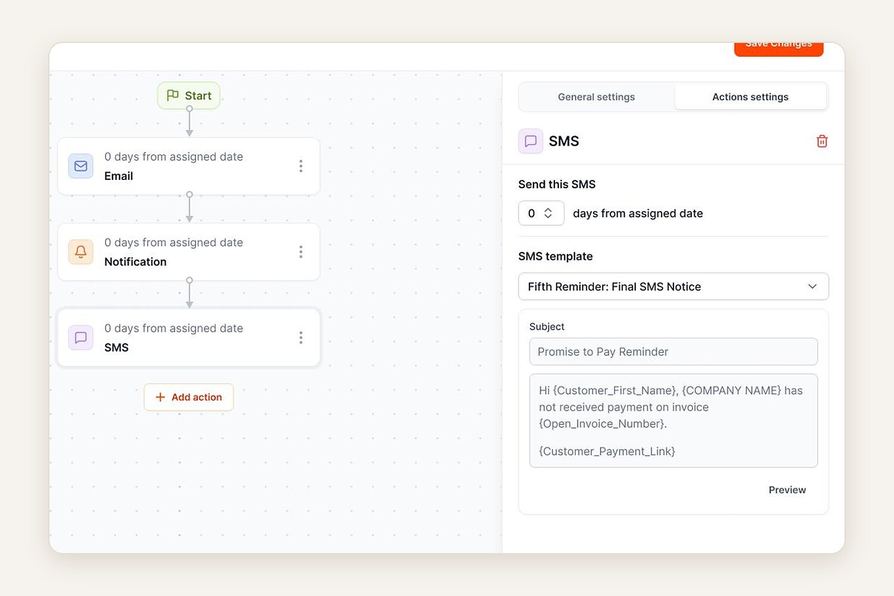
One overdue invoice, two ways
How one stuck $22,000 invoice gets handled
A made-up remodeler has a $22,000 final invoice that is 18 days late because the homeowner is unhappy about a punch list item.
With InvoiceSherpa Typical
Scheduled emails and texts go to the homeowner before and after the due date, with a link to pay.
The homeowner ignores the messages because the real issue is the punch list, not forgetting to pay.
Nothing in the system flags this large invoice as needing a person, so it sits behind dozens of small ones.
With AR Workflow Automatic
Its size and age move the invoice to the top of the Priority Queue each morning.
The punch list text lands in your shared inbox, where staff can see it right away.
Your project manager schedules the fix and logs a promise to pay on completion.
The workflow pauses until the promised date, then picks back up automatically when that date passes.
Cost over a year
Cost over a year: an example
Unlimited open invoices on the $199 a month plan
Unlimited open invoices on the Enterprise plan
InvoiceSherpa is clearly cheaper. The question is whether the extra follow-up gets you paid enough faster to cover the difference.
Real results
What contractors see with AR Workflow
Numbers from our customers' own stories.
fewer payment delays at Flood Rescue
Read the story →days to collect at SERVPRO of NE San Diego
Read the story →a month saved at ProRestore
Read the story →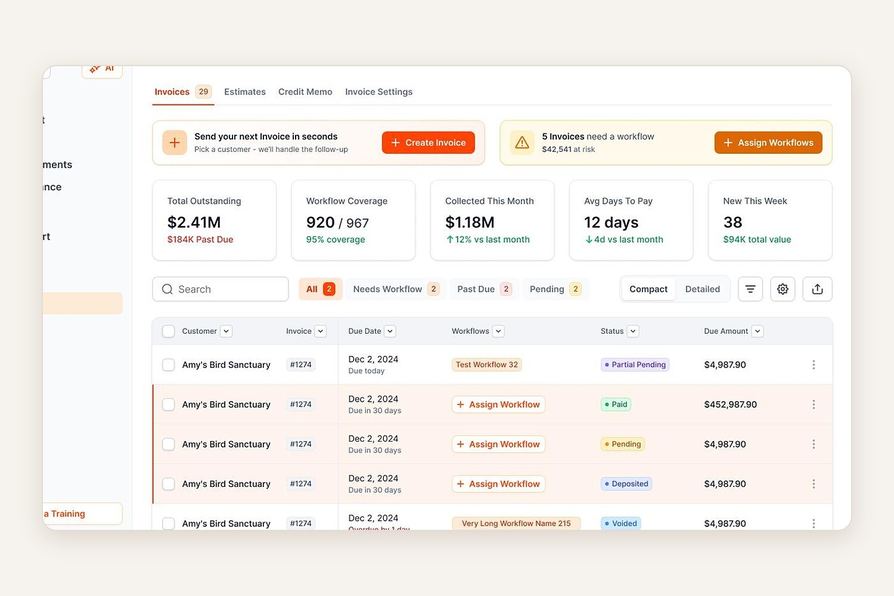
Still deciding?
Ask yourself these questions
If most are businesses with bill-paying staff, InvoiceSherpa may be enough. If most are homeowners, insurers and property managers, you need text, voicemail and calls, which favors AR Workflow.
AR Workflow works only with QuickBooks Online. If you're on something else, that decides it.
Pull your aging report. If more than 20 percent is past 60 days, reminders alone aren't working.
An office manager with ten other jobs needs a short daily list of who to call, not another dashboard to check.
If yes, check that the tool lets you add adjusters, homeowners and mortgage companies to one job. Most don't.
Making the move
How to switch to AR Workflow
Here is how to move your overdue invoices from your current reminder tool to AR Workflow.
Bring one real overdue invoice to the demo so we can show you how it would be chased.
Open invoices sync in on their own. Turn on card and ACH payments, which usually takes a few days for approval.
Build homeowner, business and insurance workflows with our team. Then turn off old reminders the same day.
Work the Priority Queue each morning and compare your aging report after 30 days.
FAQ
AR Workflow vs InvoiceSherpa: common questions
Is InvoiceSherpa good for contractors?
It's a good low-cost reminder and autopay tool. Contractors with big overdue balances, insurance work or many homeowner customers usually need more than reminders, which is where AR Workflow fits.
How much does InvoiceSherpa cost?
$49 a month for up to 100 open invoices, $99 for 101 to 500, and $199 for unlimited, or $41, $83 and $166 a month billed yearly.
Does AR Workflow have autopay?
AR Workflow supports card and ACH links, partial payments and payment plans. It's focused on getting project and service invoices paid rather than recurring autopay.
Can I use both?
You could, but customers would get two sets of messages. Most contractors pick one follow-up tool and turn the other off.
Which is faster to set up?
InvoiceSherpa is self-serve with a 14-day trial. AR Workflow sets up your workflows with you after a demo, usually within a week.
Does InvoiceSherpa leave voicemails?
No. It sends email and SMS reminders. AR Workflow adds ringless voicemail and call tasks.
Is InvoiceSherpa good for recurring billing?
Yes. Its autopay and scheduled charges suit recurring service work like lawn care and maintenance plans.
When should I upgrade from InvoiceSherpa to AR Workflow?
When large invoices get stuck, your office spends hours a week chasing, or you do insurance work with several payers.
Can InvoiceSherpa charge late fees?
Yes, InvoiceSherpa supports late fees. AR Workflow doesn't add late fees for you.

Still comparing? Bring one overdue invoice.
Book a demo, bring one overdue invoice and we'll show you how AR Workflow would follow it up.

 Built for contractors on QuickBooks Online
- Setup done with you
- No long-term contract