Accounts receivable best practices for contractors: 8 tips to invoice clearly, follow up on schedule and collect faster without hurting the relationship.


In the restoration industry, one of the most common problems businesses still face is getting paid on time for work they have already completed. These accounts receivable tips start from a simple idea: finish the job, send the invoice, and collect payment for the work completed.
Unfortunately, it does not always work that way. Invoices can sit unpaid for 30, 60, or even 90+ days, while someone on your team has to keep track of who owes what and when to reach out again.
So what can you do to keep more invoices from reaching that point? The accounts receivable (AR) tips and best practices below will help you improve how your team manages outstanding receivables and collects the money your business has already earned. They are written for restoration companies, but they apply to roofing, HVAC, plumbing, electrical and most other contractors who bill after the work is done.
KEY TAKEAWAYS
One reason AR management can get complicated for restoration companies is that there can be a lot happening between sending an invoice and actually getting paid. You may be waiting on insurance billing, have a mortgage company involved, or simply have a customer who has not paid yet.
Then there is the actual process of collecting that money. You want to get paid for the work you have already completed, but calling or emailing a customer too often can put unnecessary strain on the relationship.
So each unpaid invoice can end up needing a different approach. One may be waiting on an insurer, while another needs another payment reminder. As more invoices pile up, keeping track of where each one stands and what needs to happen next takes more time from your team.
You can only spend so much time managing each account individually. The good news is that a few changes to how you manage AR can make that process much easier.
Here are eight accounts receivable strategies that make it easier to stay on top of outstanding invoices without spending more of your team's time managing each one. Most of them also work as collection tips for contractors in any trade. If you are asking how to improve accounts receivable without hiring another person, start with tips 1 through 4 and add the rest as volume grows.
| 1 | Set clear payment terms from the start |
| 2 | Send accurate invoices as soon as they are ready |
| 3 | Review and prioritize accounts using AR aging |
| 4 | Create a consistent follow-up schedule |
| 5 | Keep collection communication clear and professional |
| 6 | Track collection activity and next steps |
| 7 | Make it easy for customers to pay |
| 8 | Automate repetitive AR tasks as volume grows |
One of the easiest ways to avoid confusion later is to make sure customers understand the payment terms before an invoice becomes overdue.
Be clear about when payment is due, which payment methods you accept, and any other terms that could affect when or how the customer pays. The same information should also appear clearly on the invoice so the customer does not have to look elsewhere for it.
Clear terms will not prevent every late payment, especially when an insurance or mortgage company is involved. But they give both your team and the customer a clear starting point if payment does not arrive when expected.
Once a restoration job is ready to be billed, avoid adding unnecessary time to the payment process by letting the invoice sit longer than it needs to.
Before sending it, make sure the invoice has the correct customer and job information, an accurate breakdown of the charges, and any other details the person responsible for payment needs to review it.
This is especially important when another party needs to approve or process the payment. A missing claim number, incorrect amount, or unclear charge can also keep an invoice unpaid while someone goes back to resolve the issue.
A quick pre-send check catches most of these problems:
When you have several outstanding invoices to manage, it helps to know which ones need your attention first. Your AR aging report can help you see which accounts have been outstanding the longest and where your team may need to focus first.
That does not mean automatically chasing the oldest invoice before everything else. Look at what is actually happening with the account. A 60-day invoice waiting on a known insurance issue may need a different next step than another 60-day invoice where the customer simply has not responded.
Reviewing AR this way helps your team spend less time deciding what to work on and more time acting on the accounts that actually need attention.
Once an invoice becomes outstanding, decide when your team should reach out instead of making that decision from scratch every time.
For example, an early reminder may simply let the customer know that payment is due. If the invoice remains unpaid, later communication can become more direct or involve another method of contact.
The exact schedule can depend on how your company handles collections. What matters is having one. When every account is handled differently, follow-up becomes easier to delay or forget altogether. Our guide on how to improve your collections process shows how to set those timing rules.
Consistency also does not mean being aggressive. You can be polite and professional while still being persistent about collecting money your company is owed.
How you communicate matters just as much as how often you reach out.
A payment reminder should make it easy for the recipient to understand what you are contacting them about. Include the relevant invoice information, the amount that remains outstanding, and what they need to do next.
Keep the message professional and direct. There is no need to make an early reminder sound like a final demand, but being too vague can leave the customer unsure of what you are asking them to do. If you need wording, our past due invoice letter templates give you a friendly, firm and final version.
This is especially important when you want to collect an outstanding balance without unnecessarily putting strain on a customer relationship. Being clear about what is owed allows you to be persistent without making every interaction confrontational.
Every time someone contacts a customer about an outstanding invoice, your team should be able to see what happened and what needs to happen next.
Keeping those details together means the next person working on the account does not have to search through emails or ask around to figure out where things stand. It also helps prevent customers from receiving another reminder when someone on your team has already spoken with them.
As the number of outstanding invoices grows, having that history becomes even more important. Your team should not have to rely on memory to know what happens next.
Getting someone to respond is only part of collecting an outstanding invoice. Once they are ready to pay, the payment process itself should not create another delay.
Give customers clear instructions on how they can make their payment and make those options easy to access. If you accept online payments, for example, including a direct link to the payment portal in your collection communication can remove an extra step.
Tip: Payment links belong in messages to the homeowner or customer who owes the balance, such as a deductible. When an insurance carrier or adjuster is involved, send them status requests and documentation instead, never a payment link.
Being persistent about what you are owed is important, but customers also need a convenient way to actually settle the balance.
A consistent AR process still takes time when someone has to manage every step manually.
Your team may be checking which invoices need attention, sending the same types of reminders, updating account activity, and remembering when to reach out again. That may be manageable with a small number of outstanding invoices.
As AR grows, repeating those tasks for every account can take up a significant amount of the team's time.
That said, look for parts of the process that follow the same pattern from one account to another, and identify platforms or software that can automate those tasks.
Scheduled payment reminders and recurring follow-ups are examples of work that can often be automated while your team continues handling situations that actually require their attention. See our roundup of payment reminder software for options.
The goal is not to remove people from the debt collections process. Rather, it is to help them stop spending their time on work that does not need to be done manually every time.
Tip 4 is easier to apply when you can see an example. The schedule below is a starting point for homeowner and commercial balances. Adjust the timing to your payment terms and the size of the invoice, and keep the tone friendly in the early steps.
| When | Channel | What the message does |
|---|---|---|
| 3 days before due | Friendly heads-up with the invoice, amount, due date and how to pay. | |
| Due date | Email and text | Short note that the invoice is due today, with the payment portal link for the customer. |
| 7 days past due | Email and text | Polite reminder that payment has not arrived; asks if anything is holding it up. |
| 15 days past due | Phone call | A person calls to find the real reason (insurance check, dispute, cash flow) and agree on a date. |
| 30 days past due | Email letter | Firmer past due letter that restates the terms and the next step if the balance stays open. |
| 45 to 60 days past due | Call, letter, voicemail | Final notice, payment plan offer, or a decision to escalate to lien or collections. |
Tip: For insurance jobs, run two tracks. The homeowner track covers the deductible and any non-covered work. The carrier track is status requests and documentation to the adjuster, with no payment link. Our guide to speeding up payments from insurance adjusters covers that side.
Most AR problems are not caused by one bad customer. They come from small habits that let invoices drift. Watch for these:
The eight tips apply to every contractor, but where invoices get stuck depends on the work you do.
| Trade | Where AR usually stalls | Tip that helps most |
|---|---|---|
| Restoration | Carrier approvals, supplements and mortgage-held checks | Track the claim status separately from the homeowner balance. |
| Roofing | Depreciation holdback and final insurance payments | Invoice the moment the completion certificate is signed. |
| HVAC | High volume of small service invoices | Automate reminders so no small balance is forgotten. |
| Plumbing and electrical | Commercial customers on net 30 or longer terms | Confirm who approves invoices and send to that person directly. |
| Remodeling | Change orders and final punch list disputes | Get change orders signed and billed as they happen. |
Bring one overdue invoice.
We'll show you how these AR tips would run on it without managing every step by hand.

AR Workflow keeps every outstanding account and its next step in one place.
Knowing what you can do to improve your AR process is one thing. Keeping up with it consistently becomes much harder when outstanding invoices start piling up, and each one needs something different from your team.
You can only send so many reminders, check so many accounts, and track so many next steps manually. At a certain point, the better approach is to make the process itself easier to manage.
AR Workflow was built specifically to help restoration companies do that. You can create custom collection workflows that keep follow-up moving, schedule email and SMS reminders from a dedicated number, and track what has already happened with an account.
Your team can also see outstanding receivables through the AR health dashboard and use detailed AR and invoice reporting to understand where money is still sitting.
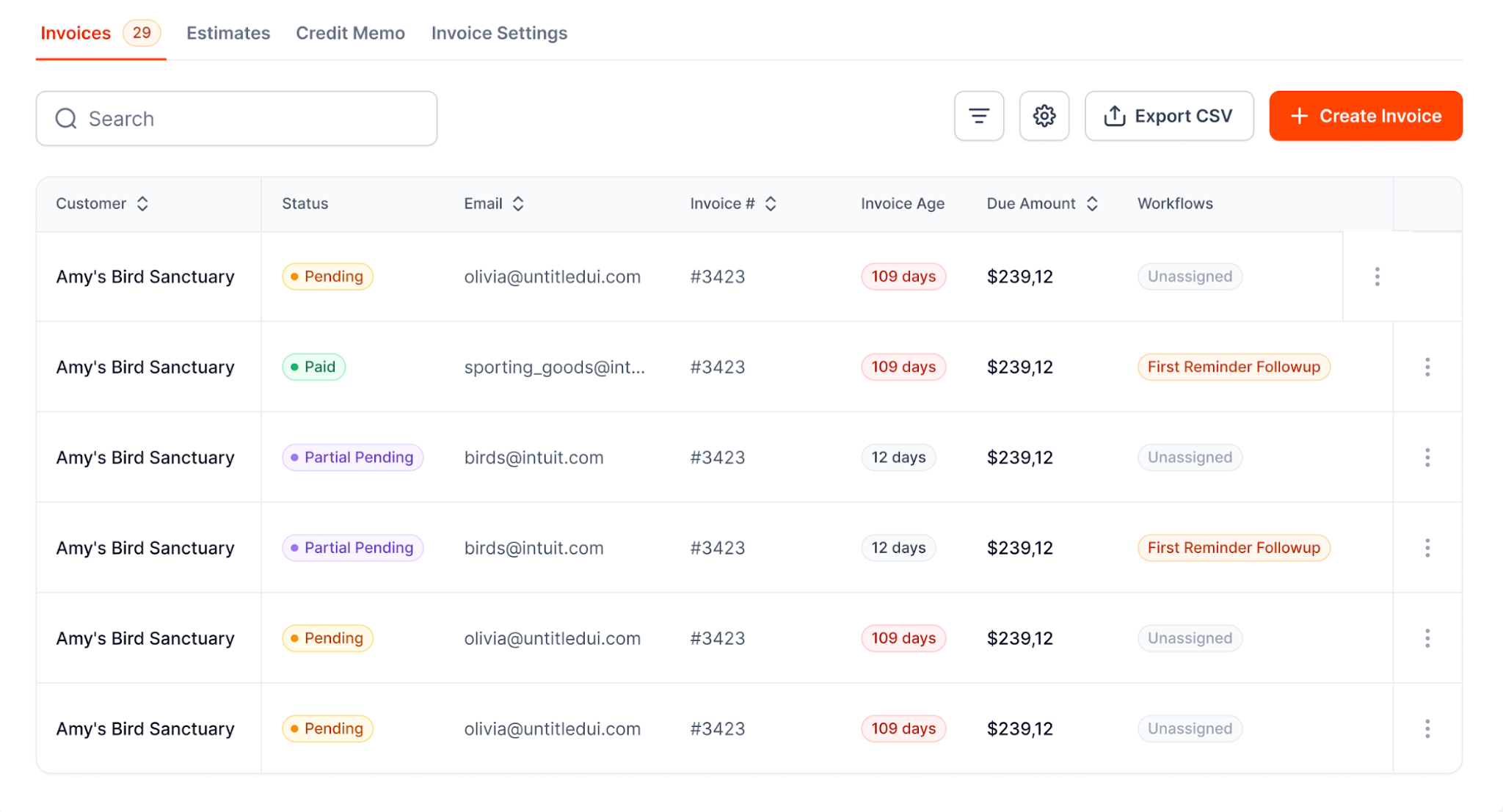
The AR health dashboard shows where outstanding money is still sitting.
When a customer is ready to pay, AR Workflow gives them access to a secure online payment portal and supports scheduled payment plans when needed.
Since AR Workflow also connects with QuickBooks (see our QuickBooks accounts receivable automation guide), you can add a more structured collection process around the accounting information your business already uses without treating the two systems as if they serve the same purpose.
Better AR management comes down to knowing which invoices need attention and making sure the right action actually happens next. AR Workflow can make it easier to keep that process running as your restoration business grows. If you are comparing tools, start with our guide to accounts receivable management software.
Start by creating a consistent process for managing outstanding invoices. Review AR aging regularly, prioritize accounts that need attention, keep track of collection activity, and set a clear schedule for payment reminders.
As the number of outstanding invoices grows, automating repetitive parts of the process can also help your team stay consistent without spending as much time managing each account manually.
Review accounts receivable at least weekly, so your team can identify invoices that are becoming overdue and decide what needs attention next.
Companies with a higher volume of outstanding invoices may need to review AR more frequently. The important part is having a regular schedule rather than waiting until overdue balances become a larger problem.
Start with a clear and professional payment reminder that identifies the invoice, outstanding balance, and how the customer can pay.
If payment still does not arrive, continue contacting the customer according to a consistent follow-up schedule. Keep a record of each interaction so your team knows what has already happened and what the next step should be. Our guide to unpaid invoices lays out the full sequence.
Reducing overdue AR starts before an invoice becomes significantly past due. Send accurate invoices promptly, make payment terms clear, and begin following up when payment does not arrive as expected.
Making it easy for customers to pay and consistently tracking outstanding accounts can also help prevent invoices from sitting unnoticed for long periods.
Consider automating AR when repetitive collection work starts taking too much time or becomes difficult for your team to manage consistently.
For example, if employees spend hours checking outstanding invoices or sending recurring reminders, automation can take over much of that repetitive work.
AR Workflow helps restoration companies automate collection workflows while giving their teams visibility into accounts that still need attention.
For a small contractor, the most important best practices are invoicing the day the work is done, printing clear terms on every invoice, and checking the aging report every week. Add a written follow-up schedule so reminders go out even when the office is busy. Those four habits cover most of what larger AR teams do.
Related reading
Your invoice, not a feature tour.
Bring one overdue invoice to a demo and see what AR Workflow would send, when, and how your customer would pay.
Sam owned and ran three restoration companies for more than 14 years and collected over $100 million in receivables. He built AR Workflow in 2020 to give contractors the collections system he wished he'd had.

AI writes the emails, sends the texts, and leaves the voicemails. Your team handles the conversations that matter, and your cash keeps moving.
 Keep QuickBooksStart with one invoiceStay in control

 Log in